
Key facts
- Manuals
- 11
- Models
- 1
- Categories
- 3
- Languages
- ZH · EN · JA · DE
- Last added
- 2026-10-01
AUDI models by category
Featured AUDI manuals
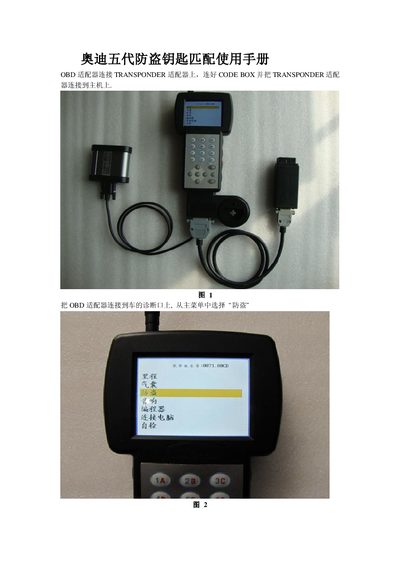
Audi Fifth Generation Anti-Theft System BCM2 Key Matching Manual
The guide describes the required equipment—an OBD adapter and a TRANSPONDER adapter—and how to connect them to the vehicle’s diagnostic port. After selecting the Audi fifth‑generation anti‑theft system (BCM2) from the menu, users can read the BCM2 data, write new keys, and perform key‑matching operations.
Step‑by‑step procedures cover reading BCM2 data, writing blank keys using a saved .bin file, matching multiple keys within a 30‑second window, and checking the status of existing keys (locked, unlocked, smart, non‑smart). The manual also notes the location of the BCM2 computer in the vehicle. This manual is written in Chinese.
Covers: OBD Adapter Connection · System Selection · Read BCM2 Data · Key Writing · Key Matching Procedure · Key Status Detection
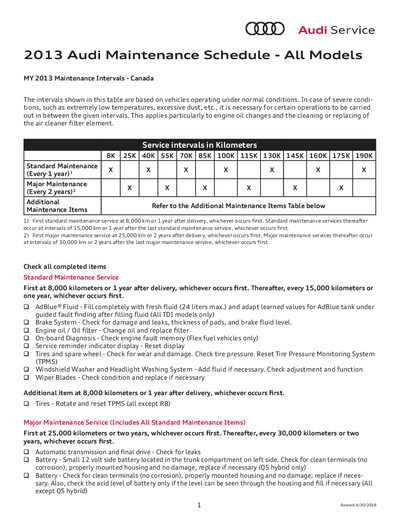
Audi All Models MY 2013 Maintenance Schedule
This document provides the maintenance intervals for all 2013 Audi models sold in Canada. It defines standard service every 8,000 km or 1 year, major service every 25,000 km or 2 years, and additional items based on model and mileage.
The schedule includes detailed tasks such as oil changes, brake inspections, fluid checks, and component replacements like timing belts and spark plugs, with specific intervals for each vehicle variant.
Covers: Standard Maintenance Intervals · Major Maintenance Intervals · Additional Maintenance Items · AdBlue Fluid Service · Brake System Checks · Transmission Service
Audi UTR Vehicle Recorder User Manual
This manual explains how to install the Audi UTR recorder, connect it to the dedicated smartphone app, and use its various recording modes. Safety warnings advise installation at an authorized Audi dealer and prohibit smartphone operation while driving.
The document also lists technical data such as camera resolutions, CPU, memory, supported SD cards, Wi‑Fi, power specifications, and operating temperature, as well as instructions for using indicators, resetting the device, and managing recorded video files. This manual is written in Japanese.
Covers: Product Overview · Installation Guidelines · Smartphone App Setup · Recording Modes and Storage · Indicator LEDs · Front and Rear Camera Features
Audi A3 e-tron 2011 User Manual
The manual identifies the Audi A3 e-tron by its e‑tron logo and outlines safety warnings for the high‑voltage system, including the need to secure the vehicle and avoid contact with high‑voltage components. It describes the vehicle’s high‑voltage architecture (324 V DC, up to 400 V AC) and the location of safety labels.
Detailed procedures cover deactivating the drive and high‑voltage systems from both the passenger compartment and the engine compartment, disconnecting the charging cable, fire‑fighting measures for lithium‑ion battery incidents, and reporting requirements for test‑vehicle accidents. This manual is written in Chinese.
Covers: Vehicle Identification · Deactivating the Drive System and High‑Voltage System (Passenger Compartment) · Deactivating the Drive System and High‑Voltage System (Engine Compartment) · Disconnecting the Charging Cable · Safety Guidelines for Lithium‑Ion Batteries · Guidelines for Audi Test Vehicles
Latest AUDI manuals
Audi Fifth Generation Anti-Theft System BCM2 Key Matching Manual
User Manual 14 pages · 801 KB · ZHThis manual explains how to use OBD and TRANSPONDER adapters to read, write and match keys for the Audi fifth‑generation anti‑theft system (BCM2).
Audi All Models MY 2013 Maintenance Schedule
Service Manual 4 pages · 68 KB · ENAudi's 2013 maintenance schedule lists standard, major, and additional service intervals for all Canadian models.
Audi UTR Vehicle Recorder User Manual
User Manual 17 pages · 517 KB · JAThe Audi UTR vehicle recorder user manual provides setup, operation, and technical specifications for the universal traffic recorder.
Audi A3 e-tron 2011 User Manual
User Manual 7 pages · ZHThis user manual provides safety guidelines and procedures for operating and servicing the Audi A3 e-tron 2011 high‑voltage vehicle.
Audi Q7 Owner's Manual
User Manual 348 pages · 10.6 MB · ZHChinese owner’s manual for the Audi Q7, covering vehicle features, controls, and maintenance information.
Audi 16 K-L Converter Service Manual
Service Manual 1 pages · 10 KB · ZHThe Audi 16 K‑L Converter Service Manual provides wiring, diagnostic and installation details for the converter used in Audi vehicles.
Audi A8 Car Manual
User Manual 305 pages · 9.3 MB · ENOfficial Audi A8 car manual with information on features, controls, and maintenance.
Audi A6 '05 self-taught Manual 323
AUDI A8 '03 self-taught Manual 282
User Manual 96 pages · 5.3 MB · ZHThe Audi A8 2003 Self-Study Manual provides an overview of the vehicle’s structure, systems, and technical data.
Audi A6 2005 Engine and Gearbox Self-Study Manual
Service Manual 92 pages · 9.1 MB · DETechnical service manual for the 2005 Audi A6 covering the 3.0I‑V6‑TDI and 3.2L‑V6‑FSI engines and related gearboxes.
Audi A6 ´05 self-taught Manual 323
Service Manual 76 pages · 8.3 MB · DEOfficial Audi A6 2005 service manual with technical data, system overviews and maintenance procedures.
Which document do I need?
User Manual
Day-to-day operation, settings and troubleshooting. Start here if the product is already set up.
Service Manual
Disassembly, diagnostics and part numbers, for repair.
Questions answered in AUDI manuals
How do I read the BCM2 data?
Connect the OBD adapter to the diagnostic port, select “Read BCM2” from the menu, follow the wiring shown in the figures, and save the data.
From: Audi Fifth Generation Anti-Theft System BCM2 Key Matching Manual
How do I write a new key?
Place a blank key on the TRANSPONDER adapter, select “Write Key”, open the saved .bin file when prompted, and press OK to write the key.
From: Audi Fifth Generation Anti-Theft System BCM2 Key Matching Manual
When is the first standard maintenance service required?
At 8,000 km or 1 year after delivery, whichever occurs first.
How often should the timing belt be replaced on a TTS?
Every 175,000 km for TTS models.
How do I connect the Audi UTR to my smartphone?
Select the Wi‑Fi network named "Audi UTR" on your phone, install the free Audi UTR app from the App Store or Google Play, and follow the on‑screen setup steps.
What recording modes does the Audi UTR support and how are files saved?
The device records continuously in driving and parking modes, overwriting old footage when the microSD card fills; important events are saved separately and can be transferred via the app or by removing the card.