
Key facts
- Manuals
- 2
- Models
- 1
- Categories
- 1
- Languages
- EN
- Last added
- 2012-03-14
Velocity models by category
Featured Velocity manuals

Velocity Micro NoteMagix M10 User Guide
This guide introduces the NoteMagix M10 notebook, covering its physical layout, basic operations such as attaching the battery, connecting the AC adapter, turning the device on and off, and using the touchpad and keyboard.
Later sections detail multimedia features, peripheral connections (USB, LAN, VGA, audio), power‑saving options, and a troubleshooting chapter that helps resolve common issues like power loss, battery charging problems, and display or audio failures.
Covers: Getting to Know the M10 · Learning the Basics · Using Your M10 · Using Multimedia · Connecting Peripherals · Troubleshooting
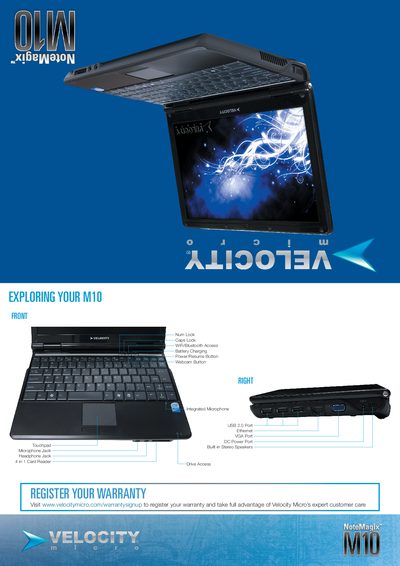
Velocity Micro NoteMagix M10 Quick Setup Guide
This quick start guide walks you through the essential steps to get your Velocity Micro NoteMagix M10 up and running. It includes instructions for inserting the battery, connecting external power, and turning the notebook on, as well as an overview of the available ports and built‑in features.
Additional sections explain how to register your warranty, connect an optional external optical drive via USB or network sharing, and where to find further support and software installation help on the Velocity Micro website.
Covers: Exploring Your M10 · Register Your Warranty · Open the Display Panel · Install the Battery Pack · Connect to External Power · Turning On the M10
Latest Velocity manuals
Velocity Micro NoteMagix M10 User Guide
User Manual 44 pages · 2.8 MB · ENThe Velocity Micro NoteMagix M10 User Guide provides setup, operation, care, and troubleshooting instructions for the ultra‑portable notebook.
Velocity Micro NoteMagix M10 Quick Setup Guide
Quick Start Guide 2 pages · 5.3 MB · ENQuick setup guide for the Velocity Micro NoteMagix M10 notebook covering battery installation, power connection, ports and basic usage.
Which document do I need?
User Manual
Day-to-day operation, settings and troubleshooting. Start here if the product is already set up.
Quick Start Guide
The shortest path to a working setup, usually only a few pages.
Questions answered in Velocity manuals
How do I turn the M10 on and off?
Press the vPower button to power the notebook on or off; the same button also puts the device into sleep mode.
What should I do if the screen stays blank?
Press the hot key combination Fn + F5 to switch the display mode, and ensure the system is not in hibernation or standby.
How do I install the battery pack?
Insert the battery into the compartment at the bottom rear of the M10 and press the power button for about two seconds to turn it on.
Where can I register the warranty for my M10?
Visit www.velocitymicro.com/warrantysignup to register your warranty.