
Key facts
- Manuals
- 4
- Models
- 1
- Languages
- EN · ZH
- Last added
- 2026-10-03
Project models by category
Featured Project manuals
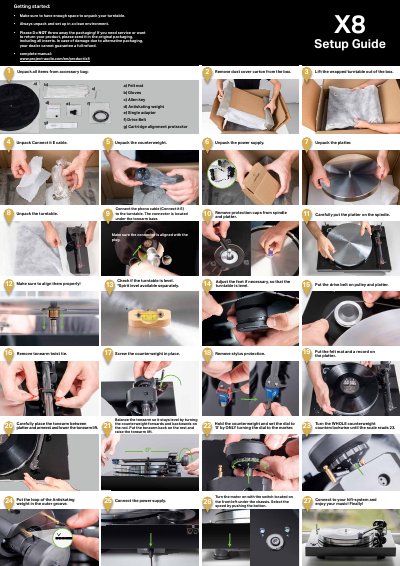
Pro-Ject X8 Turntable User Manual
This manual walks you through unpacking the X8 turntable, connecting the phono cable, installing the drive belt, and balancing the tonearm. Detailed instructions cover each component, from the felt mat and anti‑skating weight to the power supply and cartridge alignment.
It also explains warranty terms, service procedures, and how to contact an authorized dealer. Keeping the original packaging is required for warranty claims, and the guide includes multilingual safety notices.
Covers: Setup Guide · Unpacking · Connecting the Phono Cable · Balancing the Tonearm · Drive Belt Installation · Warranty and Service
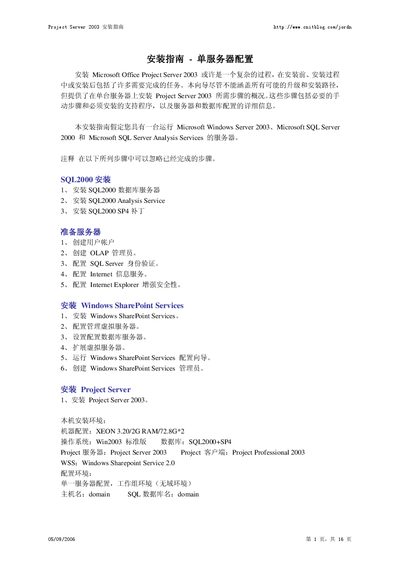
Microsoft Project Server 2003 Installation Guide
This guide walks you through the complete installation of Microsoft Project Server 2003 on a single‑server configuration. It covers prerequisite software, SQL Server 2000 setup, Windows SharePoint Services installation, and the configuration of IIS, authentication, and database connections.
The document assumes a Windows Server 2003 host with SQL Server 2000 (SP4) and includes detailed instructions for creating required user accounts, setting up the SharePoint virtual server, and finalizing the Project Server deployment. This manual is written in Chinese.
Covers: Single‑Server Configuration Overview · SQL Server 2000 Installation · Creating User and SQL Accounts · Configuring SQL Server Authentication · IIS and Internet Explorer Enhanced Security Settings · Installing Windows SharePoint Services
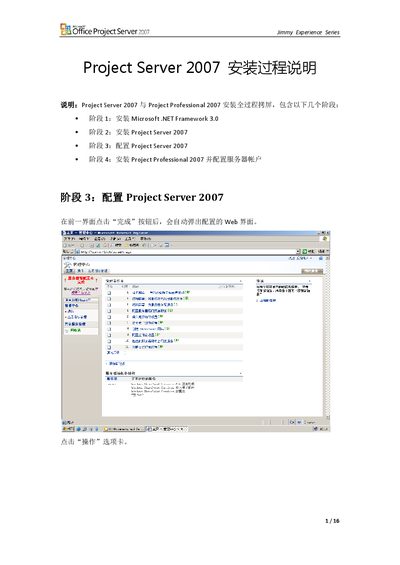
Microsoft Project Server 2007 Installation Guide
This document describes the complete installation process for Microsoft Project Server 2007. It is divided into four main phases: installing Microsoft .NET Framework 3.0, installing Project Server 2007, configuring the server, and installing Project Professional 2007 with the required service accounts.
After each phase the guide shows how to access the configuration web interface, set up shared services, create web applications, and finish the Project Web Access setup. Screenshots and navigation paths are provided for small‑server or Web‑server deployments. This manual is written in Chinese.
Covers: Installation Phases · .NET Framework 3.0 Installation · Project Server 2007 Installation · Server Configuration · Project Professional 2007 Installation · Shared Services Management

Microsoft Project Server 2007 Installation Guide
This guide walks you through the complete installation process for Microsoft Project Server 2007 and Project Professional 2007. It covers prerequisite software, the four main stages—installing .NET Framework 3.0, installing Project Server, configuring the server, and installing Project Professional—and the required user account setup.
Each stage provides detailed screens, required disk space information, and options for immediate or custom installation, helping administrators complete the setup efficiently. This manual is written in Chinese.
Covers: Prerequisite: Install .NET Framework 3.0 · Install Project Server 2007 · Configure Project Server 2007 · Install Project Professional 2007 · Configure user accounts
Latest Project manuals
Pro-Ject X8 Turntable User Manual
User Manual 4 pages · 1.6 MB · ENThe Pro‑Ject X8 turntable user manual provides step‑by‑step setup, operation, and warranty information.
Microsoft Project Server 2003 Installation Guide
Installation Guide 16 pages · 1.3 MB · ZHStep‑by‑step guide for installing Microsoft Project Server 2003 on a single‑server Windows environment.
Microsoft Project Server 2007 Installation Guide
Installation Guide 16 pages · 1.8 MB · ZHStep‑by‑step guide for installing and configuring Microsoft Project Server 2007 and Project Professional 2007.
Microsoft Project Server 2007 Installation Guide
Installation Guide 6 pages · 827 KB · ZHStep‑by‑step instructions for installing Microsoft Project Server 2007 and Project Professional 2007.
Which document do I need?
User Manual
Day-to-day operation, settings and troubleshooting. Start here if the product is already set up.
Installation Guide
Mounting, wiring and first power-up. Read it before the hardware goes in.
Questions answered in Project manuals
How do I balance the tonearm?
Hold the counterweight, set the dial to “0”, then turn the counterweight until the scale reads zero and the arm floats level.
How do I connect the phono cable?
The connector is located under the tonearm base; plug the Connect‑it E cable into that socket.
What operating system is required for Project Server 2003?
The installation requires Windows Server 2003 Standard edition.
Which SQL Server version and service pack are needed?
SQL Server 2000 with Service Pack 4 (SP4) must be installed.
What are the installation phases for Project Server 2007?
The process has four phases: (1) install Microsoft .NET Framework 3.0, (2) install Project Server 2007, (3) configure Project Server 2007, and (4) install Project Professional 2007 and configure service accounts.
How do I open the configuration web interface after installing Project Server?
After completing the previous step, click the “完成” button and the configuration web page will automatically open.