
Key facts
- Manuals
- 545
- Models
- 10
- Languages
- EN
- Last added
- 2026-10-03
Phoenix Contact models by category
Featured Phoenix Contact manuals
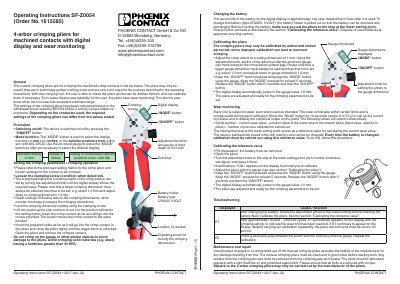
Phoenix Contact SF-Z0054 4-Arbor Crimping Pliers Operating Instructions
The SF-Z0054 is a 4‑arbor crimping plier equipped with a digital display and wear‑monitoring function. It is intended for crimping machined contacts and provides selectable display units (mm or inches) and eight selector positions in accordance with MIL‑22520.
The manual explains how to switch the tool on and off, set crimping dimensions, change the CR2025 battery, calibrate the tool, interpret wear‑monitoring data and perform routine maintenance. Troubleshooting guidance is provided for error codes E1 and E2, and all repairs must be performed by authorized personnel.
Covers: General · Procedure · Switching on/off · Mode function · Setting the crimping parameters · Changing the battery
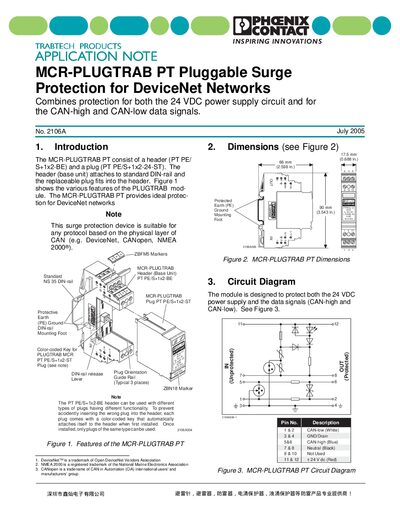
Phoenix Contact MCR-PLUGTRAB PT Surge Protection Module Application Note
The MCR-PLUGTRAB PT is a pluggable surge protection module that safeguards both the 24 VDC power supply and the CAN‑high/CAN‑low data signals in DeviceNet and other CAN‑based networks. It consists of a DIN‑rail‑mounted header and a replaceable plug, with color‑coded keys to prevent mismatched connections.
The document provides dimensions, a circuit diagram, technical data (voltage, current, surge ratings, response time, temperature range), detailed installation and removal instructions for the DIN‑rail header, and ordering data for the header, plug and accessories.
Covers: Introduction · Dimensions · Circuit Diagram · Application Example · Technical Data · Installing and Removing the MCR-PLUGTRAB Module
Latest Phoenix Contact manuals
Phoenix Contact SF-Z0054 4-Arbor Crimping Pliers Operating Instructions
User Manual 3 pages · 281 KB · ENOperating instructions for the Phoenix Contact SF-Z0054 4‑arbor crimping pliers with digital display, covering setup, calibration, wear monitoring and…
Phoenix Contact MCR-PLUGTRAB PT Surge Protection Module Application Note
Application Note 61 pages · 1.7 MB · ENThe Phoenix Contact MCR-PLUGTRAB PT application note describes surge protection for DeviceNet power and CAN data lines, with specifications, installation…
PHOENIX CONTACT -PC 4/ 6-STF-7 62 Order No.: 1828281 The figure shows a 5-pos. version of the product handbook
PC 4/6-STF-7,62 is a plug component from PHOENIX CONTACT with a nominal current of 20A, a nominal voltage of 400V and a screw connection. It is green in color.
PHOENIX CONTACT - PLH 16/ 7-10-ZF handbook
This product is the PLH 16/ 7-10-ZF connector from PHOENIX CONTACT, with a 16mm2 rated cross section, 1000V rated voltage, 10mm pitch and 7 positions.
PHOENIX CONTACT -PTSA 0 5/13-2 5-Z handbook
PTSA 0,5/13-2,5-Z is a PC terminal block from PHOENIX CONTACT with a nominal current of 2A, a rated voltage of 160V, a pitch of 2.5mm, 13 positions, a spring cage connector, a soldering assembly, a conductor/PCB connection direction of 45°, a green color, offset soldering legs, and a two-rowed arrangement.
PHOENIX CONTACT - FKC 2 5/ 6-STF-5 08 handbook
FKC 2,5/ 6-STF-5,08 is a plug component from PHOENIX CONTACT. It has a nominal current of 12A, a nominal voltage of 250V, a pitch of 5.08mm, 6 positions, a spring-cage connection and is green.
PHOENIX CONTACT PT 1 5/ 8-5 0-V Order No.: 1935378 The figure shows a 10-position version of the product handbook
PT 1,5/ 8-5,0-V is a PC terminal block from PHOENIX CONTACT. It has a rated current of 17.5 A, a rated voltage of 250 V, a pitch of 5 mm, 8 connection terminals, a screw connection, a soldering assembly, a 90° conductor/PCB connection direction, and a green color.
PHOENIX CONTACT PT 2 5/ 8-PVH-5 0 Order No.: 1704220 The figure shows a 10-position version of the product handbook
PT 2,5/ 8-PVH-5,0 is a PC terminal block produced by PHOENIX CONTACT. It has a rated current of 14 A, a rated voltage of 250 V, a pitch of 5 mm, 8 connection positions, a screw connection type and a green color.
PHOENIX CONTACT - 0808587_en
This document is the English manual of ZBF 4:UNBEDRUCKT product
PHOENIX CONTACT - PLH 16/ 8-10-ZF handbook
This document describes the features and characteristics of the PC terminal block PLH 16/ 8-10-ZF from PHOENIX CONTACT GmbH & Co. KG, including nominal voltage, pitch, type of connection, etc.
PHOENIX CONTACT - MKDSP 10N/ 2-10 16 handbook
This is a pdf file containing information about the MKDSP 10N/ 2-10,16 product
PHOENIX CONTACT - PTSA 0 5/14-2 5-Z handbook
PTSA 0,5/14-2,5-Z is a PC terminal block from PHOENIX CONTACT with a nominal current of 2 A, a nominal voltage of 160 V, a pitch of 2.5 mm, 14 positions, a spring-cage connection, a conductor/PCB connection direction of 45°, a green color, and offset soldering legs in two rows
PHOENIX CONTACT FKC 2 5/ 8-STF-5 08 Order No.: 1873265 The figure shows a 10-position version of the product handbook
FKC 2,5/ 8-STF-5,08 is a connector product from PHOENIX CONTACT. It has a rated current of 12A, a rated voltage of 250V, a pitch of 5.08mm, 8 positions, and a spring cage connection. It is green in color.
PHOENIX CONTACT PLH 16/ 7-15 handbook
This document is an introduction to PHOENIX CONTACT GmbH & Co. KG PLH 16/ 7-15. It includes the product's model, dimensions, color, connection type, mounting type, rated voltage, rated cross section, etc.
PHOENIX CONTACT PT 1 5/10-5 0-V Order No.: 1935394 The figure shows a 10-position version of the product handbook
PT 1,5/10-5,0-V is a terminal block from PHOENIX CONTACT. It has a nominal current of 17.5 A, a rated voltage of 250 V, a pin spacing of 5 mm and 10 pins.
Which document do I need?
User Manual
Day-to-day operation, settings and troubleshooting. Start here if the product is already set up.
Application Note
How to use the product for one specific task, with worked examples.
Questions answered in Phoenix Contact manuals
How do I change the battery in the SF‑Z0054 pliers?
Pull out the battery holder, remove the CR2025 cell, insert a new CR2025 battery, and ensure the pliers are set to the lower stop before reinserting the holder.
From: Phoenix Contact SF-Z0054 4-Arbor Crimping Pliers Operating Instructions
What is the procedure to calibrate the crimping pliers?
Remove the battery, open the pliers, turn the adjustment knob to the lower stop, insert the battery (display shows “CAL”), adjust with the gauge, hold ON/OFF and press MODE for at least 5 seconds, then release; the display will jump to the gauge value and the tool is calibrated.
From: Phoenix Contact SF-Z0054 4-Arbor Crimping Pliers Operating Instructions
What network protocols can the MCR-PLUGTRAB PT protect?
It can protect any protocol that uses the CAN physical layer, such as DeviceNet, CANopen and NMEA 2000.
From: Phoenix Contact MCR-PLUGTRAB PT Surge Protection Module Application Note
What is the recommended tightening torque for the terminal screws?
Tighten the terminal screws to 0.5 Nm.
From: Phoenix Contact MCR-PLUGTRAB PT Surge Protection Module Application Note