
Key facts
- Manuals
- 4
- Categories
- 1
- Languages
- EN · JA
- Last added
- 2012-03-14
Featured Legend manuals
Legend SIS650 Motherboard User Manual
This guide provides step‑by‑step instructions for installing the chip driver and video driver for the Legend SIS650 motherboard on Windows 98, Windows 2000 and Windows XP. It includes the required CD directory paths and the sequence of setup dialogs.
The manual also covers the installation of the on‑board audio driver using the same driver CD. After copying the driver files, the user runs Setup.exe, follows the prompts, and restarts the computer to complete the installation.
Covers: User's Guide of Motherboard · Installation of motherboard’s chip driver · Installation of on‑board audio driver · Driver CD directory structure · Setup procedure for Windows 98/2000/XP
Legend Intel Pro100S Network Adapter User Manual
The Legend Intel Pro100S is a 32‑bit PCI Ethernet adapter that supports 10/100 Mbps auto‑negotiation, full‑duplex operation and PCI REV2.2 compliance. The manual describes its features, hardware installation steps, driver installation for Windows 95/98 and Windows NT 4.0, and troubleshooting guidance.
Detailed procedures include shutting down the PC, inserting the card into a PCI slot, securing it, connecting the RJ‑45 cable, and installing the appropriate drivers. Precautions for static electricity and electromagnetic interference are also provided.
Covers: Features and Functions · Hardware Installation · Driver Installation · Troubleshooting · Precautions
Legend POWER DVD Quick Start Guide
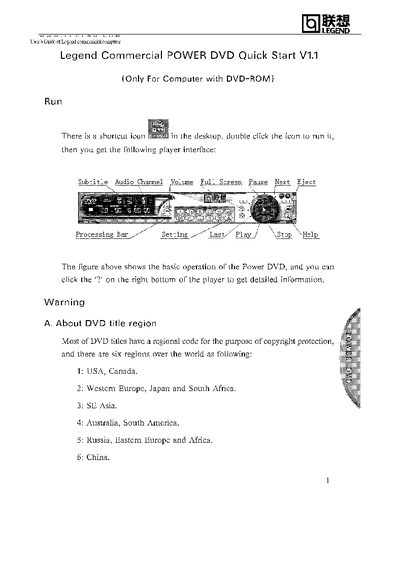
This guide explains how to launch the Legend POWER DVD player and use its basic controls such as subtitle, audio channel, volume, full screen, pause, next, and eject. Double‑click the desktop shortcut to open the player and access the interface.
It also covers DVD region handling: the first time a disc with a regional code is inserted, a Region Playback Control window appears. You can set the player’s region to match the disc, but the region can only be changed five times, after which it is fixed to the last setting.
Covers: Running the Player · Player Interface Controls · DVD Region Codes · Changing Regional Settings · Region Change Limitations

Honda ACC/LKAS User Manual
The ACC (Adaptive Cruise Control) and LKAS (Lane Keep Assist) are driver‑assist systems that help reduce the driver’s workload by automatically maintaining a set speed and lane position. ACC keeps a constant distance to the vehicle ahead without the driver needing to press the accelerator or brake, while LKAS adds steering torque to keep the vehicle centered in its lane.
The manual describes how to operate the system using the MAIN, RES/ACCEL, SET/DECEL, and LKAS switches, outlines the warning and information displays, and lists situations where the systems should not be used, such as heavy traffic, steep grades, or adverse weather conditions. This manual is written in Japanese.
Covers: アダプティブクルーズ · ACCの作動 · ACCの解除 · LKASの作動 · LKASの解除 · ディスプレイの表示について
Latest Legend manuals
Legend SIS650 Motherboard User Manual
User Manual 4 pages · 131 KB · ENUser guide for installing the Legend SIS650 motherboard drivers and audio on Windows systems.
Legend Intel Pro100S Network Adapter User Manual
User Manual 6 pages · 272 KB · ENUser manual for the Legend Intel Pro100S PCI Ethernet adapter covering features, installation, driver setup and troubleshooting.
Legend POWER DVD Quick Start Guide
Quick Start Guide 2 pages · 153 KB · ENQuick start guide for Legend POWER DVD showing basic operation, regional code settings, and playback controls.
Honda ACC/LKAS User Manual
User Manual 50 pages · 1.4 MB · JAThis manual explains the operation, warnings, and controls of Honda's Adaptive Cruise Control (ACC) and Lane Keep Assist (LKAS) system.
Which document do I need?
User Manual
Day-to-day operation, settings and troubleshooting. Start here if the product is already set up.
Quick Start Guide
The shortest path to a working setup, usually only a few pages.
Questions answered in Legend manuals
What do the three LED lights on the adapter indicate?
The green LED (LINK/100) shows a 100 Mbps link, the yellow LED (LINK/10) shows a 10 Mbps link, and the red LED (ACT) indicates active transmission/reception.
How do I start the Legend POWER DVD player?
Double‑click the shortcut icon on the desktop to run the player.
How many times can I change the DVD region setting?
You can change the region setting up to five times; after that the region is fixed.
How do you deactivate LKAS?
Press the LKAS switch once to activate LKAS; press it again to deactivate the system.