
Key facts
- Manuals
- 7
- Models
- 1
- Categories
- 2
- Languages
- EN · ZH
- Last added
- 2026-09-30
EVGA models by category
Featured EVGA manuals
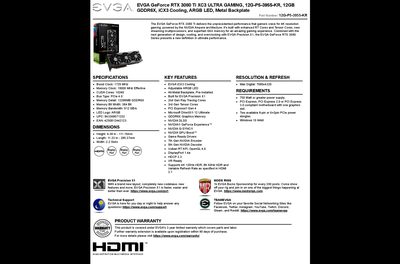
EVGA GeForce RTX 3080 Ti 12G-P5-3955-KR Product Leaflet
The EVGA GeForce RTX 3080 Ti XC3 UL TRA GAMING graphics card delivers high‑performance 4K gaming with NVIDIA Ampere architecture, EVGA iCX3 cooling, adjustable ARGB LED and an all‑metal backplate. It supports PCIe 4.0, DirectX 12 Ultimate, DLSS, G‑SYNC and a range of modern display standards.
The leaflet provides detailed specifications such as a 1725 MHz boost clock, 12 GB GDDR6X memory, 10240 CUDA cores, and a 3‑year limited warranty covering parts and labor. Power requirements, dimensions and warranty details are also included.
Covers: SPECIFICATIONS · KEY FEATURES · RESOLUTION & REFRESH · REQUIREMENTS · PRODUCT WARRANTY
EVGA Graphics Accelerator User Manual
This manual explains how to install and configure a genuine EVGA graphics accelerator, covering hardware preparation, driver installation, and the NVIDIA nView multi‑display features. It also includes safety warnings, compliance details, and contact information for EVGA support.
Step‑by‑step hardware installation instructions guide you through powering down the system, removing the old video card, seating the new card in the appropriate PCI‑Express, AGP or PCI slot, and connecting any supplemental power adapters. Software installation instructions describe using the EVGA ADM™ utility to load drivers, and the troubleshooting section offers quick fixes for common issues such as missing IRQ resources or black screens.
Covers: Overview · Hardware Installation · Quick Start · Software Installation · nView Features · Troubleshooting
EVGA nForce 590 SLI Mainboard Manual
This manual covers the EVGA 122-M2-NF59-AX motherboard, detailing its features, supported AMD AM2 processors, memory options, and expansion capabilities. It includes hardware installation instructions, jumper settings, and BIOS configuration guidance.
Additional sections describe NVIDIA networking features, RAID configuration, and troubleshooting resources such as POST codes and debug ports. Contact information for EVGA support and regulatory compliance statements are also provided. This manual is written in Chinese.
Covers: Introduction · Motherboard Features · Specifications · Layout Diagram and Jumper Settings · Hardware Installation · BIOS Setup
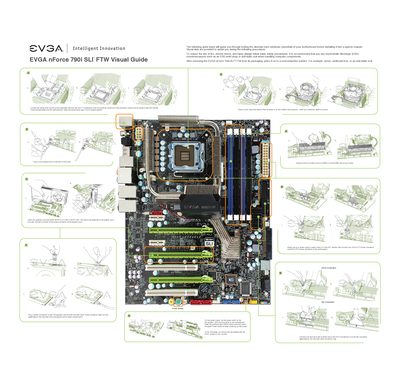
EVGA nForce 790i SLI FTW Quick Install Guide
This quick install guide walks you through the essential steps to test and install the EVGA nForce 790i SLI FTW motherboard before placing it in a chassis. It includes safety reminders, ESD precautions, and visual aids to help avoid damage during handling.
The guide details CPU installation, memory module placement, graphics card insertion, and connection of power and peripheral cables. It also notes the motherboard’s key features such as three PCI‑Express X16 slots, four DDR3 memory slots, and the required 24‑pin ATX and 8‑pin CPU power connectors.
Covers: Safety Precautions · STEP 1 – Install CPU · STEP 2 – Install Memory · STEP 3 – Install Graphics Card(s) · STEP 4 – Connect Peripheral Cables · Quick Install Overview
Latest EVGA manuals
EVGA GeForce RTX 3080 Ti 12G-P5-3955-KR Product Leaflet
Product Leaflet 1 pages · 246 KB · ENThe EVGA GeForce RTX 3080 Ti 12G-P5-3955-KR product leaflet lists specifications, key features, and warranty information.
EVGA Graphics Accelerator User Manual
User Manual 16 pages · 2 MB · ENThe EVGA Graphics Accelerator User Manual provides installation, software setup, nView features, troubleshooting, and warranty information.
EVGA nForce 750i SLI Motherboard User Guide
The user guide for the EVGA nForce 750i SLI motherboard provides instructions for installing the motherboard, connecting various cables and setting switches, as well as BIOS configuration.
EVGA nForce 590 SLI Mainboard Manual
User Manual 67 pages · 2.3 MB · ZHThe EVGA 122-M2-NF59-AX motherboard user manual provides installation steps, BIOS setup, and hardware specifications for AMD AM2 CPUs.
EVGA nForce 790i SLI FTW Quick Install Guide
Quick Start Guide 2 pages · 2.1 MB · ENStep‑by‑step quick install guide for the EVGA nForce 790i SLI FTW motherboard, covering CPU, memory, graphics and peripheral connections.
EVGA 123-K8-NF47-XX Motherboard User Manual
User Manual 40 pages · 3.7 MB · ENThe EVGA 123-K8-NF47-XX motherboard user manual provides installation, BIOS setup, and troubleshooting instructions for the nForce4 platform.
EVGA 123-K8-NF47-XX User Manual
User Manual 40 pages · 3.7 MB · ENThe EVGA 123-K8-NF47-XX motherboard user manual provides installation, BIOS, and troubleshooting instructions.
Which document do I need?
User Manual
Day-to-day operation, settings and troubleshooting. Start here if the product is already set up.
Quick Start Guide
The shortest path to a working setup, usually only a few pages.
Questions answered in EVGA manuals
What power supply is required for the EVGA GeForce RTX 3080 Ti?
A power supply of 750 W or greater is required.
From: EVGA GeForce RTX 3080 Ti 12G-P5-3955-KR Product Leaflet
What warranty does EVGA provide for this graphics card?
EVGA offers a 3‑year limited warranty covering parts and labor, with optional extension if registered within 90 days.
From: EVGA GeForce RTX 3080 Ti 12G-P5-3955-KR Product Leaflet
Which AMD CPUs are supported by the 122-M2-NF59-AX motherboard?
The motherboard supports AMD AM2 processors including Athlon 64 FX, Athlon 64 X2 (dual‑core), Athlon 64, and Sempron.
How many USB ports are available on the board?
The board provides six USB 2.0 ports.
How do I install the CPU on the EVGA nForce 790i SLI FTW motherboard?
Unlock the socket lever, lift the load plate, remove the protective cover, align the CPU notches with the socket, lower the CPU, close the load plate and re‑engage the lever.
How many DDR3 memory modules can the motherboard support?
The board supports up to four 240‑pin DDR3 memory modules, with dual‑channel operation recommended using matched pairs.