
Key facts
- Manuals
- 13
- Models
- 1
- Categories
- 1
- Languages
- EN · ZH
- Last added
- 2026-09-28
Autodesk models by category
Featured Autodesk manuals

Autodesk February 2010 Licensing User Manual
This manual explains how to activate, register, and manage both stand‑alone and network licenses for Autodesk software. It covers license types, activation methods, and steps for saving or updating license information.
It also details the License Transfer Utility, license borrowing, server configuration, and provides FAQs for common licensing issues.
Covers: Stand‑Alone Licensing · Network Licensing · License Types and Behaviors · License Transfer Utility · License Borrowing · Network License Manager
Autodesk Navisworks Manage 2012 User Manual
This manual introduces Autodesk Navisworks Manage 2012, covering topics such as installation, system requirements, licensing, and the basic user interface. It walks users through quick‑start steps, file handling, supported CAD and laser‑scan formats, and how to create, edit, and save projects.
Advanced sections describe batch utility command‑line options, database linking, custom property editing, and rendering settings. The guide also includes detailed information on navigation tools, view management, and model inspection features.
Covers: Welcome to Autodesk Navisworks Manage 2012 · Installation · Quick Start · Using Files · Browsing Models · Controlling Model Appearance and Rendering Quality
Autodesk Mudbox 2010 Installation Guide
The Autodesk Mudbox 2010 Installation Guide walks users through installing the 3‑D sculpting software on supported platforms and configuring its licensing.
It covers Windows, macOS and Linux installation steps, uninstallation, stand‑alone and network licensing, license server setup, and troubleshooting common license errors.
Covers: Installation Overview · Windows Installation · macOS Installation · Linux Installation · Uninstalling Mudbox · Licensing Overview
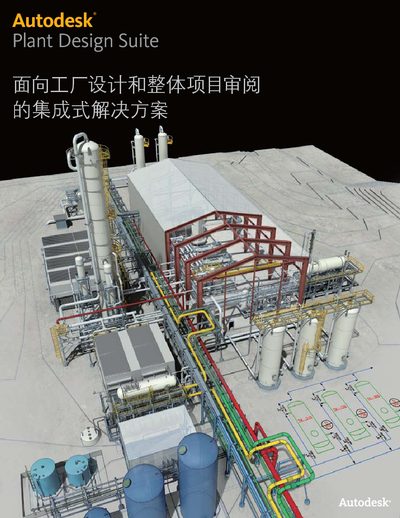
Autodesk Plant Design Suite User Manual
The Plant Design Suite combines AutoCAD, AutoCAD P&ID, AutoCAD Plant 3D, and Autodesk Navisworks into a single integrated solution for plant design, documentation, and project review. It helps users create, edit, and manage piping and equipment data, generate reports, and perform clash detection across multiple design disciplines.
Key capabilities include industry‑standard symbol libraries, automatic line editing, dynamic attribute linking, 3‑D model generation, and export of project data as NWD or DWF7 files. The suite also offers subscription‑based maintenance contracts that provide free upgrades, technical support, and training resources. This manual is written in Chinese.
Covers: AutoCAD P&ID · AutoCAD Plant 3D · Autodesk Navisworks · Suite Advantages · Subscription and Maintenance
Latest Autodesk manuals
Autodesk February 2010 Licensing User Manual
User Manual 62 pages · 362 KB · ENGuidance on stand‑alone and network licensing, activation, registration, transfers and troubleshooting for Autodesk products.
Autodesk Lustre Color Management User Guide
This manual introduces Autodesk Lustre's color management features, including color management workflows, color configurations, color space management, color correction, color tracking, ICC profiles and LUT files, and color management tools for interacting with other applications using Autodesk Lustre.
Autodesk Navisworks Manage 2012 User Manual
User Manual 802 pages · 11.8 MB · ENThe Autodesk Navisworks Manage 2012 User Manual provides installation, usage, and troubleshooting guidance for the software.
Autodesk Mudbox 2010 Installation Guide
Installation Guide 110 pages · 1.1 MB · ENStep‑by‑step instructions for installing and licensing Autodesk Mudbox 2010 on Windows, macOS, and Linux.
Autodesk Plant Design Suite User Manual
User Manual 6 pages · 2.7 MB · ZHThe Autodesk Plant Design Suite User Manual provides an overview of AutoCAD P&ID, AutoCAD Plant 3D, and Navisworks features for integrated plant design and…
Autodesk Buzzsaw User Manual
User Manual 486 pages · 2.8 MB · ZHThe Autodesk Buzzsaw User Manual provides step‑by‑step instructions for navigating sites, managing projects, members and collaboration tools.
Autodesk 3ds Max 2009 Project Management Tutorial Manual
User Manual 15 pages · 4.3 MB · ENThis Autodesk 3ds Max 2009 tutorial manual teaches basic project management concepts, scene state saving, and batch rendering.
Autodesk Inventor software Manual
Autodesk 3ds Max User Manual
User Manual 4 pages · 506 KB · ZHThe Autodesk 3ds Max user manual explains the software’s modeling tools, particle system, rendering features, and subscription services.
Autodesk Model Performance Technical Note Manual
Autodesk Inventor 9 QuickStart Guide
Quick Start Guide 296 pages · 4.4 MB · ZHA concise guide introducing Autodesk Inventor 9 features, workflow, and basic operations for new users.
Autodesk AutoCAD 2006 user manual
Autodesk Education Suites 2010 Installation Guide
Installation Guide 82 pages · 1000 KB · ENInstallation guide for Autodesk Education Suites 2010, providing step‑by‑step instructions for setting up the software.
Which document do I need?
User Manual
Day-to-day operation, settings and troubleshooting. Start here if the product is already set up.
Installation Guide
Mounting, wiring and first power-up. Read it before the hardware goes in.
Quick Start Guide
The shortest path to a working setup, usually only a few pages.
Questions answered in Autodesk manuals
What is a stand‑alone license?
A stand‑alone license allows you to run an Autodesk product on a single workstation.
How can a stand‑alone license be transferred?
The License Transfer Utility transfers a product license online from one computer to another.
Where can I find the batch utility command‑line options?
The batch utility command‑line options are described on page 239 in the section titled “批处理实用程序的命令行选项”.
How do I install Mudbox on Windows?
Follow the step‑by‑step instructions in the "Install Mudbox on Windows" section of the guide.
How can I transfer a Mudbox license to another computer?
Use the License Transfer Utility as described in the "License Transfer Utility" section.
What software components are included in the Plant Design Suite?
The suite integrates AutoCAD, AutoCAD P&ID, AutoCAD Plant 3D, and Autodesk Navisworks Simulate/Manage.