
Key facts
- Brand
- SONBest
- Model
- SCTH2001
- Industry
- Industrial
- Documents
- 2
- Languages
- ZH
- Last added
- 2012-03-13
Start here
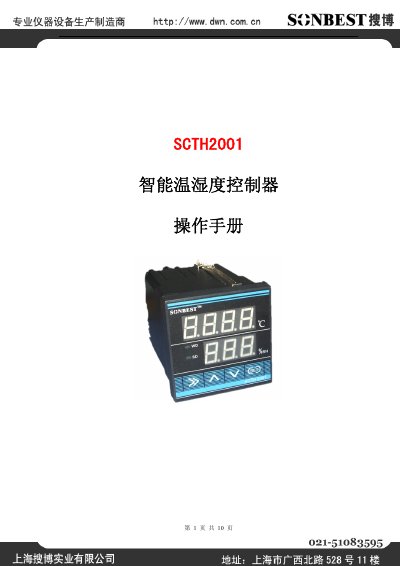
Shanghai Soubo SCTH2001 Temperature Humidity Controller User Manual
The SCTH2001 intelligent temperature and humidity controller uses a high‑precision digital sensor and offers a wide measurement range, RS232 interface and optional CAN/RS485/Ethernet connections. It is designed for long‑term stable operation in harsh environments and supports cable lengths over 60 m.
The manual covers product overview, features, communication protocol, installation, operation instructions, parameter setting, wiring diagrams, expansion wiring and ordering information, providing all details needed for setup and use in outdoor terminal boxes, high‑voltage distribution equipment and various industrial applications. This manual is written in Chinese.
SONBest SCTH2001 specifications
| Temperature measurement range | 0.1℃ |
|---|---|
| Temperature accuracy | ±0.5℃ |
| Humidity accuracy | ±4.5%RH |
| Temperature setting range | -30‑120℃ |
| Humidity setting range | 11‑99.9%RH |
| Output power | 5A 250V |
| Baud rate | 9600 |
| Communication port | RS232 (optional CAN, RS485, Ethernet) |
| Mechanical life | ≥3,000,000 cycles |
| Working voltage | AC 85‑265V |
| Weight | 210 g |
| Storage temperature range | -20 ℃ ~ 80 ℃ |
| Operating temperature range | -40 ℃ ~ +85 ℃ |
| Supported sensor cable length | >60 m |
| Dimensions | 72 × 72 × 111 mm |
| Panel size | 72 mm × 72 mm |
| Opening size | 67.5 mm × 67.5 mm |
| Installation type | Panel‑mounted |
Source: Shanghai Soubo SCTH2001 Temperature Humidity Controller User Manual
All SONBest SCTH2001 documents by type
Day-to-day operation, settings and troubleshooting. Start here if the product is already set up.
Questions answered in these manuals
How do I set the temperature on the controller?
Press and hold the K1 key for 3 seconds to enter temperature setting mode.
From: Shanghai Soubo SCTH2001 Temperature Humidity Controller User Manual
What do the WD and SD indicator lights indicate?
WD lights up when the temperature relay is closed, and SD lights up when the humidity relay is closed.
From: Shanghai Soubo SCTH2001 Temperature Humidity Controller User Manual
What does the K1 button do?
Pressing K1 for 3 seconds sets the temperature and saves the setting.
From: Sonbest SCTH2001 Intelligent Temperature Controller User Manual
What do the WD and SD indicator lights indicate?
WD lights up to show the temperature condition, while SD lights up to indicate the humidity condition.
From: Sonbest SCTH2001 Intelligent Temperature Controller User Manual