
Key facts
Start here
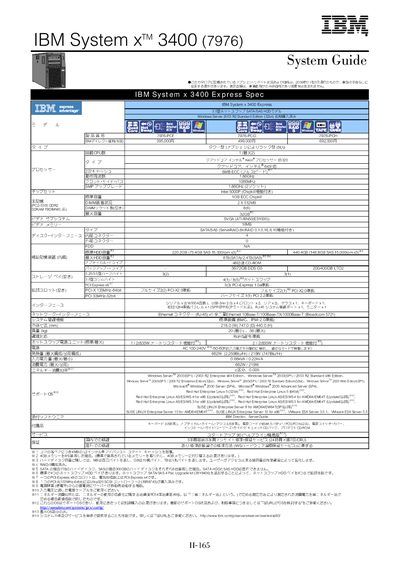
IBM System x 3400 (7976) Manual(1)
The IBM System x 3400 is a tower‑type server (optionally rack‑mountable 5U) that supports dual‑core Intel Xeon processors such as the E5310, E5320 and E5335, with a base memory of 1 GB ECC DDR2 that can be expanded up to 32 GB. It provides four hot‑swap SATA HDD bays (expandable to eight with an upgrade kit) and includes PCI‑Express, PCI‑X and PCI slots for additional expansion.
Power is supplied by an 835 W hot‑swap unit with an auto‑restart feature, and the system offers built‑in management via BMC with IPMI 2.0, Ethernet networking (10/100/1000 Mbps), and a range of supported operating systems including Windows Server 2003 R2 and various Linux distributions. Warranty service includes three‑year parts and on‑site repair. This manual is written in Japanese.
IBM System x 3400 specifications
| Processor | Intel Xeon E5320 1.86 GHz 8 MB L2 cache |
|---|---|
| Memory (standard) | 1 GB ECC DDR2 |
| Maximum memory | 32 GB DDR2 ECC |
| Management controller | BMC with IPMI 2.0 |
All IBM System x 3400 documents by type
Day-to-day operation, settings and troubleshooting. Start here if the product is already set up.
Mounting, wiring and first power-up. Read it before the hardware goes in.
Questions answered in these manuals
What processors are supported by the IBM System x 3400?
It supports Intel Xeon processors such as the E5310, E5320 and E5335, with options for dual‑core and quad‑core models.
How many hot‑swap SATA HDD bays does the standard configuration provide?
The standard configuration includes four hot‑swap SATA HDD bays, which can be expanded to eight using the upgrade kit.
What is the maximum memory capacity of the System x 3400?
The server can be equipped with up to 32 GB of DDR2 ECC memory.
Can SATA and SAS drives be mixed in the same system?
No, SATA and SAS drives cannot be mixed; they must be used separately.
Where can I find the latest firmware for the System x3400?
Visit http://www.ibm.com/servers/eserver/support/xseries/index.htm for the latest firmware updates.
From: IBM System x3400 7973/7974/7975/7976 Installation Guide
What safety information must be read before installing the system?
Read the Safety Information section, which is provided in multiple languages, before beginning installation.
From: IBM System x3400 7973/7974/7975/7976 Installation Guide