
Key facts
- Manuals
- 1
- Categories
- 1
- Languages
- ZH
- Last added
- 2012-03-16
Featured 喷墨多功能 integration 机M820快速安装指南 manuals
inkjet multi-function all-in-oneM820 quick installation Service Manual
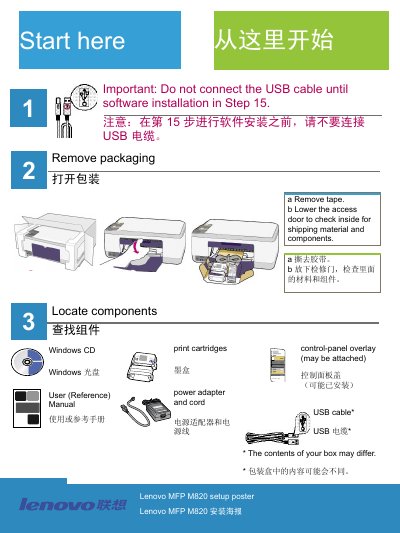
The manual guides users through unpacking the device, removing packaging tape, attaching the control‑panel overlay, loading paper and powering on the M820. It also shows how to open the access door, prepare and install the black and tri‑color print cartridges, and run the cartridge alignment procedure.
After hardware setup, the guide explains how to insert the Windows installation CD, complete the software installation, connect the USB cable, and resolve common issues such as cartridge check warnings, paper jams during alignment, and USB connection problems. This manual is written in Chinese.
Covers: Unpacking and removing packaging tape · Attach control‑panel overlay · Load paper · Power on the device · Prepare and insert print cartridges · Cartridge alignment
Latest 喷墨多功能 integration 机M820快速安装指南 manuals
inkjet multi-function all-in-oneM820 quick installation Service Manual
Service Manual 12 pages · 892 KB · ZHLenovo M820 all‑in‑one service manual provides step‑by‑step instructions for unpacking, assembly, cartridge installation, USB connection and troubleshooting.
Which document do I need?
Service Manual
Disassembly, diagnostics and part numbers, for repair.
Questions answered in 喷墨多功能 integration 机M820快速安装指南 manuals
When should I connect the USB cable?
Connect the USB cable only after you see the screen prompting you to do so (step 15).
From: inkjet multi-function all-in-oneM820 quick installation Service Manual
What should I do if the “Check Print Cartridge” indicator stays on?
Remove the print cartridges, make sure all tape is removed from the copper contacts, then re‑insert the cartridges.
From: inkjet multi-function all-in-oneM820 quick installation Service Manual