
Key facts
- Manuals
- 16
- Models
- 2
- Categories
- 2
- Languages
- ZH
- Last added
- 2012-04-01
Proton models by category
Featured Proton manuals
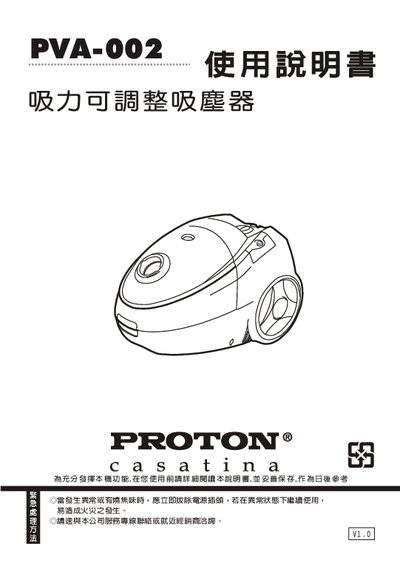
PROTON casatina PVA-002 Adjustable suction vacuum cleaner Manual
This manual provides detailed safety precautions, component identification, and step‑by‑step assembly instructions for the Sampo EC‑W1035RL bag‑free vacuum cleaner. It also covers operation methods, cleaning procedures, and proper storage of the unit and accessories.
Additional sections explain how to replace and clean the dust‑bag, perform regular maintenance, and troubleshoot common issues such as loss of suction or failure to start. Technical specifications are listed at the end of the document. This manual is written in Chinese.
Covers: 安全注意事項 · 各部位名稱與組裝方法 · 操作方法 · 清潔方法 · 收納辦法 · 集塵布袋清潔及更換
Proton 47 Monitor User Manual
This manual explains the safety precautions required when using the Proton 47 LCD monitor, including proper handling, cleaning, and power‑off procedures to prevent fire or electric hazards. It also details how to install the monitor, connect video and audio inputs, and adjust settings.
Operational guidance covers basic functions, troubleshooting common issues such as loss of image or sound, and maintenance tips like cleaning the screen with a soft dry cloth. Contact information for service support is provided at the end of the document. This manual is written in Chinese.
Covers: Safety Instructions · Installation Guide · Operation Instructions · Connection and Interfaces · Troubleshooting · Product Overview
Proton 32-C6 LCD Monitor User Manual
This manual provides safety guidelines, installation instructions, and system integration details for the Proton high‑quality LCD monitor. It covers proper handling, power requirements, mounting recommendations, and cleaning procedures to ensure safe operation.
Technical information includes connection methods for power, video, and audio signals, a description of panel functions, and a full specifications table, including supported video resolutions and RGB frequency ranges. This manual is written in Chinese.
Covers: Safety Instructions · System Integration · Connection Methods · Panel Key Functions · Panel Terminal Functions · Product Features
32-C6 37-C6 LCD Monitor User Manual
This manual provides safety warnings, installation guidelines, and usage instructions for the 32‑C6/37‑C6 LCD monitor. It covers power handling, ventilation, handling precautions, and proper connection of audio/video cables.
The document also lists the monitor’s technical specifications, panel button functions, back‑panel connector details, and a troubleshooting section with common problems and their solutions. This manual is written in Chinese.
Covers: Safety Instructions · Installation Safety · System Integration · Connection Methods · Panel Button Functions · Back Panel Connector Functions
Latest Proton manuals
PROTON PBK-S01 universal Exclusive Cup Manual
This white paper introduces how to access Google Cloud Platform (GCP) storage services using application programming interfaces (APIs). This white paper covers everything from creating a storage bucket to retrieving data from a storage bucket.
PROTON PDR-01 Salon Level Hair Dryer Manual
PROTON PDR-02 Hair Dryer Manual
PROTON PEF-K402/K403T/M404R Manual
PROTON PEI-S01 Manual
This document is a user manual for HP printers. It introduces the basic usage of HP printers, including how to install the printer, how to connect the printer, how to print documents, how to use the printer's functions, etc.
PROTON PVA-001 Manual
The document describes the features and characteristics of a product.
PROTON PBC-C01 Manual
PROTON Hand Mention CD hi-fi PRC-C04 owners manual
This document introduces the features and characteristics of the Philips electric toothbrush. The toothbrush has three cleaning modes, namely daily, deep cleaning and sensitive. The toothbrush also has a clock function to remind users of the brushing time.
PROTON PRC-CU05 Manual
The document provides an introduction to the features and characteristics of a particular product.
PROTON casatina PVA-002 Adjustable suction vacuum cleaner Manual
User Manual 12 pages · 2.3 MB · ZHSampo EC-W1035RL vacuum cleaner user manual with safety, assembly, operation, cleaning, storage, maintenance and troubleshooting instructions.
Proton 47 Monitor User Manual
User Manual 40 pages · 3.6 MB · ZHThe Proton 47 monitor user manual provides safety guidelines, installation steps, and operation instructions for the 32‑inch multimedia LCD display.
Proton 32-C6 LCD Monitor User Manual
User Manual 15 pages · 2.1 MB · ZHSafety, installation and specifications for the Proton 32‑C6 high‑quality LCD monitor.
32-C6 37-C6 LCD Monitor User Manual
User Manual 15 pages · 2.1 MB · ZHSafety, installation, operation and specifications for the 32‑C6/37‑C6 LCD monitor.
PROTON LCD MONITOR PS-47D5 high Painting Quality LCD Manual
Proton LCDMONITOR LCD Monitor User Manual
User Manual 18 pages · 1.4 MB · ZHThe Proton LCDMONITOR user manual provides safety guidelines, installation steps, features, specifications, and troubleshooting for the high‑quality LCD…
Which document do I need?
User Manual
Day-to-day operation, settings and troubleshooting. Start here if the product is already set up.
Questions answered in Proton manuals
What should I do if the vacuum does not start?
Check that the power plug is fully inserted and not loose; if the plug is correct, verify the power switch and contact the service line if the problem persists.
From: PROTON casatina PVA-002 Adjustable suction vacuum cleaner Manual
How do I adjust the suction power?
Use the suction‑adjustment knob on the handle or the suction‑adjustment opening on the motor housing to increase or decrease suction as needed.
From: PROTON casatina PVA-002 Adjustable suction vacuum cleaner Manual
How should the screen be cleaned safely?
Use a soft dry cloth to wipe the display after disconnecting the power cord; do not use spray cleaners or solvents.
What to do if there is no image or sound?
Stop using the monitor immediately, disconnect the power, and contact an authorized service center for repair.
What voltage does the monitor require?
The monitor operates on 110 V AC power.
Can the monitor be used in direct sunlight?
No, the monitor should not be exposed to direct sunlight; use ceiling‑mounted lighting for best viewing.