
Key facts
- Manuals
- 11
- Models
- 3
- Categories
- 1
- Languages
- ZH
- Last added
- 2012-03-28
PagePro models by category
Featured PagePro manuals
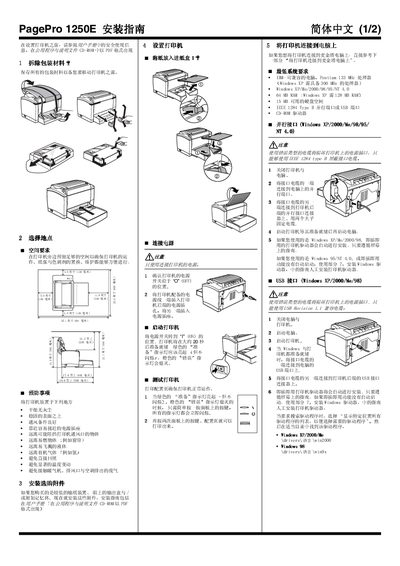
Konica Minolta PagePro 1250E Printer Installation Guide
The guide begins with unpacking the printer, retaining packaging for future moves, and selecting a suitable location with adequate ventilation, a stable surface, and easy access to a power outlet. It then details how to load paper, connect the power cord, and turn the printer on, noting that the green “Ready” indicator should light up while the orange “Error” light stays off.
Subsequent sections cover connecting the printer to a Windows or Macintosh computer via parallel or USB cables, installing the appropriate drivers from the supplied CD‑ROM, and registering the printer online. Safety information explains laser class, radiation power, wavelength, and ozone emission, and provides precautions for handling the laser and ensuring proper ventilation. This manual is written in Chinese.
Covers: Unpacking · Choosing Installation Location · Loading Paper · Power Connection and Power‑On Procedure · Connecting to Windows PC · Connecting to Macintosh PC
PagePro 1350W Printer Reference Manual
This manual introduces the PagePro 1350W laser printer, its components, and how to install the USB driver and printer software on Windows platforms. It also explains the printer’s indicator lights, status display, and paper handling options.
The guide covers consumable replacement (toner, drum), safety symbols, technical specifications, and detailed troubleshooting steps for common errors such as paper jams and print quality issues. This manual is written in Chinese.
Covers: Introduction · Printer Components · Indicator Light Functions · Installation · Using Printer Driver · Status Display
Konica Minolta PagePro 1380 MF User Manual
This manual covers the PagePro 1380 MF all‑in‑one laser printer, detailing its hardware components, control panel, and supported media. It explains how to install the printer, configure drivers, and use the optional automatic document feeder.
The guide also describes printing, scanning, and copying functions, the LinkMagic feature, consumable replacement, routine maintenance, and a troubleshooting section with common error solutions. This manual is written in Chinese.
Covers: Introduction · Machine Overview · Control Panel and Configuration Menu · Using Media · Printing Operation · Scanner Operation
PagePro 1300W Printer 4136-7746-01N user manual
This manual covers everything needed to install and use the PagePro 1300W laser printer, including driver installation, paper handling, status indicators, and consumable replacement. Detailed safety information and compliance with international standards are also provided.
Technical specifications such as print resolution, power requirements, and supported interfaces are listed, and a troubleshooting section helps resolve common error conditions. This manual is written in Chinese.
Covers: Introduction · Installing Printer Driver · Using Status Display · Using Paper · Replacing Consumables · Printer Maintenance
Latest PagePro manuals
PagePro 1200W user manual
This document describes how to use the 1800691-018B repeater, including installation, configuration, and use.
PagePro 1250E user manual
This is a product user manual for PagePro 1250E printer.
Konica Minolta PagePro 1250E Printer Installation Guide
Installation Guide 2 pages · 872 KB · ZHThis guide provides step‑by‑step instructions for unpacking, installing, and configuring the Konica Minolta PagePro 1250E laser printer.
pagepro 4650EN/5650EN Reference Manual
PagePro 1350W Printer Reference Manual
User Manual 80 pages · 4.8 MB · ZHThe PagePro 1350W printer reference manual provides setup, operation, maintenance, and troubleshooting instructions.
Konica Minolta PagePro 1380 MF User Manual
User Manual 104 pages · 7.3 MB · ZHThe Konica Minolta PagePro 1380 MF user manual provides setup, operation, scanning, copying, maintenance, and troubleshooting instructions.
PagePro 1300W Printer 4136-7746-01N user manual
User Manual 76 pages · 3.2 MB · ZHThe PagePro 1300W printer user manual provides setup, operation, maintenance, and troubleshooting instructions.
PagePro 1390 MF Printer/Copier/Scanner User Manual
User Manual 110 pages · 2.2 MB · ZHThe PagePro 1390 MF user manual provides setup, operation, and maintenance instructions for the all‑in‑one printer, copier, and scanner.
PagePro 1390 MF Printer Copier Scanner User Manual
User Manual 110 pages · 2.2 MB · ZHThe PagePro 1390 MF user manual provides setup, operation, and maintenance instructions for the printer, copier, and scanner.
PagePro 1300W/1350W User Manual
User Manual 76 pages · 1.4 MB · ZHThe PagePro 1300W/1350W user manual provides setup, operation, maintenance, and troubleshooting instructions for the laser printer.
Konica Minolta pagepro 4650EN/5650EN User Manual
User Manual 230 pages · 5.3 MB · ZHOfficial user guide for the Konica Minolta pagepro 4650EN/5650EN printer covering setup, operation, maintenance and troubleshooting.
Which document do I need?
Installation Guide
Mounting, wiring and first power-up. Read it before the hardware goes in.
User Manual
Day-to-day operation, settings and troubleshooting. Start here if the product is already set up.
Questions answered in PagePro manuals
How do I register the printer online?
Visit http://printer.konicaminolta.net/register and follow the on‑screen instructions, or mail the registration card that came with the printer.
From: Konica Minolta PagePro 1250E Printer Installation Guide
How do I install the USB driver on Windows XP?
Install the USB driver by following the steps in the "安装 USB 装置驱动程式" section.
How do I fix dark lines on the edges of printed pages?
The edges dark lines are caused by a dirty transfer roller; clean the roller or contact your local dealer.
What should I do if I see toner streaks on the page?
Remove the toner cartridge, shake it left and right several times to redistribute the toner, and reinstall it.
What do the Ready and Error indicator lights mean?
The Ready light (green) shows the printer is ready, while the Error light (orange) indicates a problem that needs attention.
How do I replace the consumables such as toner or drum?
Refer to the "更换耗材" (Replacing Consumables) section; consumable parts are listed with their expected lifespans and replacement steps.