
Key facts
- Manuals
- 3
- Languages
- EN · ZH
- Last added
- 2026-09-30
Featured P&S manuals
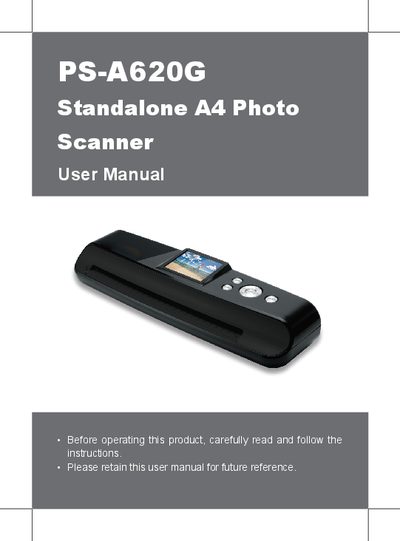
PS A620G Standalone A4 Photo Scanner User Manual
This manual provides step‑by‑step instructions for safely operating the PS A620G standalone A4 photo scanner. It covers package contents, scanner parts, power connection, scan and playback modes, file type selection, and how to transfer images to a PC.
Additional sections describe cleaning and calibration procedures, detailed technical specifications, and helpful hints for optimal image quality. The guide also includes safety warnings and troubleshooting tips.
Covers: Safety Information · Package Contents · Scanner Parts · Scanner Setup · Scan and Playback · Transferring Files to PC
P&S PSD813FH-80C31 Design Example Application Note
This document describes the architecture, memory mapping, and programming details of the PSD813FH‑80C31 design example. It explains how the FLASH‑based programmable system device (PSD) works together with the Intel 80C31 microcontroller in a multi‑chip module (MCM).
The guide includes address mapping tables, flash keyhole definitions, and examples of peripheral connections. It is intended for engineers developing custom hardware based on this PSD and MCU combination. This manual is written in Chinese.
Covers: Architecture Overview · Memory Mapping · Flash Programming · Address Mapping · Peripheral Connections · Keyhole Definitions
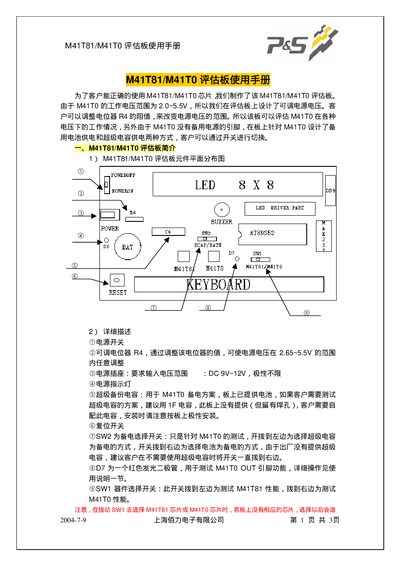
Shanghai Boli M41T81/M41T0 Evaluation Board User Manual
The M41T81/M41T0 evaluation board provides a platform for testing the M41T81 and M41T0 chips. It includes power input, a reset pin, several switches (SW1, SW2) and an LED matrix for status display. The board can be powered from DC 9‑12 V and operates with a supply voltage between 2.65 V and 5.5 V.
The manual describes how to navigate the on‑board menu using MENU, SELECT, INC, DEC, ENTER and CLR keys, configure time and date, output square‑wave signals at selectable frequencies, and adjust calibration offsets. It also lists the required components such as a CR2032 battery and optional 1 F capacitor for extended operation. This manual is written in Chinese.
Covers: Board Overview · Power Supply Requirements · Switch Functions (SW1, SW2) · Menu Navigation · Time and Date Setting · Square‑Wave Signal Output
Latest P&S manuals
PS A620G Standalone A4 Photo Scanner User Manual
User Manual 15 pages · 1 MB · ENThe PS A620G user manual explains safety, setup, scanning, playback, file transfer, cleaning, calibration, and specifications for the standalone A4 photo…
P&S PSD813FH-80C31 Design Example Application Note
Application Note 19 pages · 1.6 MB · ZHTechnical guide for integrating a FLASH‑based PSD with an Intel 80C31 MCU in a multi‑chip module.
Shanghai Boli M41T81/M41T0 Evaluation Board User Manual
User Manual 3 pages · 51 KB · ZHInstructions for setting up, operating, and configuring the M41T81/M41T0 evaluation board.
Which document do I need?
User Manual
Day-to-day operation, settings and troubleshooting. Start here if the product is already set up.
Application Note
How to use the product for one specific task, with worked examples.
Questions answered in P&S manuals
How do I turn the PS A620G scanner on or off?
Long‑press the Power (MENU) button to turn the scanner on, and long‑press it again to turn it off.
Which microcontroller is used in the PSD813FH‑80C31 design?
The design integrates an Intel 80C31 microcontroller.
From: P&S PSD813FH-80C31 Design Example Application Note
What is the flash memory capacity of the PSD813FH?
The PSD813FH provides 512 Kbytes of flash memory organized as 8‑bit wide.
From: P&S PSD813FH-80C31 Design Example Application Note
What input voltage does the board require?
The board accepts a DC input voltage of 9 V to 12 V.
From: Shanghai Boli M41T81/M41T0 Evaluation Board User Manual
How can I output a square‑wave signal and choose its frequency?
Press SELECT, then choose the desired frequency option (e.g., 8.192 kHz, 1.024 kHz, 128 Hz, 1 Hz).
From: Shanghai Boli M41T81/M41T0 Evaluation Board User Manual