
Key facts
- Manuals
- 4
- Categories
- 3
- Languages
- ZH
- Last added
- 2012-08-07
Featured Nitro manuals
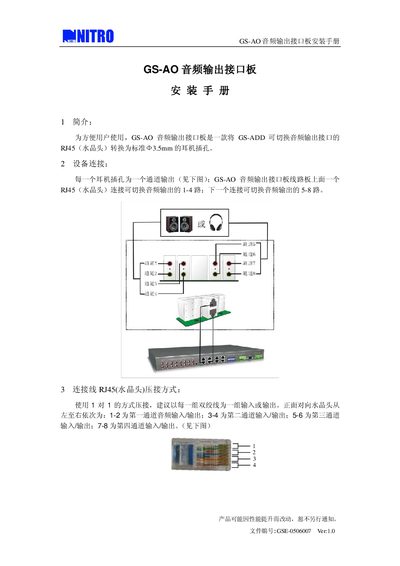
Nitro GS-AO Audio Output Interface Installation Guide
The GS-AO audio output interface board provides a convenient way to convert the GS-ADD switchable audio output RJ45 connector to standard 3.3 mm headphone jacks. It is designed for users who need multiple headphone outputs from a single RJ45 source.
The board offers eight audio channels (four stereo pairs) routed through two RJ45 connectors. Each RJ45 uses a 1‑to‑1 pairing of twisted‑pair wires, with channels 1‑4 on the first connector and channels 5‑8 on the second. The RJ45 pins are mapped to the corresponding 3.3 mm jack contacts as shown in the wiring diagram. This manual is written in Chinese.
Covers: Introduction · Device Connection · RJ45 Wiring Method
Nitro USP-SecNET Access Management Software User Manual
This manual describes the Nitro USP‑SecNET access management software and its compatible NAC8000N/NAC800ON controllers. It includes product features, hardware specifications, and step‑by‑step instructions for system installation, network setup, and controller configuration.
The guide also covers system settings such as door definitions, cardholder management, attendance analysis, and database maintenance, providing tools for quick setup, language selection, and operation log review. This manual is written in Chinese.
Covers: Product Introduction · System Installation · System Settings · System Tools · Operation Log
USP-CDG Access Management Software User Manual
The USP‑CDG software provides a graphical interface for managing up to 64 access controllers. It supports data import, system configuration, event monitoring, and batch operations, with multilingual support for Chinese (traditional and simplified) and English.
The manual explains installation steps, version checking, user and attendance management, data format settings, and how to search and export operation logs. This manual is written in Chinese.
Covers: Installation · Data Installation · Software Version Check · System Configuration · Operation Menu Overview · Data Management
Latest Nitro manuals
NITRO EVADER ST assemble Manual
DuraTrax® guarantees this kit to be free from defects in both material and workmanship at the date of purchase. DuraTrax will warranty this kit for 90 days after the purchase date. DuraTrax will repair or replace, at no charge, the incorrectly made part.
Nitro GS-AO Audio Output Interface Installation Guide
Installation Guide 1 pages · 83 KB · ZHInstallation guide for the Nitro GS-AO audio output interface board that converts RJ45 audio signals to 3.5 mm headphone jacks.
Nitro USP-SecNET Access Management Software User Manual
User Manual 78 pages · 3.2 MB · ZHUser manual for Nitro USP‑SecNET access control software, covering installation, configuration and system tools.
USP-CDG Access Management Software User Manual
User Manual 66 pages · 5.1 MB · ZHUser manual for the USP‑CDG access management software, covering installation, configuration, operation and log handling.
Which document do I need?
Installation Guide
Mounting, wiring and first power-up. Read it before the hardware goes in.
User Manual
Day-to-day operation, settings and troubleshooting. Start here if the product is already set up.
Questions answered in Nitro manuals
What type of connector is used for the input?
The board uses an RJ45 (crystal head) connector with a 1‑to‑1 pairing of twisted pairs.
How many cardholders can each controller store?
Each controller can store up to 12,000 cardholders.
From: Nitro USP-SecNET Access Management Software User Manual
What network speed does the NAC8000N controller support?
The controller supports a 10 Mbps Ethernet connection.
From: Nitro USP-SecNET Access Management Software User Manual
Which languages does the software support?
It supports Chinese (both traditional and simplified) and English.