
Key facts
- Manuals
- 4
- Categories
- 1
- Languages
- ZH
- Last added
- 2026-09-30
Featured DrayTek manuals
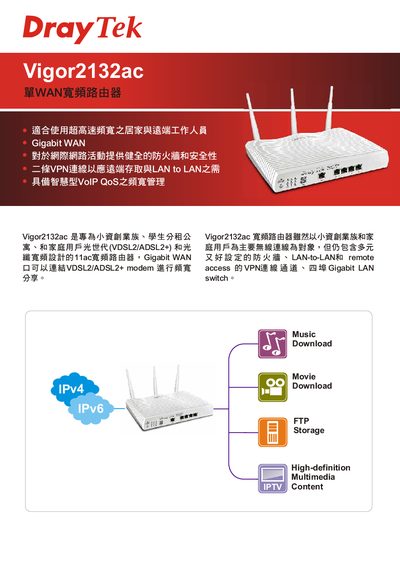
Draytek Vigor2132ac Wireless Broadband Router Product Specification
The Vigor2132ac is a wireless broadband router designed for small‑business entrepreneurs, student shared apartments and home users. It supports VDSL2/ADSL2+ and fiber broadband, providing high‑speed connectivity for remote work and home networking.
Key features include a Gigabit WAN port, four Gigabit LAN ports, dual‑VPN tunnels, VoIP QoS, comprehensive firewall and content filtering, IEEE 802.11ac Wi‑Fi, USB printing/NAS capability, and extensive management options such as web UI, CLI, SNMP and TR‑069. This manual is written in Chinese.
Covers: WAN Interface · LAN Switch · VPN Functionality · Security Features · Wireless Connectivity · USB & NAS Support

DrayTek DrayTools User Manual
This manual introduces the DrayTools software suite, which provides auxiliary functions for Vigor routers such as firmware upgrading, system log collection, and Smart VPN client connectivity. It guides users through downloading the tools, selecting network interfaces, and configuring essential parameters.
Detailed sections cover the Firmware Upgrade Tool (including timeout settings and supported file types), the System Log Tool (log recording options, default ports, and storage limits), and the Smart VPN Client (VPN server settings, authentication methods, and IP configuration). This manual is written in Chinese.
Covers: Introduction · Firmware Upgrade Tool · System Log Tool · Smart VPN Client · Configuration
DrayTek Vigor2104/Vigor2104p Quick Installation Guide
This guide provides safety instructions, hardware installation steps, and basic configuration procedures for the DrayTek Vigor2104/Vigor2104p router. It explains how to connect the WAN and LAN ports, power the device, and verify the system LEDs.
The document also covers setting the system administrator password, using the web interface at the default IP address (192.168.1.1), performing a factory reset, and troubleshooting common issues such as connection failures and ISP settings. This manual is written in Chinese.
Covers: Safety Instructions · Package Contents · Panel Description · Hardware Installation · Basic Settings · System Administrator Password
DrayTek Vigor2950 Dual WAN Firewall User Manual
This manual covers the Vigor2950 series dual‑WAN firewall router from DrayTek. It includes safety notices, hardware installation steps, web‑interface configuration, and detailed explanations of WAN, LAN, VPN, QoS, and firewall features.
The document also provides system maintenance procedures, self‑diagnostic tools, firmware upgrade instructions, and a comprehensive troubleshooting section to help users resolve common issues. This manual is written in Chinese.
Covers: 前言 · 安裝您的路由器 · 基本設定 · 進階設定 · 防火牆設定 · VPN 與遠端存取
Latest DrayTek manuals
Draytek Vigor2132ac Wireless Broadband Router Product Specification
Product Leaflet 2 pages · 189 KB · ZHThe Draytek Vigor2132ac wireless broadband router offers Gigabit WAN, dual VPN, VoIP QoS, multiple security features, and extensive LAN/USB interfaces.
DrayTek DrayTools User Manual
User Manual 17 pages · 1.2 MB · ZHThe DrayTek DrayTools User Manual explains how to use the firmware upgrade, system log, and Smart VPN client tools for Vigor routers.
DrayTek Vigor2104/Vigor2104p Quick Installation Guide
Quick Start Guide 23 pages · 717 KB · ZHQuick guide for installing and configuring the DrayTek Vigor2104/Vigor2104p broadband IP sharing router.
DrayTek Vigor2950 Dual WAN Firewall User Manual
User Manual 183 pages · 3.7 MB · ZHThe DrayTek Vigor2950 dual‑WAN firewall user manual provides installation, configuration, advanced settings and troubleshooting guidance.
Which document do I need?
User Manual
Day-to-day operation, settings and troubleshooting. Start here if the product is already set up.
Quick Start Guide
The shortest path to a working setup, usually only a few pages.
Questions answered in DrayTek manuals
How many VPN connections does the Vigor2132ac support?
It supports two VPN tunnels, including PPTP/IPSec LAN‑to‑LAN and L2TP over IPSec.
From: Draytek Vigor2132ac Wireless Broadband Router Product Specification
What type of WAN port is provided?
The router includes a single Gigabit Ethernet WAN port (10/100/1000Base‑TX).
From: Draytek Vigor2132ac Wireless Broadband Router Product Specification
How can I increase the timeout for a firmware upgrade?
You can increase the timeout value, for example to 20 seconds, if the router does not respond within the default time.
What firmware file types are supported by the upgrade tool?
The tool supports ".all" files, which keep the router’s settings, and ".rst" files, which reset the router to factory defaults after upgrade.
What is the default IP address for the web management interface?
The default address is http://192.168.1.1 (alternatively http://192.168.2.1).
What are the default administrator login credentials?
Username is "admin" and the password is blank.