
Key facts
- Manuals
- 7
- Languages
- ZH · EN
- Last added
- 2026-09-30
Featured AVR manuals
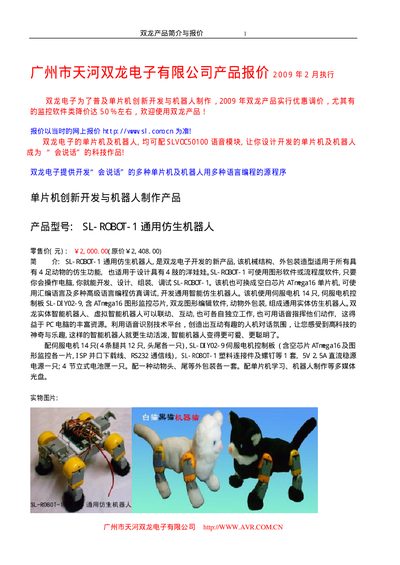
AVR Robot Products Product Leaflet
The document presents a range of AVR robot products, including the SL‑ROBOT series (1‑5), the SL‑3010 platform and various DIY kits (SL‑DIY02‑1,‑2,‑3,‑6). Each entry shows a brief description, price in GBP and key technical data such as power requirements and microcontroller type.
Additional sections provide component pricing, part numbers and ordering information, as well as contact details for AVR China. The leaflet is organized by product family and includes pricing tables and brief technical notes. This manual is written in Chinese.
Covers: SL‑ROBOT Series · DIY Kit Series · SL‑3010 Platform · Pricing and Ordering · Technical Specifications · Contact Information
Atmel AVR STK500 User Guide
The AVR STK500 Flash Microcontroller Starter Kit is a complete development system for Atmel AVR microcontrollers. It includes a control board, power supply, RS‑232 interface, sockets for various AVR devices, LEDs, push‑buttons, and expansion connectors.
The guide covers unpacking, system requirements, quick start wiring, detailed hardware description, installation of AVR Studio, step‑by‑step programming procedures, troubleshooting tips, technical support information, and example applications using the kit’s LEDs and switches.
Covers: Introduction · Getting Started · Hardware Description · Installing AVR Studio · Using AVR Studio · In-System Programming of an External Target System
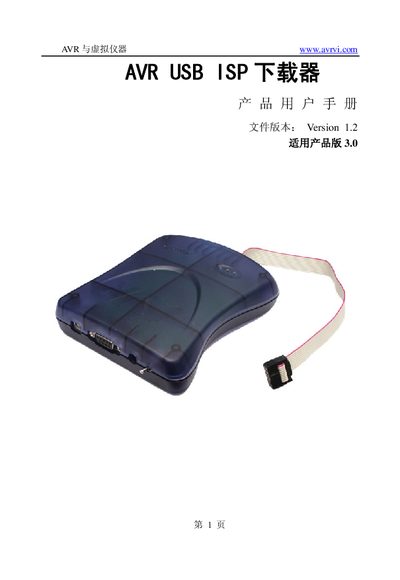
AVR USB ISP Downloader User Manual
The AVR USB ISP Downloader is a low‑cost, USB‑connected in‑system programmer for AVR 8‑bit microcontrollers. It draws power directly from the target board and works with voltages from 2.7 V to 5.5 V.
This manual covers the hardware features, supported chip families, package contents, system requirements, driver installation, usage procedures, interface description, firmware upgrade methods, precautions, and customer service information. This manual is written in Chinese.
Covers: Introduction · Features · Supported Chips · Package Contents · System Requirements · Driver Installation
AVR JTAG ICE User Manual
This manual introduces the AVR JTAG ICE hardware debugger, its JTAG interface compliance with IEEE1149.1, and how it works with AVR microcontrollers. It covers installation of AVR Studio, firmware updates, and the differences between JTAG ICE and on‑chip debugging (OCD).\n\nDetailed sections describe power requirements, pin connections, breakpoint types, register visibility, and supported devices. The document also provides version history and troubleshooting tips for common connection problems. This manual is written in Chinese.
Covers: Introduction · Connection and Power · Debugging Modes · Breakpoints · Register Visibility · Supported AVR Devices
Latest AVR manuals
AVR Robot Products Product Leaflet
Product Leaflet 43 pages · 2.6 MB · ZHA Chinese-language product leaflet that lists AVR robot kits, DIY kits, accessories, prices and basic specifications.
AVR JTAGICE mkII On-chip Debug DEBUG AVR APPLICATIONS USING System
Atmel AVR STK500 User Guide
User Manual 61 pages · 2.3 MB · ENThe Atmel AVR STK500 User Guide provides setup, hardware description, programming instructions, and troubleshooting for the AVR Starter Kit.
AVR USB ISP Downloader User Manual
User Manual 10 pages · 285 KB · ZHThe AVR USB ISP Downloader User Manual provides setup, driver installation, programming instructions, firmware upgrade, and safety notes for the device.
AVR JTAG ICE User Manual
User Manual 39 pages · 3.1 MB · ZHThe AVR JTAG ICE user manual explains connection, power, debugging modes and supported AVR devices.
MCUzone AVR mkII Lite User Manual
User Manual 25 pages · 1 MB · ZHThe MCUzone AVR mkII Lite User Manual explains setup, debugWIRE and ISP usage, firmware upgrade, and troubleshooting for supported AVR devices.
AVR JTAG ICE User Manual
User Manual 27 pages · 752 KB · ZHThe AVR JTAG ICE User Manual provides setup, connection, and programming instructions for the low‑cost AVR JTAG debugger.
Which document do I need?
User Manual
Day-to-day operation, settings and troubleshooting. Start here if the product is already set up.
Questions answered in AVR manuals
What microcontroller is used in the SL‑ROBOT‑1 kit?
The SL‑ROBOT‑1 kit uses an ATmega16 microcontroller.
How much does the SL‑ROBOT‑3 kit cost?
The SL‑ROBOT‑3 kit is priced at £1,800.00 (list price £2,008.00).
How do I program a target AVR device with the STK500?
In AVR Studio select “STK500” from the Tools menu, choose the target device, load the Intel‑hex file, then press the Erase button followed by the Program button.
What does the green status LED indicate?
The green LED shows that the target VCC is present and the board is powered.
How do I install the USB driver for the AVR ISP?
Run the driver program from the supplied CD or download it from the website, then follow the on‑screen steps to complete installation.
What voltage range does the AVR USB ISP operate in?
It operates between 2.7 V and 5.5 V.