
Key facts
- Manuals
- 8
- Categories
- 1
- Languages
- EN · ZH
- Last added
- 2012-06-05
Featured ARM manuals
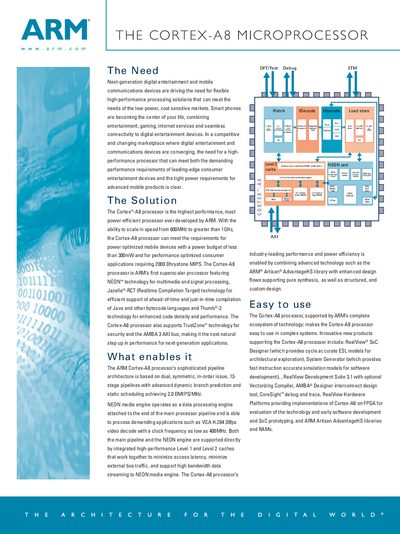
ARM Cortex-A8 Microprocessor Manual
The document describes the need for a high‑performance, low‑power processor in modern mobile and entertainment devices and presents the Cortex‑A8 as a solution. It highlights the processor’s ability to scale from 600 MHz to over 1 GHz while staying under a 300 mW power budget, making it suitable for both power‑sensitive and performance‑critical applications.
Key architectural features are detailed, including a superscalar pipeline, NEON media engine, Thumb‑2, Jazelle‑RCT, TrustZone, and an AMBA 3 AXI bus. Cache configurations, dynamic branch prediction, and optional L2 cache sizes are also covered, emphasizing the balance of performance and power efficiency.
Covers: The Need · The Solution · What enables it · Features · Benefits
ARM CortexTM-A8 MID Manual
The ARM Cortex‑A8 MID is an 8‑inch Android 2.2 tablet built on an ARM Cortex‑A8 architecture with a Samsung S5PV210 1.2 GHz CPU, 512 MB‑1 GB DDR2 RAM, and up to 32 GB flash storage. It features a resistive touchscreen with dual‑point support, 2‑MP camera, HDMI output, Wi‑Fi, optional 3G, GPS, and a 7.4 V 2600 mAh battery lasting about six hours.
This manual covers first‑time charging, power‑on procedures, basic navigation, Wi‑Fi and network configuration, USB and external device usage, software installation, touch‑screen calibration, system upgrades, and troubleshooting of common issues such as power, storage, audio, and connectivity problems. This manual is written in Chinese.
Covers: 基本配置 · 硬件规格 · 首次使用 · 基本操作 · 按键定义 · 网络设置
ARM Eclipse Plug-in for RealView Development Suite Version 1.0 User Guide
The User Guide provides information for developers who use the Eclipse IDE to manage ARM‑targeted projects with the RealView Development Suite plug‑in. It covers installation, project creation, build configuration, debugging, and importing existing CodeWarrior projects.
The document is organized into chapters on getting started, creating ARM projects, project types, build settings, Thumb interworking images, RealView Debugger usage, and CodeWarrior project import, with references to additional ARM publications and online resources.
Covers: Preface · Introduction · Creating an ARM Project · ARM Project Types · Configuring the Build Settings · Creating an ARM Thumb Interworking Image
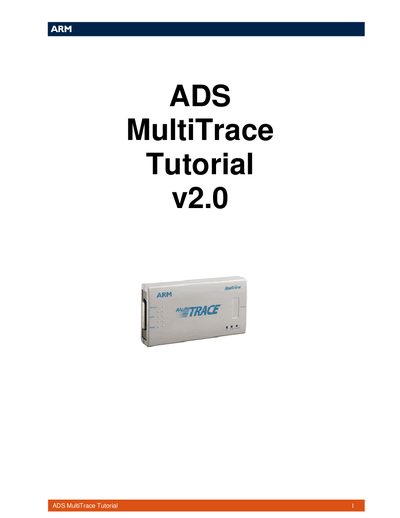
ARM MultiTrace Tutorial Manual
The guide provides a basic introduction to the ARM MultiTrace tools and step‑by‑step instructions for initial setup and use. It is split into two main sections: setting up the MultiTrace unit and using it with ADS for trace capture.
Section 1 explains hardware connections, Ethernet configuration, and how to identify the correct unit. Section 2 shows how to configure the target, start tracing, and view captured data in the AXD debugger.
Covers: Introduction · Icon Conventions · Setting up the MultiTrace Unit · Configuring the Ethernet Connection · Using MultiTrace with ADS · Configuring the Target
Latest ARM manuals
ARM programmer daughter board EB185-00-1 Technical datasheet
This document describes the features and characteristics of the E-blocks ARM programmer and daughter board.
ARM Cortex-A8 Microprocessor Manual
Product Leaflet 2 pages · 77 KB · ENThe ARM Cortex-A8 Microprocessor Manual provides an overview of features, architecture, and performance specifications.
ARM CortexTM-A8 MID Manual
User Manual 41 pages · 1.5 MB · ZHThe Philips 701/702/703/705/706 ARM Cortex‑A8 MID user manual provides setup, hardware specs, and operation instructions for the Android‑based handheld device.
ARM Eclipse Plug-in for RealView Development Suite Version 1.0 User Guide
User Manual 52 pages · 527 KB · ENThis ARM guide explains how to install, configure, and use the Eclipse Plug-in for RealView Development Suite version 1.0.
ARM MultiTrace Tutorial Manual
User Manual 22 pages · 287 KB · ENThis tutorial introduces the ARM MultiTrace tools, covering setup, Ethernet configuration, and basic trace capture using ADS.
ARM RealView Debugger 1.6.1 user manual
ARM RealView Development Suite 4.0 User Guide
User Manual 102 pages · ZHThe ARM RealView Development Suite 4.0 User Guide provides an introduction, setup steps, and reference information for developers.
ARM Workbench IDE 4.0 User Manual
User Manual 140 pages · 3.8 MB · ZHThe ARM Workbench IDE 4.0 User Manual explains how to install, configure, and use the IDE on Windows or Unix.
Which document do I need?
User Manual
Day-to-day operation, settings and troubleshooting. Start here if the product is already set up.
Questions answered in ARM manuals
What is the maximum operating frequency of the Cortex‑A8?
The processor can operate at speeds greater than 1 GHz.
What is the typical power consumption of the Cortex‑A8?
It can run on a power budget of less than 300 mW.
How should I charge the device before first use?
Connect the charger to the DC port and charge until the indicator changes from red to green, then press and hold the power button to turn it on.
How can I calibrate the touchscreen if it becomes inaccurate?
Long‑press the Menu key until the calibration screen appears, then follow the on‑screen prompts to tap the calibration points.
Which operating systems are supported by the plug‑in?
The plug‑in runs on Microsoft Windows (2000, XP), Red Hat Linux, and Sun Solaris (versions 9 and 10).
From: ARM Eclipse Plug-in for RealView Development Suite Version 1.0 User Guide
What IDE is required to use this plug‑in?
The plug‑in is designed for the Eclipse Integrated Development Environment (IDE).
From: ARM Eclipse Plug-in for RealView Development Suite Version 1.0 User Guide