
Key facts
- Manuals
- 5
- Languages
- EN · ZH
- Last added
- 2026-09-29
Featured abi manuals

Abi MK2 Refrigerated Cot Operation & Maintenance Manual
This manual describes the general information, handling, transport, installation, and service instructions for the Abi MK2 Refrigerated Cot. It explains start‑up and shut‑down procedures, safety notes, and the required supervision by a qualified bereavement midwife.
Technical data such as refrigeration specifications, electrical requirements, and controller settings are listed, along with a detailed spare‑parts list and cleaning guidelines to keep the cot operating within the required temperature range of –1 °C to +4 °C.
Covers: General Information · User Guide · Handling and Transport · Installation · Service Instructions · Case Cleaning
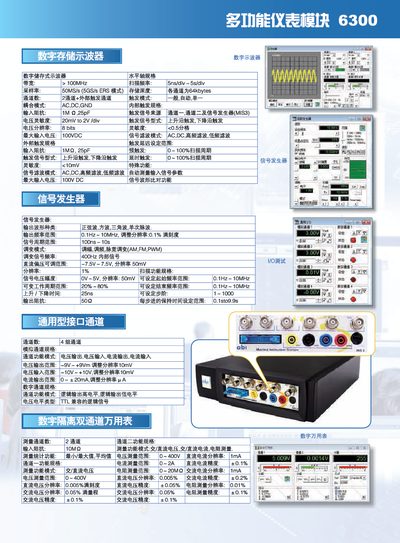
ABI 6300 Multi‑Function Meter Module User Manual
The ABI 6300 is a multifunction instrument that combines a digital storage oscilloscope, multimeter, signal generator, and adjustable power supply. It offers two main channels with a bandwidth greater than 100 MHz, a sampling rate of 50 MSa/s, and input impedance of 1 MΩ · 25 pF.
The manual details channel specifications, measurement ranges (voltage up to ±400 V, current up to 20 mA), and special functions such as automatic measurement, waveform comparison, and various signal generation modes. It also describes optional digital IC test modules and provides contact information for the Chinese distributor. This manual is written in Chinese.
Covers: Digital Storage Oscilloscope · Channel Specifications · Signal Generator · Adjustable Power Supply · Multimeter Functions · Digital IC Test Modules
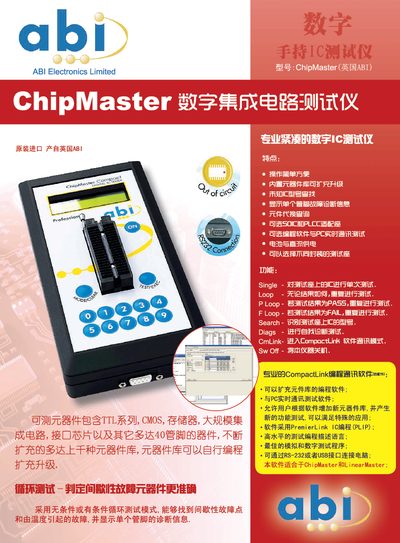
ABI ChipMaster Hand‑held IC Tester User Manual
The ABI ChipMaster is a portable digital IC tester that offers simple operation, built‑in component libraries and the ability to expand the library via programming software. It supports multiple test sockets (SOIC, PLCC, etc.) and can be powered by battery or AC supply.
The device provides several test modes such as Single, Loop, P‑Loop and F‑Loop, and includes diagnostic functions like self‑test and pin‑by‑pin fault display. Communication with a PC is possible through RS‑232 or USB using the CompactLink software, allowing real‑time testing and library updates. This manual is written in Chinese.
Covers: Features · Test Modes · Diagnostics · Software Interface · Power Supply · Test Sockets
Latest abi manuals
Abi MK2 Refrigerated Cot Operation & Maintenance Manual
Service Manual 9 pages · 1.5 MB · ENThe Abi MK2 Refrigerated Cot Operation & Maintenance Manual provides setup, cleaning, service, and technical specifications for safe use.
ABI SENTRY Counterfeit IC Detector
Sentry is a simple yet powerful instrument designed to ensure that your components are what they claim to be !
ABI Multiple programming problems We have THE solution
The ABI JTAGMaster is a fully integrated and powerful solution for the in-system programming of Programmable Logic Devices (PLDs) and memory devices. Standalone programming is also supported by the JTAGMaster for serial EEPROMs. With direct applications in Electronics Production (End-of-Line) and Research & Development, the JTAGMaster is the only tool required to cover all your programming needs.
ABI 6300 Multi‑Function Meter Module User Manual
User Manual 2 pages · 1.4 MB · ZHThe ABI 6300 Multi‑Function Meter Module manual provides specifications, measurement functions, and operating instructions.
ABI ChipMaster Hand‑held IC Tester User Manual
User Manual 2 pages · 1.2 MB · ZHThe ABI ChipMaster manual explains features, test modes, software communication and power options for the hand‑held IC tester.
Which document do I need?
Service Manual
Disassembly, diagnostics and part numbers, for repair.
User Manual
Day-to-day operation, settings and troubleshooting. Start here if the product is already set up.
Questions answered in abi manuals
What is the bandwidth of the ABI 6300?
The instrument has a bandwidth greater than 100 MHz.
What is the maximum input voltage the device can handle?
It can accept up to 100 VDC on its inputs.
How does the ChipMaster identify an unknown IC model?
Use the Search function, which recognises the IC model on the test socket.
Can the component library be expanded?
Yes, the programming software allows users to add new components to the library.