
Key facts
- Manuals
- 49
- Models
- 5
- Categories
- 2
- Languages
- EN
- Last added
- 2026-10-03
Vizio models by category
Featured Vizio manuals
VIZIO VX37L HDTV User Manual
This manual introduces the VIZIO VX37L high‑definition LCD television, covering safety precautions, registration, warranty options, and basic handling. It explains how to unpack, protect the glass surface, and register the product for extended service plans.
Installation guidance includes power requirements, wall‑mount preparation, recommended ventilation, and detailed connection diagrams for antennas, HDMI, component, and audio cables. The later chapters describe on‑screen menu navigation, picture and audio adjustments, remote‑control programming, and troubleshooting steps.
Covers: Basic Controls and Connections · Connecting Equipment · Setting Up to Watch Television · Advanced Adjustment of HDTV · Maintenance and Troubleshooting · Miscellaneous Information
VIZIO SV320XVT & SV370XVT User Manual
This manual covers important safety guidelines, antenna grounding, and DTV transition information for the VIZIO SV320XVT and SV370XVT high‑definition televisions. It also details unpacking, stand assembly, wall‑mounting, and basic operation of the TV and its remote control.
Further sections explain video input options, media port usage, picture and audio settings, programming the universal remote, maintenance, troubleshooting, and a full specification table for both models.
Covers: Important Safety Instructions · Television Antenna Connection Protection · TV Setup and Stand Assembly · Basic Controls and Connections · Using the Media Port · Programming the VIZIO Universal Remote Control
VIZIO VBR231 Blu-ray DVD Player User Manual
This manual guides owners of the VIZIO VBR231 Blu‑ray DVD Player through safe installation, basic controls, and connection options. It includes important safety instructions, packaging details, and recommendations for placement and ventilation.
The guide also covers features such as dual‑band 802.11n Wi‑Fi, HDMI video/audio output, supported disc formats, remote‑control usage, network setup, and troubleshooting for services like Netflix, Vudu, and Pandora. Specifications, warranty information, and a quick reference index are provided at the end.
Covers: Important Safety Instructions · Opening the Package · Features & Formats · Basic Controls and Connections · Connecting Equipment · Using Netflix
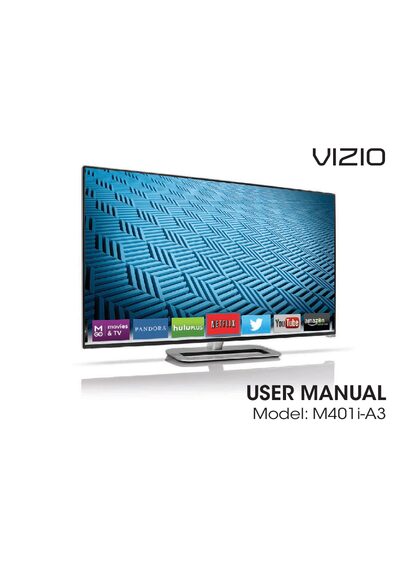
VIZIO M401i-A3 HDTV User Manual
This manual guides you through installing the VIZIO M401i-A3 HDTV, including unpacking, stand assembly, and wall‑mounting. It also covers connecting antennas, cables, and network setup.
Further sections explain how to use the on‑screen menu, adjust picture and audio settings, configure parental controls, and troubleshoot common issues. Legal, warranty, and technical specifications are included at the end of the document.
Covers: Installing the TV · Controls and Connections · Network Setup · Picture Settings · Audio Settings · Parental Controls
Latest Vizio manuals
VIZIO VX37L HDTV User Manual
User Manual 76 pages · 2.6 MB · ENThe VIZIO VX37L HDTV User Manual provides setup, safety, connection, and operation instructions for the 37‑inch high‑definition TV.
VIZIO SV320XVT & SV370XVT User Manual
User Manual 85 pages · 6.1 MB · ENThe VIZIO SV320XVT and SV370XVT HDTV user manual provides safety instructions, setup steps, remote control programming, and technical specifications.
VIZIO VBR231 Blu-ray DVD Player User Manual
User Manual 54 pages · 2.9 MB · ENThe VIZIO VBR231 Blu‑ray DVD Player User Manual provides setup, safety, operation, network, and troubleshooting instructions.
VIZIO M401i-A3 HDTV User Manual
User Manual 80 pages · 4.1 MB · ENThe VIZIO M401i-A3 HDTV User Manual provides installation, setup, operation, and safety instructions for the TV.
VIZIO XVT3D650SV USER MANUAL
This is a VIZIO XVT3D650SV user manual, introducing the features and characteristics of the product.
VIZIO VM190XVT/VM230XVT User Manua
This document is the user manual for VIZIO VM190XVT/VM230XVT. It provides instructions on adjusting and using VIZIO HDTV, recommends registering the product, and purchasing extended warranty service.
VIZIO VF552XVT HDTV User Manual
This document is an introduction to the VIZIO VF552XVT HDTV user manual. The manual provides instructions on how to adjust and use the VIZIO HDTV, as well as registration and warranty information.
VIZIO VF551XVT User Manual
This is the user manual for VIZIO VF551XVT television
VIZIO VF550XVT1A User Manual
This document is the user manual for VIZIO VF550XVT1A High Definition LCD Television, providing instructions for use, adjustment, as well as registration and warranty information.
VIZIO SV472XVT HDTV User Manual
Provide VIZIO SV472XVT HDTV user manual, which introduces the features and usage methods of the product.
VIZIO SV421XVT SV471XVT User Manual
This manual describes how to use the VIZIO SV421XVT or SV471XVT television.
VIZIO SV422XVT HDTV User Manual
This manual is for VIZIO SV422XVT HDTV product user manual, which introduces the product's various functions and features
VIZIO SV320XVT/SV370XVT User Manual
User manual, introduces the use of TV sets, including the use of remote control, connection method, image setting, etc.
VIZIO SV320XVT SV370XVT User Manual
This is the VIZIO SV320XVT & SV370XVT user manual, which introduces the use and precautions of this product
VIZIO M470NV/M550NV User Manual
This is a user manual for VIZIO M470NV/M550NV television, introducing the features and usage of the TV.
Which document do I need?
User Manual
Day-to-day operation, settings and troubleshooting. Start here if the product is already set up.
Questions answered in Vizio manuals
How should I clean the VIZIO VX37L HDTV?
Unplug the TV and use a damp cloth; do not use liquid, spray cleaners, or abrasive materials.
What power source does the VIZIO VX37L require?
The TV must be connected to a grounded three‑pronged outlet using the supplied power cord.
What distance should be kept between the HDTV and a heat source?
A distance of at least 3 feet should be maintained between the HDTV and any heat source such as a radiator, heater, or oven.
What is the typical brightness of the display?
The display brightness is typically 500 nits.
What is the effective range of the remote control?
The remote works up to about 23 feet (7 m) from the front of the remote, within a 30° left/right/up/down cone.