
Key facts
- Manuals
- 2
- Languages
- ZH · EN
- Last added
- 2011-12-10
Featured SWAN manuals
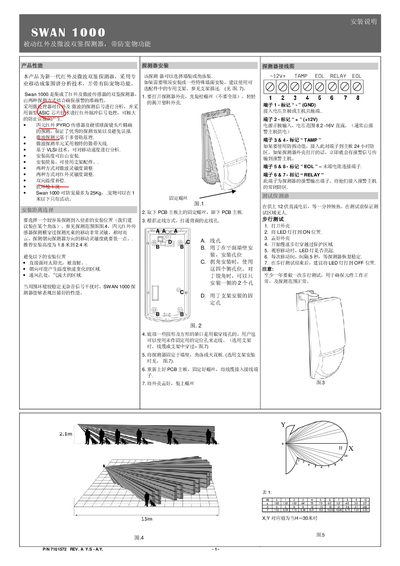
SWAN 1000 Passive Infrared and Microwave Dual-Technology Detector Installation Manual
The SWAN 1000 is a passive infrared and microwave dual‑technology detector that combines four‑element IR sensors and a Doppler‑based microwave unit to provide reliable intrusion detection while offering a pet‑immunity function. It includes adjustable sensitivity for both IR and microwave channels, temperature compensation, and a tamper‑switch.
The manual explains how to mount the detector on walls, corners or ceilings, connect the power and alarm wiring, configure the LED indicators, sensitivity switches, pet‑immunity setting, and alarm mode (AND/OR). It also describes the walk‑test procedure to verify proper operation after installation. This manual is written in Chinese.
Covers: Product Overview · Installation · Mounting Options · Wiring Diagram · Detector Settings · Technical Parameters
Swan SWAN NC Simulation Software User Manual
The SWAN NC Simulation Software, developed by Nanjing Swan Software Technology, offers a virtual CNC environment that mimics real machines such as FANUC, SINUMERIK, Mitsubishi and others. It is intended for educational use and low‑cost practical training on milling, lathe and machining centre operations.
The manual is organized into chapters covering a summary of the software, startup interfaces, toolbar setup, file management, and detailed operation procedures for various SINUMERIK models (802S/c, 802D, 810/840, 801, 802Se). It also includes programming guides for G‑codes, cycles, arithmetic parameters and subroutines, plus instructions for network login and teacher‑computer configuration.
Covers: Summary of SWAN NC Simulation Software · Operations of SWANSC NC Simulation Software · SINUMERIK 802S/c Operation · SINUMERIK 802D Operation · SINUMERIK 810/840 Operation · SINUMERIK 801 Operation
Latest SWAN manuals
SWAN 1000 Passive Infrared and Microwave Dual-Technology Detector Installation Manual
Installation Guide 2 pages · 203 KB · ZHInstallation guide for the SWAN 1000 dual infrared and microwave detector with pet immunity, covering mounting, wiring, settings, and testing.
Swan SWAN NC Simulation Software User Manual
User Manual 251 pages · 3.6 MB · ENThe Swan SWAN NC Simulation Software User Manual provides an overview, functions, and detailed operation instructions for SINUMERIK CNC systems.
Which document do I need?
Installation Guide
Mounting, wiring and first power-up. Read it before the hardware goes in.
User Manual
Day-to-day operation, settings and troubleshooting. Start here if the product is already set up.
Questions answered in SWAN manuals
How do I set the pet‑immunity function?
Use the PET switch: set it to ON to protect pets up to 15 kg, or set it to OFF to protect pets up to 25 kg.
From: SWAN 1000 Passive Infrared and Microwave Dual-Technology Detector Installation Manual
How can I adjust the detection distance?
Turn the MW knob; the middle position gives a 15 m range, while the minimum position reduces the range to 7 m.
From: SWAN 1000 Passive Infrared and Microwave Dual-Technology Detector Installation Manual
Which CNC machine brands are supported by the SWAN NC Simulation Software?
The software supports FANUC, SINUMERIK, Mitsubishi, GSK, HNK, KND and DASEN CNC systems.
What programming codes are supported by the software?
It supports ISO‑1056 preparatory G‑codes, secondary M‑codes, system‑defined codes and canned cycles.