
Key facts
- Manuals
- 11
- Categories
- 3
- Languages
- ZH
- Last added
- 2012-03-28
Featured SVA manuals
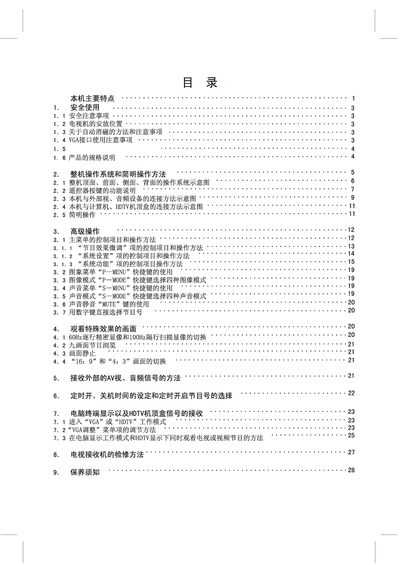
SVA HD3436FZ Color Television User Manual
This manual covers safety precautions, installation requirements and proper placement of the SVA HD3436FZ TV, including power source specifications and demagnetisation procedures. It also explains the front‑panel controls, remote‑control functions and how to switch display modes such as 60 Hz progressive and 100 Hz interlaced.
Detailed sections describe the rear‑panel video and audio inputs (VGA, AV, S‑VHS), the supported resolutions (640×480, 800×600, 1920×1080), and the full technical specifications such as screen size, power consumption and dimensions. Troubleshooting tips and maintenance instructions are provided at the end of the document. This manual is written in Chinese.
Covers: Safety Instructions · Installation Guide · Operation Overview · Remote Control Functions · Video & Audio Connections · Specifications
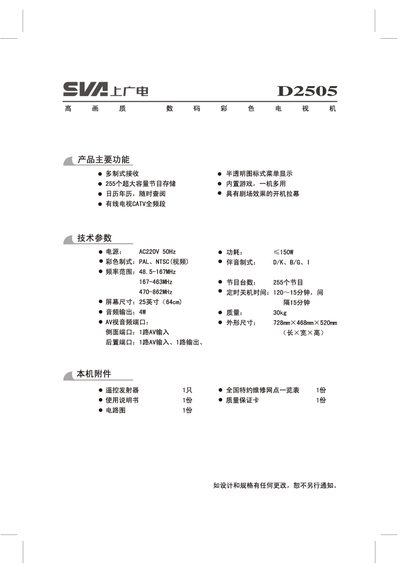
SVA D2505 Digital Color Television User Manual
This manual explains how to connect the TV to antennas and external devices, install and use the remote control, and configure picture and sound settings. It also covers safety precautions, proper installation location, and routine maintenance.
Detailed sections guide users through automatic and manual channel searching, image adjustment, system menus, and troubleshooting common issues such as signal loss or remote‑control problems. This manual is written in Chinese.
Covers: Product Features · Safety Precautions · Remote Control Battery Installation · Remote Control Button Functions · Connecting External Devices · Antenna Connection
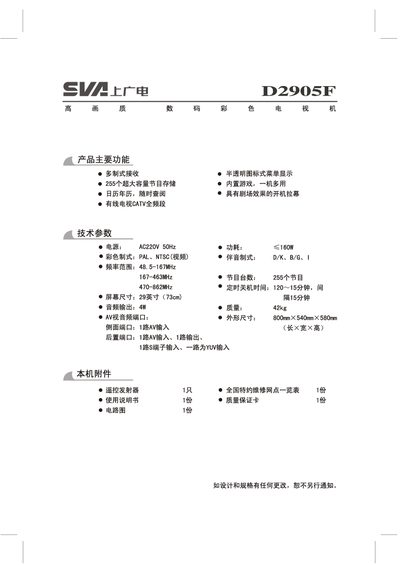
SVA D2905F digital color Television Manual
This manual provides safety precautions, installation guidelines, and connection instructions for the SVA ID290SF digital color television. It explains how to connect antennas, external audio/video devices, and how to set up the remote control.
Detailed operating instructions cover power on/off, automatic and manual channel tuning, image and system menu adjustments, as well as troubleshooting steps for common issues such as signal loss or remote‑control failures. This manual is written in Chinese.
Covers: Product Features · Safety Precautions · Connection to External Devices · Remote Control Battery Installation · Remote Control Button Functions · Basic Operation
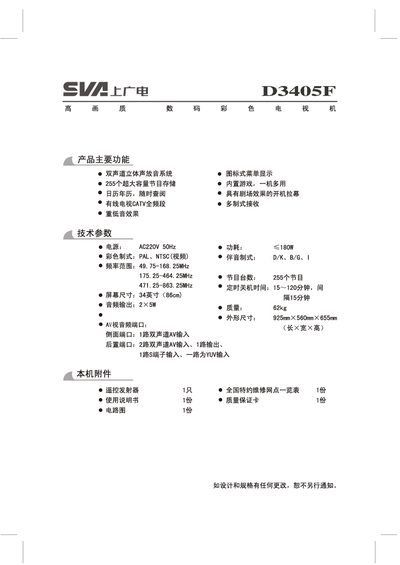
SVA D3405F Digital Color Television User Manual
This manual covers the main functions of the SVA D3405F digital color television, including dual‑channel stereo sound, 255 program storage, built‑in games, and multi‑standard reception (PAL/NTSC). Technical specifications such as AC220V 50 Hz power, 180 W consumption, 34‑inch screen, and audio output details are listed.
Safety precautions, proper placement, antenna connection, remote‑control battery installation, channel searching (automatic and manual), picture adjustments, and troubleshooting steps are described in detail to help users set up and maintain the TV safely and efficiently. This manual is written in Chinese.
Covers: 产品主要功能 · 技术参数 · 本机与其它外部设备的连接 · 安全注意事项 · 产品特点 · 电视机的安放位置
Latest SVA manuals
SVA CTF-501Fax Manual
This document is a user manual of CTF-501 fax machine and cordless phone, introducing the features of automatic dialing, storage capacity, transmission time, resolution, automatic document feeder, recording system, display screen, etc.
SVA HD3436FZ Color Television User Manual
User Manual 29 pages · 12.7 MB · ZHThe SVA HD3436FZ color television user manual provides safety instructions, operation guide, connection details, and specifications.
SVA D2505 Digital Color Television User Manual
User Manual 13 pages · 7.9 MB · ZHThe SVA D2505 user manual provides setup, operation, safety, and troubleshooting instructions for the 25‑inch digital color TV.
SVA D2905F digital color Television Manual
User Manual 13 pages · 7.9 MB · ZHUser manual for the SVA ID290SF digital color TV, covering safety, setup, remote control, and troubleshooting.
SVA D3405F Digital Color Television User Manual
User Manual 13 pages · 8.5 MB · ZHThe SVA D3405F user manual provides safety guidelines, installation steps, remote control instructions, and operating features for the digital color TV.
SVA Multimedia Color Television User Manual
User Manual 17 pages · 10.1 MB · ZHUser manual for the SVA multimedia color television covering safety, setup, remote control and maintenance.
SVA Color Television User Manual
User Manual 16 pages · 8.7 MB · ZHUser manual for a color television covering safety, installation, remote control, operation, and troubleshooting.
SVA Television User Manual
User Manual 12 pages · 9.3 MB · ZHThe SVA television user manual provides safety guidelines, installation steps, remote‑control operation, picture and sound settings, and maintenance…
Philips 3.1.1 Television User Manual
User Manual 10 pages · 6.5 MB · ZHThe Philips 3.1.1 television user manual explains operation, input connections, remote control functions, and menu settings.
SVA Multimedia Color Television User Manual
User Manual 17 pages · 6.5 MB · ZHThe SVA multimedia color TV user manual provides safety guidelines, operation instructions, connection diagrams, and specifications for the television set.
SVA HD5009TI Plasma TV User Manual
User Manual 32 pages · 2.2 MB · ZHThe SVA HD5009TI plasma TV user manual provides safety, installation, connection and operation instructions for the PDP display.
Which document do I need?
User Manual
Day-to-day operation, settings and troubleshooting. Start here if the product is already set up.
Questions answered in SVA manuals
What power source should be used with the SVA HD3436FZ TV?
The TV must be connected to a 220 V, 50 Hz AC power source; other power types must not be used.
Which remote button switches between 60 Hz progressive and 100 Hz interlaced modes?
Press the remote’s “60/100 Hz” button to toggle between the two display modes.
What voltage and frequency should be used for the TV?
The television is designed for a 220 V, 50 Hz AC power source.
How many preset channels can the TV store?
It can store up to 200 different television programs.
How can I connect external audio/video devices to the TV?
Use the front or rear audio/video ports as shown in the diagrams; follow the connection illustrations for each device.
How do I connect the antenna to the TV?
Insert the antenna plug into the antenna input socket on the rear panel of the TV.