
Key facts
- Manuals
- 11
- Languages
- ZH · EN
- Last added
- 2012-07-11
Featured EASY manuals
Easy EP-848S Phone Administrator Manual
This manual begins with important safety notices, reminding users to keep the phone dry, avoid moisture, use correct cables, and never open the unit themselves. It also lists the packaging contents, including the phone unit, two Ethernet cables, and a 24 V power adapter.
The guide then describes the hardware (ARM7 processor, DSP voice co‑processor, dual 10/100 Base‑T Ethernet ports, LED indicators) and software (Linux OS, web/Telnet configuration, PPPoE, DHCP, NAT). Detailed instructions cover installation, web‑based configuration, super‑terminal setup, network settings, broadband dialing, DHCP service, and online firmware upgrades. Appendices explain how to view the network card MAC address on Windows. This manual is written in Chinese.
Covers: 重要提示 · 概论 · 硬件配置 · 软件配置 · 包装清单 · 面板说明
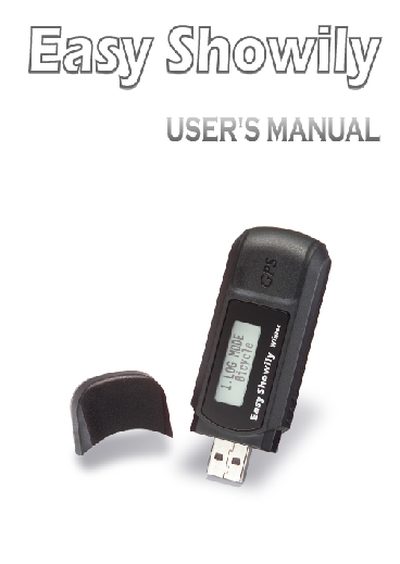
Easy Showily User Manual
Easy Showily is an auto‑show track logger equipped with an internal u‑blox GPS module, a USB interface and powered by two AAA alkaline batteries. It records position, speed and time data and can store up to 16 GPS channels with a sensitivity of -158 dBm.
The manual is organized into sections covering product introduction, features, safety notes, user guide, operation notes, access tools, application examples and troubleshooting, offering step‑by‑step instructions for powering the device, creating tracks, viewing data and downloading logs.
Covers: Product introduction · Features · Safety notes · User's guide · Operation notes · Access tool
Easy EP-838/EP-838A Manager Manual
This manual begins with important safety warnings, advising users to keep the device dry, avoid exposure to moisture, corrosive liquids, and fire hazards. It also outlines proper handling, storage, and warranty considerations.
The remainder of the guide covers hardware specifications, front‑panel functions, web‑interface setup, network configuration (including DHCP, PPPoE, and MAC address lookup), and step‑by‑step installation procedures for Windows and other operating systems. This manual is written in Chinese.
Covers: Safety Warnings · Product Overview · Hardware Configuration · Installation Procedure · Web Interface Setup · Network Settings
Easy Phone EP-848S Phone Administrator Manual
The EP-848S is a broadband IP phone that also functions as a router, supporting PPPoE dialing, DHCP services, and multiple VoIP protocols. This manual guides administrators through safe handling, hardware setup, and detailed configuration of the device.
It includes sections on product introduction, supported protocols, hardware and software specifications, packaging contents, panel descriptions, installation procedures, terminal and web configuration, default IP phone parameters, and appendices for network troubleshooting. This manual is written in Chinese.
Covers: Introduction · Product Overview · Supported Protocols · Hardware Configuration · Software Configuration · Package Contents
Latest EASY manuals
EASY TEMP pool heat pump owner's Manual
EASY TEMP pool heat pump manual, introduces the features and instructions of the product
EASY SOUND EM55200U Tiny Controller-Based Synthesizer
This document mainly introduces the embedded ultrasound talking toy feature of EM55200U and contains pending patent information
Easy set up guide for D-Link 504T
This document is the setup guide for the D-Link 504T router. It introduces the detailed steps of setting up the router, including unplugging the existing router, connecting the power supply, connecting the Ethernet cable, connecting the telephone cable, opening the browser, entering the router address, entering the username and password, setting the time, selecting the connection type, entering the account and password, setting the connection type, and restarting the router.
Easy Clicker UR3-SR3 Operating Manual
This document is the operating manual for Universal Remote Control, Inc.'s UR3-SR3. This remote control is designed to operate most Digital and Analog Cable Boxes, as well as TVs, and a VCR or DVD player. The manual includes instructions for battery installation, button functions, and programming the remote control.
Easy Clicker UR3-SR3 Operating Guide
This manual describes how to use UR3-SR3 remote control to operate most digital and analog cable boxes, TVs, and VCR or DVD players
Easy Interactive Tools Operation Guide
Easy Interactive Tools is a dedicated application software for projectors. You can use the supplied electronic pen to make electronic annotations on documents or projection screens, highlight key points and draw on the projection screen while projecting. This will make your presentations or lessons much more compelling.
easy control relay Manual
This document summarizes the features and characteristics of the Huawei MateBook X Pro 2022 laptop. The laptop features a 13.9-inch OLED display with a 90Hz refresh rate and a 2.5K screen resolution. Additionally, the laptop is powered by an Intel 12th Gen Core i7-12700H processor, as well as 16GB of LPDDR5 RAM and a 1TB PCIe 4.0 SSD. The Huawei MateBook X Pro 2022 laptop also features a 92Wh battery that can provide up to 14.2 hours of battery life.
Easy EP-848S Phone Administrator Manual
User Manual 61 pages · 5.3 MB · ZHThe Easy EP-848S Phone Administrator Manual provides safety warnings, installation steps, and configuration instructions for the broadband IP phone.
Easy Showily User Manual
User Manual 168 pages · 5.6 MB · ENThe Easy Showily user manual provides an overview, features, safety notes, operation instructions, and troubleshooting for the auto‑track GPS logger.
Easy EP-838/EP-838A Manager Manual
User Manual 64 pages · 2.2 MB · ZHThe Easy EP-838/EP-838A manager manual provides safety warnings, installation steps, and operation instructions for the Easy Phone device.
Easy Phone EP-848S Phone Administrator Manual
User Manual 61 pages · 2.2 MB · ZHThe Easy Phone EP-848S Phone Administrator Manual provides product overview, installation steps, configuration options, and network settings for administrators.
Which document do I need?
User Manual
Day-to-day operation, settings and troubleshooting. Start here if the product is already set up.
Questions answered in EASY manuals
How do I power on the Easy Showily?
Press and hold the Power button until the LCD shows the main screen and GPS acquisition starts.
From: Easy Showily User Manual
How can I download logged data from the device?
Connect the device via USB and use the provided Win_Tool software to download the log data without installing additional drivers.
From: Easy Showily User Manual
What items are included in the EP-848S package?
The package contains the EP-848S unit, two straight‑through Ethernet cables, a power adapter (AC22 0V input, AC24V 800 mA output), a serial cable, the manual, warranty card, and a CD.
How many Ethernet ports does the EP-848S have?
It provides two Ethernet ports that comply with the IEEE802.3 10BaseT standard.