
Key facts
- Manuals
- 3
- Languages
- ZH
- Last added
- 2026-10-03
Featured 萤石 manuals
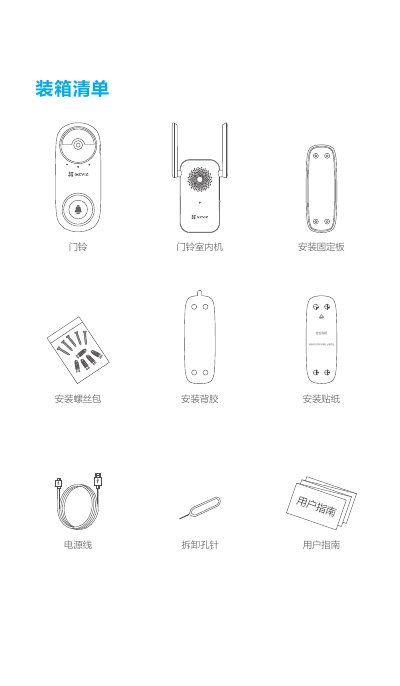
Yingshi Doorbell Installation Guide
This guide provides all the information needed to install and configure a Yingshi smart doorbell. It includes a box contents list, product overview, indicator light meanings, network configuration, mobile app setup, and recommended installation methods.
Safety and maintenance tips are also covered, such as recommended mounting height, distance to the indoor unit, power adapter specifications, and troubleshooting for connectivity issues. This manual is written in Chinese.
Covers: Box Contents · Product Overview · Indicator Lights · Network Configuration · Mobile App Setup · Installation Methods
Ying Shi Alarm User Manual
This manual explains how to add the Ying Shi alarm to compatible Ying Shi devices (such as A1C or C6T), including QR‑code and registration‑signal methods. It also covers operation of the test/hush button, interconnection of up to ten alarms, and safety precautions.
Technical specifications, fire‑protection guidelines, and warranty information are provided to help users ensure reliable performance and proper maintenance of the battery‑powered alarm in residential settings. This manual is written in Chinese.
Covers: Adding to Ying Shi Device · Precautions · Installation Limitations · Operation (Test/Hush) · Interconnection · Technical Specifications

Ezviz CS-HAL-SW63 Smart Curtain Motor User Manual
This manual provides detailed installation and wiring instructions for the Ezviz CS-HAL-SW63 smart curtain motor, including required tools, mounting steps, and connection of the neutral and line wires. It also explains how to configure the device using the Ezviz Cloud Video app and bind it to the Ezviz smart gateway.
Safety guidelines, technical specifications, and device operation details such as indicator light behavior and reset procedure are included to ensure proper and safe use of the indoor-only motor. This manual is written in Chinese.
Covers: Safety Information · Installation Instructions · Technical Specifications · Wiring and Connection · Device Configuration · Indicator Lights and Controls
Latest 萤石 manuals
Yingshi Doorbell Installation Guide
Installation Guide 13 pages · 395 KB · ZHStep‑by‑step installation guide for Yingshi doorbell models CS‑CMT‑CHIME and CS‑DB2C, covering mounting, wiring, network setup and maintenance.
Ying Shi Alarm User Manual
User Manual 2 pages · 3.8 MB · ZHInstructions for installing, configuring, testing, and maintaining the Ying Shi home fire alarm.
Ezviz CS-HAL-SW63 Smart Curtain Motor User Manual
User Manual 1 pages · 541 KB · ZHEzviz CS-HAL-SW63 smart curtain motor user manual with installation, wiring, safety and configuration instructions.
Which document do I need?
Installation Guide
Mounting, wiring and first power-up. Read it before the hardware goes in.
User Manual
Day-to-day operation, settings and troubleshooting. Start here if the product is already set up.
Questions answered in 萤石 manuals
What is the video encryption password?
The video encryption password defaults to the device’s verification code, which is the six‑character uppercase string printed on the indoor unit label.
What should I do if the doorbell disconnects during use?
Check the network; a red slow‑flashing indicator means a network issue. Also ensure the doorbell is within about 3 m of the indoor unit so the red fast‑flashing indicator does not appear.
How many alarms can be interconnected?
Up to ten alarms can be linked together; when any alarm detects smoke, all linked alarms sound the alarm.
What is the battery life of the alarm?
The built‑in battery provides up to ten years of service under normal use.
How do I reset the curtain motor?
Press the RESET hole with the card needle for about 2 seconds until the white light flashes continuously, which restores factory settings.
Which app is used to configure the motor and bind it to the gateway?
Use the “Ezviz Cloud Video” client to complete binding with the Ezviz smart gateway and add the curtain motor.