
Key facts
- Manuals
- 2
- Languages
- ZH
- Last added
- 2026-10-01
Featured Feiyu manuals
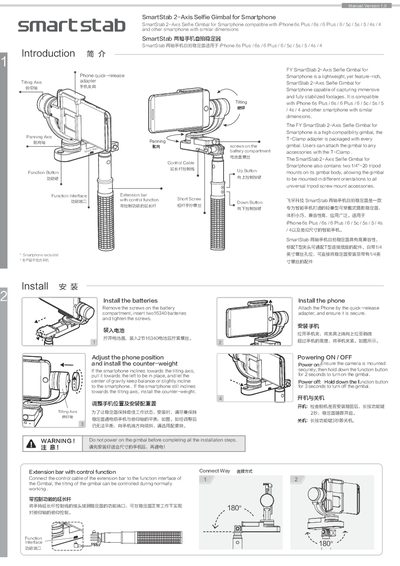
Feiyu SmartStab 2-Axis Selfie Gimbal User Manual
The SmartStab 2-Axis is a lightweight, wearable gimbal designed for smartphones such as the iPhone 6 series and other similarly sized devices. It features high compatibility, a T‑Clamp adapter, and dual 1/4‑20 tripod mounts for versatile mounting.
The manual explains how to install the batteries, attach the phone, power the device, and use the control buttons and extension bar. It also lists technical specifications, safety warnings, and troubleshooting steps to ensure reliable operation. This manual is written in Chinese.
Covers: Introduction · Installation and Battery Insertion · Power On / Power Off · Function Interface and Controls · Extension Bar with Control Function · Manual Pulling Locking

Feiyu Panoramic Camera Stabilizer User Manual
This manual provides a complete guide to the Feiyu Panoramic Camera Stabilizer, a gimbal designed for 360° cameras such as Samsung Gear 360, Kodak Pixpro SP360 and Sony FDR‑X3000. It covers product overview, installation steps, balance adjustment, and safety warnings.
Key sections include a getting‑started guide for battery installation and camera mounting, detailed descriptions of yaw‑follow and lock modes, firmware upgrade procedures via the Feiyu ON app, and a full list of technical specifications. The document also contains troubleshooting tips and warranty information. This manual is written in Chinese.
Covers: Product Overview · Getting Started · Installation and Balance Adjustment · Modes and Functions · Firmware Upgrade · Warnings and Disclaimer
Latest Feiyu manuals
Feiyu SmartStab 2-Axis Selfie Gimbal User Manual
User Manual 2 pages · 1.5 MB · ZHThe Feiyu SmartStab 2-Axis Selfie Gimbal User Manual provides assembly, operation, and specifications for the lightweight smartphone stabilizer.
Feiyu Panoramic Camera Stabilizer User Manual
User Manual 7 pages · 1.3 MB · ZHThe Feiyu Panoramic Camera Stabilizer user manual explains setup, operation modes, firmware upgrade, and specifications for use with Samsung Gear 360, Kodak…
Which document do I need?
User Manual
Day-to-day operation, settings and troubleshooting. Start here if the product is already set up.
Questions answered in Feiyu manuals
How do I power off the gimbal?
Press and hold the function button for 3 seconds; the gimbal will shut down.
What batteries are required for the gimbal?
Insert two 16340 rechargeable batteries into the battery compartment and secure the cover.
How do I install the battery?
Open the handle, insert one 22650 battery, and tighten the screw.
How can I switch between yaw‑follow and lock modes?
Press the function key once to toggle between yaw‑follow mode and lock mode.