
Key facts
- Manuals
- 6
- Languages
- ZH · EN
- Last added
- 2026-09-30
Featured Waters manuals

Waters Chemical Consumables Online Ordering Platform Catalog
Waters offers an online ordering platform that lets customers browse and purchase a wide range of chemical consumables directly from the Waters website. The platform supports Business‑to‑Consumer, Business‑to‑Business, and Online‑to‑Offline channels, with a dedicated service hotline for activation.
The catalog lists numerous consumables, including UPLC, UHPLC, HPLC columns, solid‑phase extraction (SPE) products, sample vials, filtration devices, and analytical standards. Detailed product specifications, ordering numbers, and compatibility notes are provided for each item. This manual is written in Chinese.
Covers: Sample Preparation and Filtration · Sample Vials and Plates · How to Choose a Chromatography Column · UPLC Columns and Accessories · UHPLC Columns · HPLC Analytical and Preparative Columns

Waters 71500074403 Ethernet Instrument Quick Start Guide
The guide provides step‑by‑step instructions for installing the Ethernet instrument hardware and software, setting up the instrument LAN card, and configuring network settings such as IP protocols and DHCP servers. It also covers cable installation, switch configuration, and optional wireless networking.
Additional sections describe how to rename network adapters, connect multiple instruments, and perform basic troubleshooting, including hardware issue checks and safety warnings specific to the instrument. This manual is written in Chinese.
Covers: Installation of Ethernet hardware and software · Setup Waters Ethernet instrument · Install second network (instrument LAN) card · Configure network card and IP settings · Cable installation and recommended cable type · Network switch configuration (single and multiple)
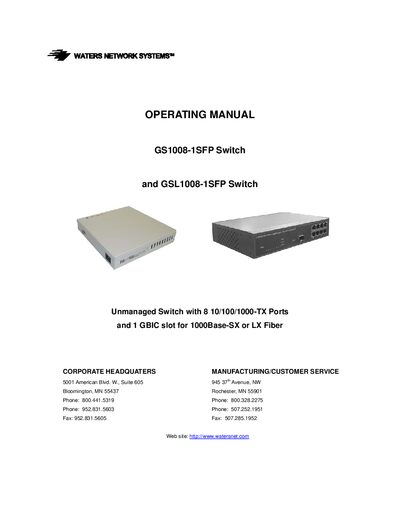
Waters GS1008-1SFP and GSL1008-1SFP Switch User Manual
The Waters GS1008-1SFP and GSL1008-1SFP are unmanaged 8‑port switches that support 10/100/1000‑Mbps Ethernet and a single GBIC slot for 1000Base‑SX or LX fiber. The manual covers specifications, installation steps, LED indicators, troubleshooting, and warranty information.
Key sections include detailed hardware specifications, optional SFP module options, wiring guidelines, LED status explanations, and a step‑by‑step installation guide to help users set up the switch quickly and reliably.
Covers: Specifications · Package Contents · Introduction · Installation · Optional SFP Modules · Switch Topology
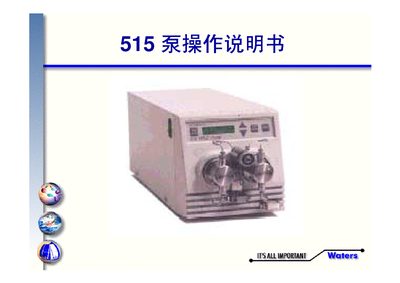
Waters 515 Pump Operating Manual
This manual explains how to operate the Waters 515 pump, covering the LCD display, function keys, and parameter configuration. It guides users through normal operation, flow settings, and mode selection.
The document also includes a parts list, detailed descriptions of each panel function, and a troubleshooting section that addresses common faults such as missing liquid, leaks, and air bubbles. This manual is written in Chinese.
Covers: Panel and Function Keys · Panel Function Description · Component Parts · Pump Operation · Common Faults and Causes
Latest Waters manuals
Waters Chemical Consumables Online Ordering Platform Catalog
Product Leaflet 259 pages · 29.3 MB · ZHThe Waters Chemical Consumables Online Ordering Platform catalog provides details and ordering information for chromatography columns, SPE products, sample…
Waters 71500074403 Ethernet Instrument Quick Start Guide
Quick Start Guide 42 pages · 481 KB · ZHThis Waters guide explains how to install, configure, and troubleshoot the 71500074403 Ethernet instrument.
Waters GS1008-1SFP and GSL1008-1SFP Switch User Manual
User Manual 16 pages · 309 KB · ENOperating manual for the Waters GS1008-1SFP and GSL1008-1SFP unmanaged switches with 8 Ethernet ports and a GBIC slot.
Waters 515 Pump Operating Manual
User Manual 18 pages · 165 KB · ZHThe Waters 515 Pump Operating Manual provides instructions for setup, panel functions, parameter settings, and troubleshooting.
Waters 2690 Separations Module chinese operating Manual
Waters Breeze system user guide
Which document do I need?
Quick Start Guide
The shortest path to a working setup, usually only a few pages.
User Manual
Day-to-day operation, settings and troubleshooting. Start here if the product is already set up.
Questions answered in Waters manuals
How do I rename the second network card?
Open the Windows Control Panel, go to Network Connections, right‑click the second network card (often shown as “Local Connection 2”), choose Rename, and enter a new name such as “Instrument LAN”.
From: Waters 71500074403 Ethernet Instrument Quick Start Guide
What type of Ethernet cable should be used for connections?
Use a shielded straight‑through Ethernet cable for all connections; a shielded crossover cable can be used for direct instrument‑to‑instrument links if needed.
From: Waters 71500074403 Ethernet Instrument Quick Start Guide
How many Ethernet ports does the switch provide?
The switch provides eight 10/100/1000‑Mbps Ethernet ports.
From: Waters GS1008-1SFP and GSL1008-1SFP Switch User Manual
What fiber optic modules are supported?
Supported SFP modules are SFP‑1000SX‑LC (multimode), SFP‑1000LX‑LC‑10 (single‑mode 10 km) and SFP‑1000LX‑LC‑30 (single‑mode 30 km).
From: Waters GS1008-1SFP and GSL1008-1SFP Switch User Manual