
Key facts
- Manuals
- 1
- Languages
- ZH
- Last added
- 2012-03-10
Featured W20 manuals
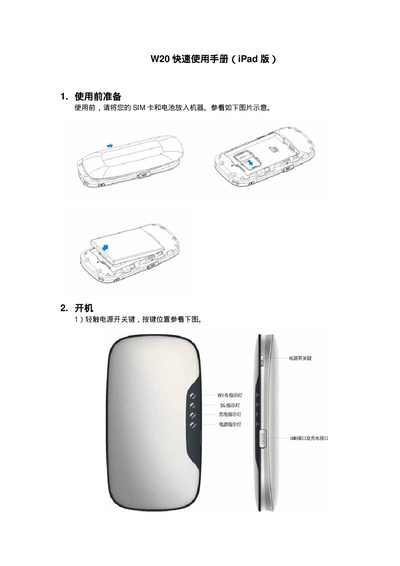
W20 Quick Start Guide (iPad Version)
The guide starts with preparation steps, instructing you to insert the SIM card and battery before turning the device on. It then explains the power button location and the meaning of the LED indicators for power, Wi‑Fi, and charging.
Next, it walks you through connecting the router to a Wi‑Fi network from an iPad, accessing the router’s web management interface at 192.168.0.1 with the default credentials (adj/adj), and browsing the internet once the WAN IP is obtained. This manual is written in Chinese.
Covers: Preparation · Power On · LED Indicators · Wi‑Fi Connection · Web Management Access · Internet Browsing
Latest W20 manuals
W20 Quick Start Guide (iPad Version)
Quick Start Guide 6 pages · 765 KB · ZHA short guide showing how to power on the W20 router, connect it to Wi‑Fi, and access its web management page using an iPad.
Which document do I need?
Quick Start Guide
The shortest path to a working setup, usually only a few pages.
Questions answered in W20 manuals
How do I turn the W20 router on?
Press the power button; the power LED will light to indicate the router has started.
How can I connect the W20 router to Wi‑Fi using an iPad?
Open Settings → Wi‑Fi on the iPad, select the SSID "CMCC‑TD", and confirm the connection.