
Key facts
- Manuals
- 1
- Languages
- ZH
- Last added
- 2012-01-17
Featured TD-SCDMA manuals
Rohde & Schwarz TD‑SCDMA Test Instrument User Manual
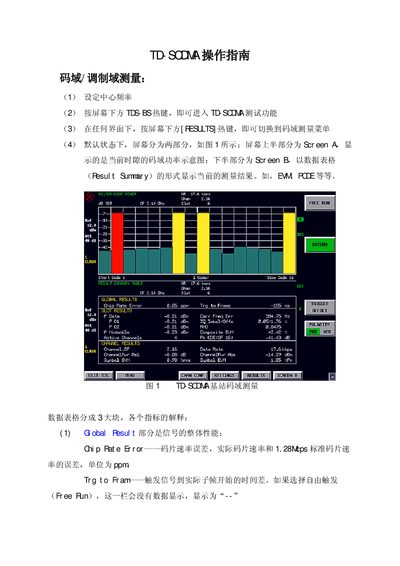
The guide provides step‑by‑step instructions for performing TD‑SCDMA code‑domain and frequency‑domain measurements with the Rohde & Schwarz test instrument. It describes the screen layout, hotkeys, and menu navigation needed to access measurement functions such as power, EVM, and ACLR.
Detailed procedures cover selecting slots and channels, adjusting reference level and attenuator, configuring trigger settings for burst‑mode signals, and performing multi‑carrier ACLR and spectrum emission mask tests. The document also includes background information on TD‑SCDMA frame structure and measurement conventions. This manual is written in Chinese.
Covers: Code Domain Measurement · Frequency Domain Measurement · Slot and Channel Selection · Reference Level and Attenuator Adjustment · Trigger Settings · Multi‑carrier ACLR Measurement
Latest TD-SCDMA manuals
Rohde & Schwarz TD‑SCDMA Test Instrument User Manual
User Manual 42 pages · 787 KB · ZHThis user manual explains how to set up and operate the Rohde & Schwarz TD‑SCDMA test instrument for code‑domain and frequency‑domain measurements.
Which document do I need?
User Manual
Day-to-day operation, settings and troubleshooting. Start here if the product is already set up.
Questions answered in TD-SCDMA manuals
How do I switch to the code‑domain measurement menu?
Press the [RESULTS] hotkey at the bottom of the screen to switch to the code‑domain measurement menu.
From: Rohde & Schwarz TD‑SCDMA Test Instrument User Manual
How do I select a specific timeslot for measurement?
Use the sequence [RESULTS] → [SELECT] → [SELECT SLOT] and enter the slot number or adjust with the wheel.
From: Rohde & Schwarz TD‑SCDMA Test Instrument User Manual