
Key facts
- Manuals
- 2
- Languages
- ZH
- Last added
- 2011-12-16
Featured Solaris manuals
Solaris User Manual
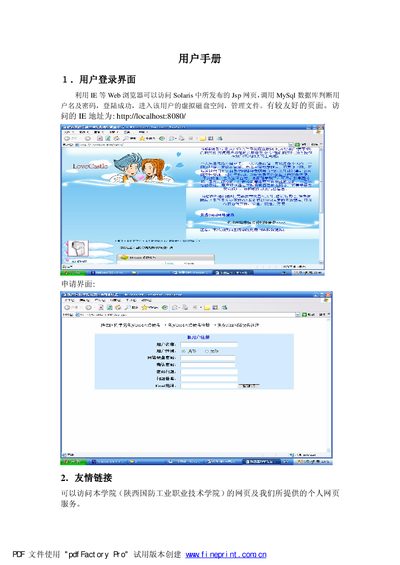
The document describes the login interface for the Solaris system, showing how users can access the web portal with a browser and enter their credentials to reach their virtual disk space. It also outlines the basic navigation and available tools within the interface.
Subsequent sections cover file operations such as uploading files, creating and deleting directories, and downloading documents. Detailed steps for each action, including button labels and expected results, are provided to help users manage their files effectively. This manual is written in Chinese.
Covers: Login Interface · File Operations · File Upload · File Directory Management · File Creation and Deletion · File Download
Sun Solaris Desktop Environment User and System Administrator Guide
This manual provides detailed instructions for configuring, managing, and troubleshooting the Solaris Common Desktop Environment (CDE). It covers login manager setup, session management, application registration, and network desktop configuration.
The guide also includes sections on printing configuration, desktop search paths, font management, and customizing the login screen appearance, helping administrators tailor the environment to their needs. This manual is written in Chinese.
Covers: Login Manager Configuration · Session Manager · Application Manager and Registration · Directory Structure · Network Desktop Configuration · Printing Configuration
Latest Solaris manuals
Solaris User Manual
User Manual 7 pages · 537 KB · ZHThis manual explains how to log in, upload, manage, and download files using the Solaris web portal.
Sun Solaris Desktop Environment User and System Administrator Guide
User Manual 306 pages · 1.9 MB · ZHReference guide for senior users and system administrators of the Solaris Desktop Environment.
Which document do I need?
User Manual
Day-to-day operation, settings and troubleshooting. Start here if the product is already set up.
Questions answered in Solaris manuals
How do I upload a file?
Select the upload button, choose the file, and confirm to upload it to the server.
From: Solaris User Manual
How can I change the appearance of the login screen?
Use the steps listed under the "更改登录屏幕的外观" section to modify the logo, welcome message, font, and language text.
From: Sun Solaris Desktop Environment User and System Administrator Guide
Where are the desktop search path variables configured?
The desktop search path and its environment variables are described in the "桌面查找路径" section, including how to view and modify them.
From: Sun Solaris Desktop Environment User and System Administrator Guide