
Key facts
- Manuals
- 3
- Languages
- EN · ZH
- Last added
- 2012-01-29
Featured SciFinder manuals
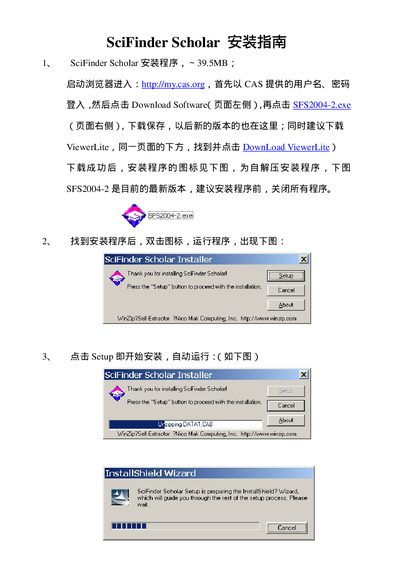
CAS SciFinder Scholar Installation Guide
This guide walks you through installing SciFinder Scholar on a Windows computer using the InstallShield wizard. It explains how to select the destination folder, choose the setup type (Typical, Compact, or Custom), and complete the main program installation.
The document also details the optional installation of the SciFinder Scholar Toolbar, how to link it to the main program, and what to do if the software cannot connect to the CAS server, including contacting the site administrator.
Covers: Installation Overview · Destination Folder Selection · Setup Type Options · Toolbar Installation · Connection Troubleshooting
SciFinder Scholar 2006 User Manual
This manual introduces SciFinder Scholar 2006, a desktop research tool for searching and processing chemical and related scientific information. It outlines the core functions, optional modules, and how to access help resources.
The guide also details the hardware and software requirements, step‑by‑step startup procedures, search and navigation features, and instructions for using 3D structure viewers and ChemPort connections. This manual is written in Chinese.
Covers: SciFinder Scholar 功能 · SciFinder Scholar 内容 · 可选功能 · 硬件与软件要求 · 启动 SciFinder Scholar · 检索
SciFinder Scholar 3.0 User Manual
This manual describes the main functions of SciFinder Scholar 3.0, including the Explore by Chemical Structure, Substructure, and Reaction modules. It shows how to draw structures, perform exact and substructure searches, refine results, and keep reactions and references of interest.
Additional sections cover importing and exporting structure queries, display format and sort order options, and accessing full‑text documents and commercial sources. System requirements and required software such as Windows and Acrobat Reader are also listed.
Covers: Explore by Chemical Structure · Explore by Substructure · Explore by Reaction · Importing and Exporting Structure Queries · Display Format and Sort Order · Reference Management
Latest SciFinder manuals
CAS SciFinder Scholar Installation Guide
Installation Guide 15 pages · 1.4 MB · ENInstallation guide for SciFinder Scholar 2004.2 software, covering setup steps, toolbar installation, and connection troubleshooting.
SciFinder Scholar 2006 User Manual
User Manual 13 pages · 343 KB · ZHThe SciFinder Scholar 2006 User Manual provides installation, hardware requirements, and usage instructions for the chemical research software.
SciFinder Scholar 3.0 User Manual
User Manual 47 pages · 5.2 MB · ENThe SciFinder Scholar 3.0 user manual explains how to navigate the software and use its chemical structure, substructure and reaction search features.
Which document do I need?
Installation Guide
Mounting, wiring and first power-up. Read it before the hardware goes in.
User Manual
Day-to-day operation, settings and troubleshooting. Start here if the product is already set up.
Questions answered in SciFinder manuals
How do I start the SciFinder Scholar installation?
Run the installer and click the "Setup" button to begin the InstallShield wizard.
How can I install the SciFinder Scholar Toolbar?
After the main program is installed, run the Toolbar setup, choose a destination folder, and follow the wizard prompts to complete the installation.
How can I view 3D structure models in SciFinder Scholar?
Install the Accelrys Discovery Studio Viewer (ViewerPro or ViewerLite) and run it once so SciFinder Scholar can use it to display 3D models.
How do I perform an exact structure search?
Select the ‘Performing an Exact Structure Search’ option from the Explore by Chemical Structure menu.
How can I import and export structure queries?
Use the ‘Importing and Exporting Structure Queries’ function available in the menu.