
Key facts
- Manuals
- 1
- Languages
- EN
- Last added
- 2012-03-20
Featured PHC manuals
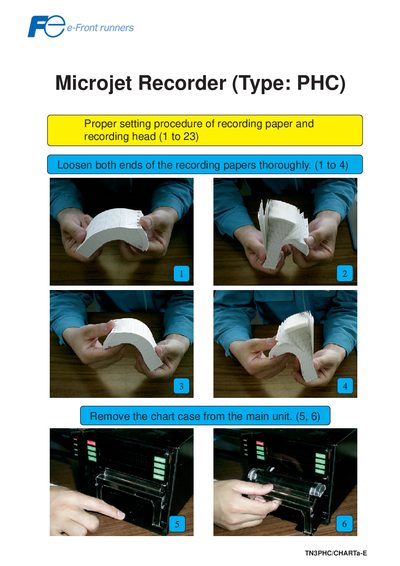
PHC Microjet Recorder User Manual
This manual explains how to prepare the PHC Microjet Recorder for operation. It covers loading the recording paper, installing the recording head, and attaching the chart case to the main unit.
Key procedures include loosening the paper ends, feeding the paper with the FEED key, ensuring the bottom face of the chart case is correctly oriented, and securing the recording head. Follow the illustrated steps to avoid paper jams and ensure reliable recording.
Covers: Setting recording paper · Installing recording head · Chart case attachment · Paper jam prevention · Using the FEED key
Latest PHC manuals
PHC Microjet Recorder User Manual
User Manual 5 pages · 1.5 MB · ENStep‑by‑step instructions for setting up the PHC Microjet Recorder, including paper loading and head installation.
Which document do I need?
User Manual
Day-to-day operation, settings and troubleshooting. Start here if the product is already set up.
Questions answered in PHC manuals
How do I load recording paper into the Microjet Recorder?
Loosen both ends of the recording paper, then press the FEED key to feed out 2 to 3 folds of the paper.
What should I do if the paper gets caught in the chart cover?
If the paper is caught in the chart cover, a paper jam may occur, so ensure the paper is properly positioned before feeding.