
Key facts
- Manuals
- 1
- Languages
- ZH
- Last added
- 2011-12-27
Featured MC3000硬件设备 manuals
MC3000 Hardware Equipment User Manual
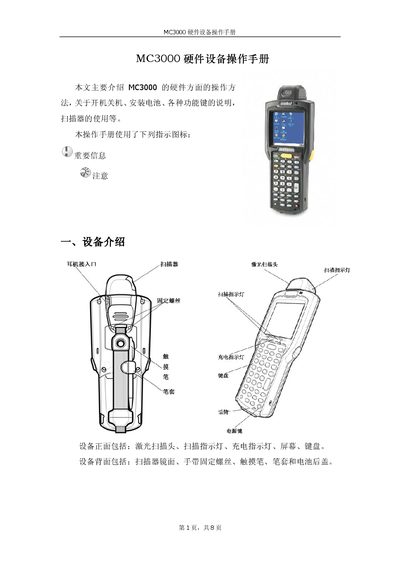
The MC3000 hardware manual describes the device’s front and rear components, including the laser pointer, indicator lights, USB interface, and background light. It explains how to install the unit, connect power, and insert the SD storage card.
Detailed sections cover charging methods, laser operation angles, keyboard layout, special function keys, and positioning procedures. The guide also includes troubleshooting tips for proper alignment and usage. This manual is written in Chinese.
Covers: Hardware Overview · Installation Procedure · Charging Method · Laser Pointer Usage · SD Card Installation · Keyboard Functions
Latest MC3000硬件设备 manuals
MC3000 Hardware Equipment User Manual
User Manual 8 pages · 445 KB · ZHThis manual provides hardware operation instructions for the MC3000, covering installation, charging, laser use, and key functions.
Which document do I need?
User Manual
Day-to-day operation, settings and troubleshooting. Start here if the product is already set up.
Questions answered in MC3000硬件设备 manuals
What is the usable rotation range of the laser pointer?
The laser pointer can rotate up to 270°, with an optimal operating angle of about 65°.