
Key facts
- Manuals
- 5
- Models
- 2
- Languages
- ZH · EN
- Last added
- 2012-01-13
LXE models by category
Featured LXE manuals
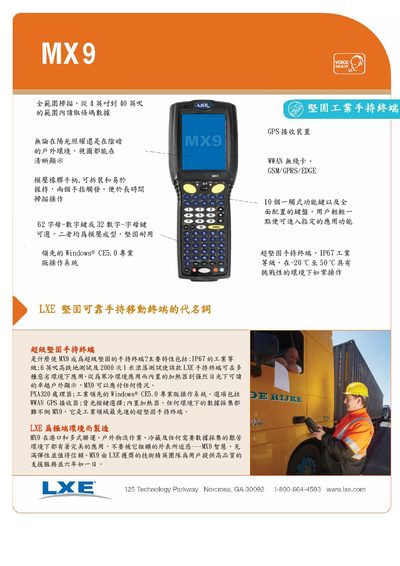
LXE MX9 User Manual
The LXE MX9 is a super‑rugged handheld terminal designed for extreme environments. It runs Windows CE 5.0 on an XScale PXA320 800 MHz processor, offers optional Wi‑Fi, Bluetooth, WWAN, and GPS, and includes a back‑lit, 3.7‑inch QVGA color display.
The device meets IP67 industrial sealing, MIL‑STD‑810F drop and roll tests, and provides USB, RS‑232, Ethernet, and charging interfaces. It is powered by a replaceable battery, weighs 34 oz, and measures 250 mm × 99 mm × 69 mm, making it suitable for logistics, outdoor, and cold‑chain applications. This manual is written in Chinese.
Covers: Processor and Memory · Operating System · Optional Options · Keyboard · Display · Power Management
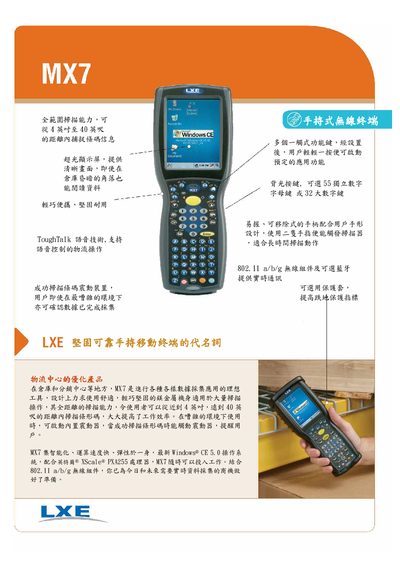
LXE MX7 Handheld Wireless Terminal User Manual
The LXE MX7 is a rugged handheld wireless terminal designed for logistics and warehouse environments. It runs Windows CE 5.0 Professional on an XScale PXA255 400 MHz processor with up to 128 MB RAM and supports SD cards for storage.
The device offers 802.11 a/b/g wireless connectivity, optional Bluetooth, a 3.5" 240 × 320 color TFT display, and a rechargeable 2200 mAh 7.2 V battery. It is rated IP65, operates from –10 °C to 45 °C, and complies with MIL‑STD‑810F and various EMC and safety standards. This manual is written in Chinese.
Covers: Overview · Hardware Specifications · Wireless Connectivity · Power and Battery · Environmental Ratings · Interfaces
LXE MX7 / MX7CS RF Terminal User Manual
This manual describes the LXE MX7 and MX7CS RF terminals, including their IP65‑rated housing, 3.5‑inch 320×240 LCD, Intel XScale PXA255 400 MHz processor, 128 MB RAM, and expandable flash storage. It also covers the device’s keyboard options, barcode scanners, wireless (802.11b/g) and Bluetooth interfaces, and battery performance.
Operational guidance includes power‑on procedures, touch‑screen calibration, volume adjustment, scanner use, wireless network setup, program lock protection, file synchronization via RS‑232/USB, FTP file transfer, and restoring factory defaults.
Covers: Performance Features · Product Introduction · Operation · Keyboard Layout · Terminal Emulation Software (RFTERM) · Program Lock
Latest LXE manuals
LXE MX9 User Manual
User Manual 2 pages · 243 KB · ZHThe LXE MX9 user manual provides specifications, features, and operating instructions for the rugged handheld terminal.
LXE MX8 hand-held Wireless terminal Manual
LXE MX7 Handheld Wireless Terminal User Manual
User Manual 2 pages · 255 KB · ZHThe LXE MX7 handheld wireless terminal user manual provides specifications, operation instructions, and connectivity details for the device.
LXE MX8 hand-held Wireless terminal Manual3
LXE MX7 / MX7CS RF Terminal User Manual
User Manual 27 pages · 1.2 MB · ENThe LXE MX7 and MX7CS RF terminal user manual provides setup, operation, wireless configuration, and maintenance instructions.
Which document do I need?
User Manual
Day-to-day operation, settings and troubleshooting. Start here if the product is already set up.
Questions answered in LXE manuals
What operating system does the MX7 run?
The MX7 runs Windows CE 5.0 Professional.
What wireless standards are supported by the MX7?
It supports 802.11 a/b/g Wi‑Fi and optional Bluetooth.
How do I calibrate the touch screen?
Open Start | Settings | Control Panel | Stylus | Calibration, then tap the crosshair and press Enter.
How can I reset the terminal to factory defaults?
Press the Start | RUN shortcut, type "coldboot" in the command window, and the device will perform a cold start restoring all settings.