
Key facts
- Manuals
- 2
- Categories
- 1
- Languages
- JA · ZH
- Last added
- 2012-03-12
Featured EMP manuals
Epson EMP Monitor User Manual
This manual describes the EMP Monitor software, its features, and the steps required to register and control Epson projectors on a Windows PC. It covers system requirements, installation procedures, usage of automatic discovery, group management, and email notification settings.
Additional sections provide troubleshooting guidance, including how to resolve connection issues, adjust network settings, and remove the software safely. Legal notices and trademark information are included at the end of the document. This manual is written in Japanese.
Covers: EMP Monitor特色 · 使用 EMP Monitor 可完成的工作 · 工作環境 · 開始操作之前 · 故障排除
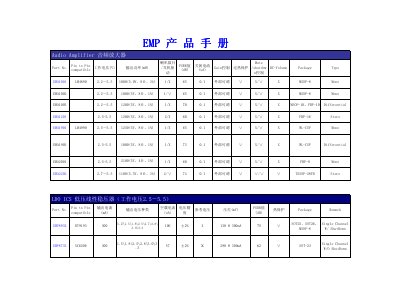
EMP Audio Amplifier and LDO Regulator Product Manual
The manual lists the technical parameters of the EMA series audio amplifiers, including working voltage (2.2‑5.5 V), speaker configurations, gain control, PSRR values and output power for each model. Package types such as MSOP‑8, MSOP‑10 and TSSOP‑28FD are also detailed.
For the EMP series low‑voltage linear regulators, the document provides output current, standby current, voltage accuracy, PSRR, thermal protection and package information (e.g., SOT‑23, SOT‑25, MSOP‑8). Additional sections cover battery management ICs and white‑LED driver ICs with efficiency and current specifications. This manual is written in Chinese.
Covers: Audio Amplifier Specifications · Low‑Voltage Linear Regulator Specifications · Package Types · Battery Management ICs · White LED Driver ICs
Latest EMP manuals
Epson EMP Monitor User Manual
User Manual 34 pages · 2 MB · JAThe Epson EMP Monitor User Manual explains how to install, configure, and operate the EMP Monitor software for controlling Epson projectors.
EMP Audio Amplifier and LDO Regulator Product Manual
Product Leaflet 2 pages · 54 KB · ZHThe EMP product manual provides specifications for EMA audio amplifiers and EMP low‑dropout regulators, covering voltage ranges, currents, PSRR and package…
Which document do I need?
User Manual
Day-to-day operation, settings and troubleshooting. Start here if the product is already set up.
Questions answered in EMP manuals
Which operating systems can run EMP Monitor?
EMP Monitor runs on Windows 98 Second Edition SP1, Windows Me, Windows NT 4.0 SP6, Windows 2000 Professional SP4, Windows XP (Home or Professional) SP2 or later, and Windows Vista (all editions except Starter).
What are the minimum system requirements for EMP Monitor?
A PC with at least a Pentium MMX 166 MHz CPU, 64 MB RAM, 50 MB free disk space, and an SVGA (800 × 600) display is required; 128 MB RAM and a Pentium II 233 MHz CPU are recommended.