
Key facts
- Manuals
- 1
- Categories
- 1
- Languages
- ZH
- Last added
- 2012-03-13
Featured DIR-602 manuals
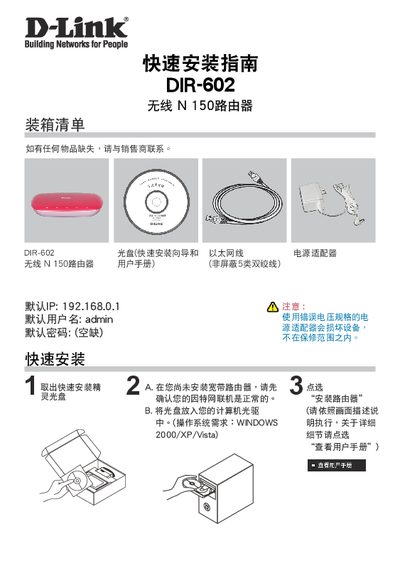
D-Link DIR-602 Wireless N150 Router Quick Installation Guide
The guide provides step‑by‑step instructions for unpacking and connecting the DIR‑602 router, including attaching the Ethernet cable, power adapter, and inserting the included CD. It also explains how to access the web‑based setup page using the default IP address 192.168.0.1 and default login credentials (admin).
Important configuration notes are included, such as the “maximum idle time” WAN parameter. The factory default is 0 (continuous connection), but for timed‑billing services you may set it to 300 seconds (5 minutes) to allow the router to disconnect after inactivity. The document also lists hazardous material compliance and GPL source‑code information. This manual is written in Chinese.
Covers: Quick Installation Guide · Important Information · Hazardous Materials · GPL Code Statement
Latest DIR-602 manuals
D-Link DIR-602 Wireless N150 Router Quick Installation Guide
Quick Start Guide 6 pages · 694 KB · ZHThis quick installation guide shows how to set up the D-Link DIR-602 Wireless N150 router, covering hardware connection, default login details, and WAN…
Which document do I need?
Quick Start Guide
The shortest path to a working setup, usually only a few pages.
Questions answered in DIR-602 manuals
What is the default IP address of the DIR‑602 router?
The default IP address is 192.168.0.1.
From: D-Link DIR-602 Wireless N150 Router Quick Installation Guide
What should I do if any items are missing from the package?
Contact the seller for replacement.
From: D-Link DIR-602 Wireless N150 Router Quick Installation Guide