
Key facts
- Manuals
- 7
- Languages
- EN · ZH
- Last added
- 2026-09-29
Featured Cadence manuals
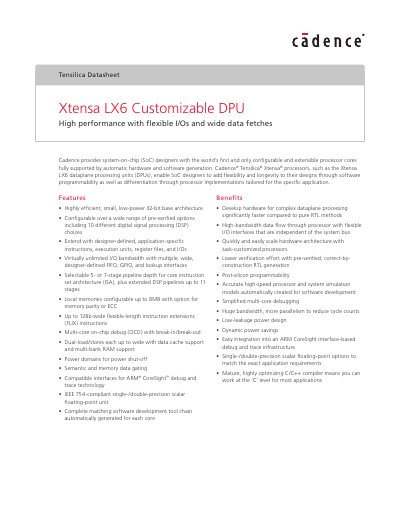
Cadence Xtensa LX6 Customizable DPU Datasheet
The Xtensa LX6 Customizable DPU is a 32‑bit configurable processor core that can be tailored with pre‑verified options such as DSP blocks, floating‑point units, and wide I/O interfaces. Designers can add application‑specific instructions, execution units and registers using the Tensilica Instruction Extension (TIE) methodology, and the tool chain automatically generates matching RTL and software support.
The core supports multiple pipeline depths (5‑ or 7‑stage), up to 128‑bit wide FLIX instructions, configurable local memories up to 8 MB with parity/ECC, and up to 32 interrupt sources. Power domains, semantic and data gating, and fine‑grained clock gating enable low‑leakage operation. Debug is provided via multi‑core on‑chip debug (OCD) with CoreSight‑compatible interfaces and optional performance counters.
Covers: Features Overview · Configurable ISA Options · Memory Subsystem · Interface Options · Power Management · Debug and Trace
Cadence AWR Design Environment User Guide
This guide introduces the AWR Design Environment, describing its overall architecture, project workflow, and the tools available for creating and managing microwave and RF designs. It covers licensing, version information, and how to obtain online help.
The manual details each major component, including the Project Browser, schematics, system diagrams, data files, netlists, graphs, measurements, annotations, and circuit symbols. It also explains how to customize the workspace, use version control, and generate reports and output files.
Covers: Preface · The Design Environment · Data Files · Schematics and System Diagrams · Netlists · Graphs, Measurements, and Output Files
Cadence SPB 15.2 Installation Guide
This guide describes the hardware and software requirements for installing Cadence SPB 15.2, a PCB design tool. It lists supported operating systems, minimum CPU, memory, disk space, and peripheral needs.
The document provides step‑by‑step instructions for installing the software, configuring the FlexLM license manager, editing the license.dat file, and verifying a successful installation. This manual is written in Chinese.
Covers: System Requirements · Supported Operating Systems · Hardware Requirements · License Configuration · Installation Procedure · Post‑Installation Verification
Cadence User Manual
This manual provides an overview of Cadence, a major EDA software suite, and describes its role in ASIC, FPGA, and PCB design. It outlines the typical ASIC design flow and highlights the main tools such as Verilog‑XL, Composer, Analog Artist, Virtuoso Layout Editor, and Dracula.
The guide includes detailed steps for configuring the Cadence environment (editing .cshrc, .cdsenv, .cdsinit files), launching individual tools, and basic skill language programming. Appendices contain example files and command scripts for reference. This manual is written in Chinese.
Covers: 概述 · Cadence 使用基础 · Verilog-XL 的介绍 · 电路图设计及电路模拟 · 自动布局布线 · 版图设计及其验证
Latest Cadence manuals
Cadence Xtensa LX6 Customizable DPU Datasheet
Datasheet 13 pages · 884 KB · ENThe Cadence Xtensa LX6 Customizable DPU datasheet describes its configurable architecture, I/O options, memory, power and debug features.
Cadence AWR Design Environment User Guide
User Manual 792 pages · 18.1 MB · ENThe Cadence AWR Design Environment User Guide provides instructions for using the software’s design environment and its features.
Cadence SPB 15.2 Installation Guide
Installation Guide 31 pages · 661 KB · ZHInstallation guide for Cadence SPB 15.2 covering system requirements, setup steps and license configuration.
Cadence User Manual
User Manual 388 pages · 1.2 MB · ZHA Chinese reference manual that introduces Cadence EDA tools, environment setup, and basic usage for beginners.
Cadence cdsSPICE User Manual(2)
Cadence cdsSPICE User Manual
User Manual 100 pages · 2 MB · ZHUser manual for Cadence cdsSPICE covering installation, library management, editing tools and DRC checks.
Cadence cdsSPICE User Manual
User Manual 100 pages · 2 MB · ZHThe Cadence cdsSPICE User Manual provides step‑by‑step instructions for using the Cadence cdsSPICE simulation software.
Which document do I need?
Datasheet
Ratings, dimensions and ordering codes, for selection and design work.
User Manual
Day-to-day operation, settings and troubleshooting. Start here if the product is already set up.
Installation Guide
Mounting, wiring and first power-up. Read it before the hardware goes in.
Questions answered in Cadence manuals
What pipeline depths can be selected for the Xtensa LX6 DPU?
The core offers a selectable 5‑ or 7‑stage pipeline, and optional DSP pipelines can be extended up to 11 stages.
How much local memory can be configured on the DPU?
Local memories can be configured up to 8 MB, with optional parity or ECC protection.
How can I access online help for the AWR Design Environment?
Use the GettingOnlineHelp section described early in the guide.
Where is licensing and version information located?
Licensing and version details are provided in the LicensingandVersionInformation section.
How do I set up the Cadence environment on my computer?
Edit the .cshrc file to set the Cadence installation path and license file, then configure .cdsenv and .cdsinit files as needed.
From: Cadence User Manual
How can I start Verilog‑XL?
After configuring the environment, launch Verilog‑XL from the Cadence tools menu or via the command line as described in the manual.
From: Cadence User Manual