
Key facts
- Manuals
- 8
- Languages
- ZH · EN
- Last added
- 2026-10-03
Featured CA manuals
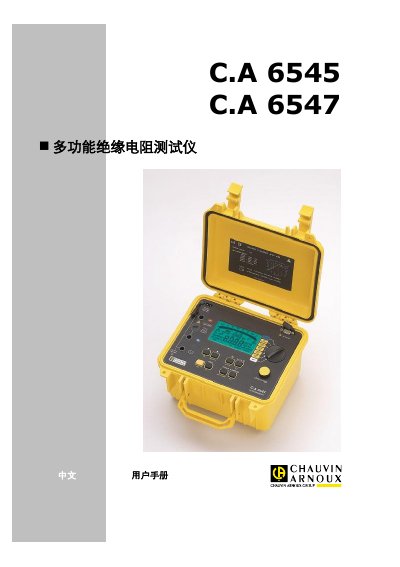
C.A 6545/6547 Multifunction Insulation Resistance Tester User Manual
The C.A 6545/6547 multifunction insulation resistance tester is a portable, rugged instrument with a large back‑lit LCD display. It can measure voltage, resistance and capacitance, and operates from battery or AC power. The manual provides safety symbols, operating conditions, measurement procedures, and maintenance guidelines.
Key sections include an introduction to the device, detailed description of the front panel and controls, measurement functions (AC/DC voltage, insulation, capacitance, residual current), special functions, memory/RS‑232 interface, specifications, maintenance, warranty and ordering information. This manual is written in Chinese.
Covers: Introduction · Description · Measurement Functions · Special Functions · Operation Procedure · Memory / RS232
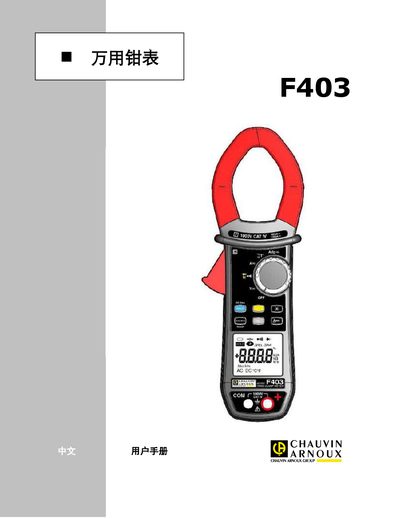
CA F403 Clamp Meter User Manual
This manual introduces the CA F403 clamp meter, describing its functions such as current, voltage, resistance, frequency, temperature, and True‑Inrush measurements. It explains the device’s safety classifications (IEC‑61010‑1/‑2‑032, CAT IV 1000 V) and outlines proper usage, configuration, and measurement procedures.
The document also details technical parameters, environmental limits, battery replacement, cleaning, calibration (at least once per year), and warranty information. A list of accessories included in the package is provided at the end. This manual is written in Chinese.
Covers: Introduction · Key Buttons · Display · Ports · Operation · Technical Parameters
CA ARCserve Backup Tape Library Selection Program User Manual
This manual explains how to install, configure and use the Tape Library Selection Program that comes with CA ARCserve Backup for Windows. It describes the program’s features for managing tape libraries, virtual media and RAID media groups, and provides step‑by‑step guidance for common tasks.
The guide also includes detailed troubleshooting information, media management procedures, and references to technical support resources. It is intended for administrators who need to set up and maintain tape‑based backup environments with CA ARCserve Backup. This manual is written in Chinese.
Covers: Introduction to the Selection Program · Installation and Prerequisites · Configuration of Media Libraries · Tape RAID Management · Using the Selection Program · Media Operations (format, clean, import/export)
CA ARCserve Backup for Microsoft SQL Server User Manual
This manual provides detailed instructions for the CA ARCserve Backup Agent for Microsoft SQL Server, covering installation prerequisites, configuration steps, backup and restore procedures, and special considerations for clustered environments.
It also includes troubleshooting tips, security configuration guidance, and references to related CA ARCserve products and options. This manual is written in Chinese.
Covers: Agent Overview · Installation Prerequisites · Installing the Agent · Backup Microsoft SQL Server Database · Restore Microsoft SQL Server Database · Backup and Restore in Cluster Environments
Latest CA manuals
C.A 6545/6547 Multifunction Insulation Resistance Tester User Manual
User Manual 34 pages · 697 KB · ZHUser manual for the C.A 6545 and 6547 multifunction insulation resistance testers, covering operation, specifications, maintenance and safety.
CA F403 Clamp Meter User Manual
User Manual 38 pages · 1.3 MB · ZHThe CA F403 clamp meter user manual provides safety instructions, operation steps, technical specifications, and maintenance guidance.
CA ARCserve Backup Tape Library Selection Program User Manual
User Manual 110 pages · 2.5 MB · ZHUser manual for CA ARCserve Backup's Tape Library Selection Program, covering installation, configuration, RAID setup and troubleshooting.
CA ARCserve Backup for Microsoft SQL Server User Manual
User Manual 140 pages · 2 MB · ZHGuide for installing, configuring, backing up and restoring Microsoft SQL Server databases with CA ARCserve Backup.
CA F405 Clamp Meter User Manual
User Manual 42 pages · 1.4 MB · ZHThe CA F405 Clamp Meter User Manual provides safety instructions, operation steps, specifications, maintenance and warranty details.
CA K1/K2 Current Probe User Manual
User Manual 9 pages · 348 KB · ZHUser manual for the K1 and K2 current probes, covering safety, operation, specifications, maintenance and warranty.
CA ARCserve Backup for Windows 16.5 Disaster Recovery Add-on Guide
User Manual 220 pages · 3.8 MB · ZHGuide for installing, configuring, and using the Disaster Recovery add‑on for CA ARCserve Backup for Windows 16.5.
CA61 Rev. A+ System Board User Manual
User Manual 66 pages · 1.4 MB · ENThe CA61 Rev. A+ system board user manual provides installation, BIOS setup, and troubleshooting information for this ATX motherboard.
Which document do I need?
User Manual
Day-to-day operation, settings and troubleshooting. Start here if the product is already set up.
Questions answered in CA manuals
What is the operating temperature range?
The instrument operates at 23 °C ± 3 K.
From: C.A 6545/6547 Multifunction Insulation Resistance Tester User Manual
What power supply voltage does the tester require?
It can be powered from 9 V to 12 V.
From: C.A 6545/6547 Multifunction Insulation Resistance Tester User Manual
How often should the CA F403 be calibrated?
The instrument must be calibrated at least once a year.
What are the steps to replace the battery?
Disconnect all leads, turn the rotary switch to OFF, remove the rear screws, open the battery cover, replace the four 1.5 V cells, then re‑close and tighten the screws.
How often should the instrument be calibrated?
The instrument must be calibrated at least once a year.
What is the warranty period for the F405?
The warranty is valid for three years from the date of sale.