
Key facts
- Manuals
- 4
- Languages
- ZH · EN
- Last added
- 2026-10-03
Featured Acronis manuals
Acronis Snap Deploy 3 Installation Guide
This guide introduces Acronis Snap Deploy 3, a flexible software solution for deploying complete operating‑system images to multiple computers. It describes the main components such as the management console, deployment server, agents, PXE server, license server and optional add‑ons.
The document provides detailed system‑requirement tables, installation file listings, common configuration scenarios, and step‑by‑step procedures for installing each component, adding licenses, configuring PXE boot, and using the management agent for online image creation and verification. This manual is written in Chinese.
Covers: 什么是 Acronis Snap Deploy · Acronis Snap Deploy 组件 · 升级至 3 版 · 系统要求 · 安装文件 · 常用安装配置
Acronis Backup & Recovery 11.5 Server for Linux Update 1 Installation Guide
Acronis Backup & Recovery 11.5 Server for Linux Update 1 provides backup and recovery capabilities for Linux servers. The product includes an agent, a management console, and a bootable media generator, and supports advanced features such as heterogeneous restore.
The installation guide walks you through pre‑installation checks, required Linux packages, RPM or manual package installation, interactive and unattended installation modes, command‑line options, software update checking, and how to uninstall the product or delete the Acronis Secure Zone. This manual is written in Chinese.
Covers: Installation Prerequisites · License Types · Product Components · Supported Operating Systems · System Requirements · Installation Procedures
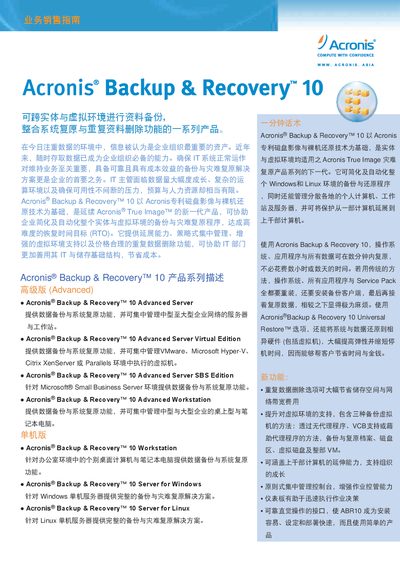
Acronis Backup & Recovery 10 User Manual
This manual provides an overview of the Acronis Backup & Recovery 10 product series, describing the Advanced, Workstation, Server and Virtual Edition versions. It outlines the core value proposition, typical sales opportunities, and the benefits of using a single solution for both physical and virtual environments.
The document details backup options, automation features, management console functions, supported operating systems, security measures such as AES encryption, data deduplication, virtualization compatibility, storage media, file‑system support, and licensing information. Contact details for Acronis China are also included. This manual is written in Chinese.
Covers: Product Series Description · Backup Options · Core Value Proposition · Supported Operating Systems · Security and Encryption · Data Deduplication
Acronis True Image OEM Quick Backup User Manual
This manual provides step‑by‑step instructions for installing and using Acronis True Image OEM Quick Backup. It describes supported operating systems, media, and connection interfaces, and includes configuration and troubleshooting guidance.
The document also contains reference tables for backup preferences, BIOS settings, and hardware compatibility, helping users set up reliable backup solutions on Windows platforms.
Covers: Installation · Backup Preferences · Supported Operating Systems · Supported Media · Connection Interfaces · BIOS Settings
Latest Acronis manuals
Acronis Snap Deploy 3 Installation Guide
Installation Guide 15 pages · 679 KB · ZHThe Acronis Snap Deploy 3 Installation Guide explains components, system requirements, and step‑by‑step installation of the deployment software.
Acronis Backup & Recovery 11.5 Server for Linux Update 1 Installation Guide
Installation Guide 14 pages · 444 KB · ZHThis guide explains how to install Acronis Backup & Recovery 11.5 Server for Linux Update 1, covering prerequisites, system requirements, and installation…
Acronis Backup & Recovery 10 User Manual
User Manual 6 pages · 2.3 MB · ZHThe Acronis Backup & Recovery 10 User Manual explains backup, deduplication, virtualization support, and restoration features for Windows and Linux…
Acronis True Image OEM Quick Backup User Manual
User Manual 101 pages · 4.2 MB · ENUser manual for Acronis True Image OEM Quick Backup covering installation, backup options, and supported hardware.
Which document do I need?
Installation Guide
Mounting, wiring and first power-up. Read it before the hardware goes in.
User Manual
Day-to-day operation, settings and troubleshooting. Start here if the product is already set up.
Questions answered in Acronis manuals
What package manager must be installed on Ubuntu before installing the product?
Ubuntu does not include RPM, so you must manually install the RPM package manager before running the installer.
From: Acronis Backup & Recovery 11.5 Server for Linux Update 1 Installation Guide
How can I perform an unattended (silent) installation?
Run the installation file with the -a command‑line switch (and optionally other switches such as -l for the license key).
From: Acronis Backup & Recovery 11.5 Server for Linux Update 1 Installation Guide
How does Acronis Backup & Recovery 10 protect backup data?
Backups are encrypted with industry‑standard AES (128, 192 or 256‑bit) and network communications are also encrypted.
Which Windows version is mentioned as supported?
The manual lists Windows Vista as a supported operating system.
Which connection types are listed for devices?
The document mentions SCSI, FireWire (IEEE‑1394), and USB 1.0/1.1/2.0 interfaces.