
Key facts
- Manuals
- 6
- Languages
- EN · ZH
- Last added
- 2012-07-06
Featured NETWORK manuals
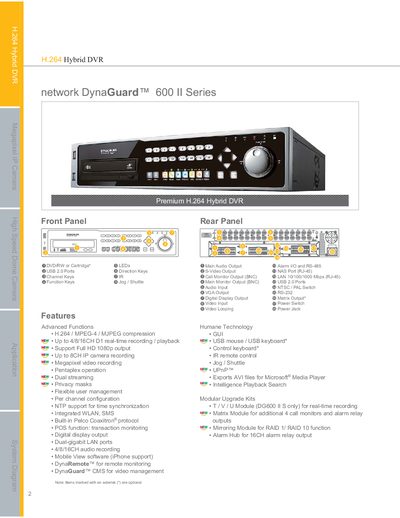
Network DG600 II Series User Manual
The Network DG600 II Series is a hybrid DVR that supports analog and IP cameras, offering H.264, MPEG‑4, MJPEG, and Megapixel video recording with up to 16 channels. It includes built‑in WLAN, SMS, dual‑gigabit LAN ports, and optional upgrade modules such as Matrix and Mirroring.
This manual details the device's features, technical specifications, installation options, and remote‑monitoring software (DynaRemote™ and DynaGuard™ CMS). It also lists optional upgrade kits and provides guidance on configuration, storage, and network connectivity.
Covers: Features · Specification · Modular Upgrade Kits · Network Connectivity · Power and Operating Conditions · Remote Monitoring Software
Network N1.1.2 Software User Manual
This manual explains how to install the Network N1.1.2 decoding software from the supplied CD, launch the program, and navigate its interface. It covers the initial setup, including default network parameters and auto‑run options.
The guide then details how to add, modify, delete, and configure decoders, set playback modes (single, loop, idle), adjust network settings, and upload changes. It also describes how to manage single‑broadcast and loop‑broadcast parameters for connected video servers. This manual is written in Chinese.
Covers: Installation · Software Launch · Decoder List · Adding a Decoder · Modifying a Decoder · Deleting a Decoder
Latest NETWORK manuals
Network Video Recorder Hardware NVS8-X NVS16-X NVS32-X Manual
NVS Hardware Manual, introduces the hardware information of NVS8-X, NVS16-X, NVS32-X, including appearance, ports, installation, etc.
Network Video Recording Software NVR SWIP-32 SWIP-16 SWIP-8 User Manual
This document introduces the use of SWIP-32 SWIP-16 SWIP-8 network video recording software
Network Video Recorder NVS/IPS NVS8-X NVS16-X NVS32-X Software Manual
This document is the Network Video Recorder NVS/IPS software manual, which describes the features and usage instructions of the NVS8-X, NVS16-X, and NVS32-X models. It also includes the features and usage instructions of the IPS8-X, IPS16-X, and IPS32-X models.
Network DG600 II Series User Manual
User Manual 3 pages · 278 KB · ENThe Network DG600 II Series manual provides specifications, features, and operation instructions for the hybrid DVR.
NETWORK CAMERA User Manual V2.0. Manual
Network N1.1.2 Software User Manual
User Manual 6 pages · 213 KB · ZHThe Network N1.1.2 software user manual provides installation steps, configuration, and operation instructions for the video decoder.
Which document do I need?
User Manual
Day-to-day operation, settings and troubleshooting. Start here if the product is already set up.
Questions answered in NETWORK manuals
What remote monitoring software is included with the DG600 II?
The device includes DynaRemote™ for remote monitoring and DynaGuard™ CMS for video management.
How do I install the Network N1.1.2 software?
Open the CD, double‑click Decoder_1.1.13.exe and follow the prompts (Next) until the installation finishes.
How can I add a new decoder in the software?
Click the “添加解码器” button, give the decoder a unique name, and the software will assign the default port 8888 and default IP 192.168.1.17.