
Key facts
- Manuals
- 1
- Languages
- ZH
- Last added
- 2026-09-29
Featured Altai Technology manuals
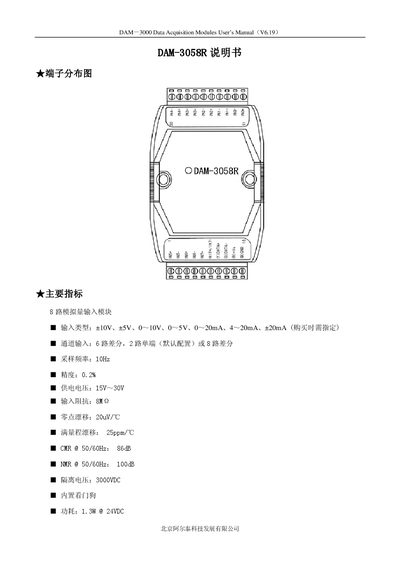
Altai Technology DAM-3058R Data Acquisition Module User Manual
The DAM-3058R is an 8‑channel analog data acquisition module designed for industrial automation and data‑collection systems. It supports multiple input ranges such as ±10 V, ±5 V, 0‑10 V, 0‑5 V, 0‑20 mA, 4‑20 mA and ±20 mA, with high accuracy and isolation.
The document includes a terminal distribution diagram, main specifications, signal wiring and jumper selection diagrams, reset procedure, block diagram, code configuration tables for baud rate and input range, and a detailed terminal definition table. It also describes how to set the module to differential or single‑ended mode and how to perform a factory reset. This manual is written in Chinese.
Covers: Terminal Distribution Diagram · Main Specifications · Signal Wiring Diagram · Jumper Selection · Reset Procedure · Block Diagram
Latest Altai Technology manuals
Altai Technology DAM-3058R Data Acquisition Module User Manual
User Manual 4 pages · 122 KB · ZHThe manual provides specifications, wiring diagrams, configuration codes, and reset procedures for the Altai Technology DAM-3058R 8‑channel data acquisition…
Which document do I need?
User Manual
Day-to-day operation, settings and troubleshooting. Start here if the product is already set up.
Questions answered in Altai Technology manuals
How do you reset the DAM-3058R module?
Set jumper JP1 to INIT* mode, short the INIT*/IN7‑ pin to GND, apply +10 V to +30 V between +Vs and GND, power on and wait for three rapid flashes, then power off and remove the short; the module will be restored to factory defaults.
From: Altai Technology DAM-3058R Data Acquisition Module User Manual
What are the default communication settings after a reset?
After reset the module defaults to address 1 and a baud rate of 9600 bps.
From: Altai Technology DAM-3058R Data Acquisition Module User Manual