
Key facts
- Manuals
- 1
- Languages
- ZH
- Last added
- 2026-09-28
Featured R4S manuals
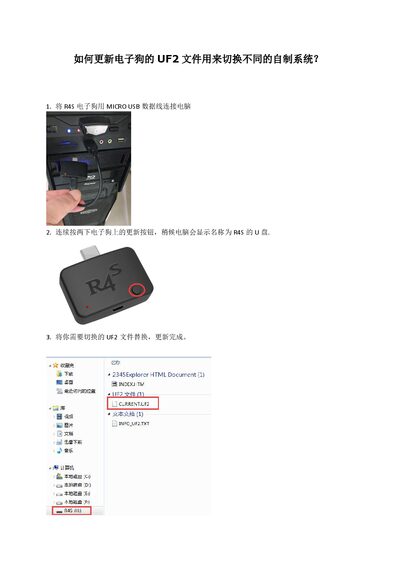
R4S Electronic Dog Update Guide
The R4S Electronic Dog is a Nintendo Switch accessory that uses a UF2 boot file to launch custom firmware such as Atmosphere, ReiNX, or SXOS. This guide shows how to replace the UF2 file and prepare the device for different homebrew systems.
Connect the device to a PC via Micro‑USB, press the update button twice to expose a R4S drive, copy the desired UF2 file, and optionally place a custom payload.bin on the SD card root. If no payload is found, the device boots the default hekate 4.1 loader. This manual is written in Chinese.
Covers: Updating the UF2 File · UF2 Files for Atmosphere · UF2 Files for ReiNX · UF2 Files for SXOS · Custom Payload Boot
Latest R4S manuals
R4S Electronic Dog Update Guide
Quick Start Guide 2 pages · 165 KB · ZHGuide for updating the R4S Electronic Dog UF2 file to switch between custom Switch firmware.
Which document do I need?
Quick Start Guide
The shortest path to a working setup, usually only a few pages.
Questions answered in R4S manuals
How do I enter update mode on the R4S Electronic Dog?
Connect the device via Micro‑USB and press the update button twice; the PC will show a drive named R4S.
What UF2 file is used to start the Atmosphere custom system?
Use the UF2 file provided at https://u18225898.ctfile.com/fs/18225898-311801092.