
Key facts
- Manuals
- 3
- Languages
- ZH
- Last added
- 2026-09-28
Featured Xinbei Yang manuals
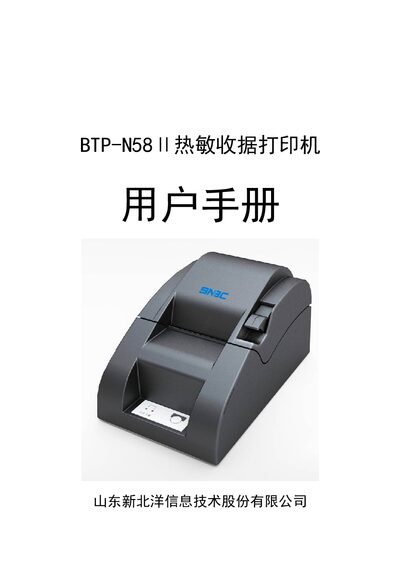
Xinbei Yang BTP-N58II Thermal Receipt Printer User Manual
The BTP-N58II thermal receipt printer from Xinbei Yang connects via parallel, serial or USB interfaces and supports Windows drivers for both 32‑bit and 64‑bit systems. It is designed for small‑ to medium‑size POS installations such as shops and convenience stores.
The manual provides safety warnings, installation steps, interface definitions, technical specifications, consumable details, and a troubleshooting guide to help users maintain reliable printing performance. This manual is written in Chinese.
Covers: Safety Instructions · Product Overview · Technical Specifications · Consumable Paper Parameters · Installation and Setup · Interface Signal Definitions
Xinbei Yang BTP-1000PT Barcode/Label Printer User Manual
This manual introduces the BTP-1000PT barcode/label printer, describing its thermal/thermal‑transfer printing technology, easy‑media loading design, modular options, and supported interfaces. It also lists the main technical specifications such as 203 dpi resolution, 104 mm print width, and 75 mm/s print speed.
The document guides users through safe installation, power connection, paper roll and ribbon loading, printer startup, printing procedures, routine cleaning, and common fault handling. Appendices contain default configuration tables and detailed interface pinouts. This manual is written in Chinese.
Covers: Overview · Technical Specifications · Appearance and Components · Installation · Operation and Printing · Routine Maintenance
Xinbei Yang BTP-2000S Label Printer User Manual
This manual introduces the BTP-2000S label printer, covering unpacking, power connection, interface wiring and basic component descriptions. It also details the printer’s control panel, indicator lights, keys and sensor functions.
Further sections describe printing procedures, paper and ribbon installation, daily maintenance, troubleshooting, and technical specifications such as printing method, resolution, speed and communication interfaces. This manual is written in Chinese.
Covers: Product Introduction · Printer Operation · Paper and Ribbon Installation · Printing Procedure · Daily Maintenance · Troubleshooting
Latest Xinbei Yang manuals
Xinbei Yang BTP-N58II Thermal Receipt Printer User Manual
User Manual 22 pages · 2 MB · ZHUser manual for the Xinbei Yang BTP-N58II thermal receipt printer covering setup, operation, specifications and troubleshooting.
Xinbei Yang BTP-1000PT Barcode/Label Printer User Manual
User Manual 32 pages · 1 MB · ZHThe Xinbei Yang BTP-1000PT barcode/label printer manual provides overview, specifications, installation, operation, maintenance, and troubleshooting.
Xinbei Yang BTP-2000S Label Printer User Manual
User Manual 42 pages · 847 KB · ZHThe BTP-2000S label printer manual provides safety guidelines, setup steps, operation instructions and maintenance tips.
Which document do I need?
User Manual
Day-to-day operation, settings and troubleshooting. Start here if the product is already set up.
Questions answered in Xinbei Yang manuals
What interfaces does the BTP-N58II support?
It supports a standard 25‑pin parallel interface, a 9‑pin RS‑232 serial interface, and a USB interface.
From: Xinbei Yang BTP-N58II Thermal Receipt Printer User Manual
What is the maximum printing speed?
The printer can print up to 50 mm per second.
From: Xinbei Yang BTP-N58II Thermal Receipt Printer User Manual
What safety warnings should be observed when using the printer?
Do not touch the print head or its surrounding parts during or immediately after printing, and avoid touching the print‑head surface or connectors to prevent static damage.
From: Xinbei Yang BTP-1000PT Barcode/Label Printer User Manual
How should the paper roll be installed?
Open the printer cover, place the paper roll on the spindle with the correct orientation, and close the cover as described in the installation section.
From: Xinbei Yang BTP-1000PT Barcode/Label Printer User Manual
What safety warnings should be observed when using the BTP-2000S label printer?
Do not touch the heating print head or its surrounding parts during or immediately after printing, keep the printer away from water, sunlight, high temperature and static electricity, and ensure the power cord is grounded.