
Key facts
- Manuals
- 1
- Languages
- EN
- Last added
- 2026-09-28
Featured Zone Labs manuals
Zone Labs Home Network Installation Guide
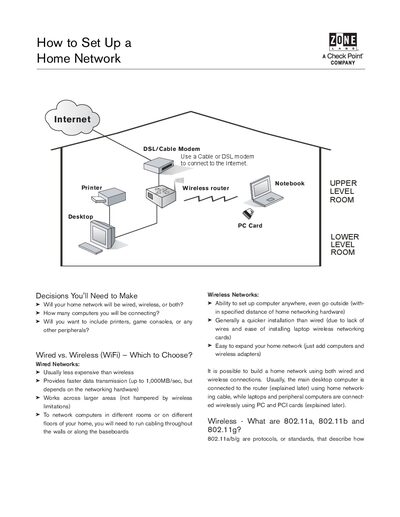
This guide walks you through the decisions needed to design a home network, compares wired and wireless options, and explains the 802.11a/b/g standards. It also covers security considerations and how routers and firewalls protect your devices.
The document lists the required equipment—modem, router/gateway, network adapter cards, Category 5 cable—and provides a clear installation sequence from connecting the modem to wiring computers to the router, both for wired and wireless setups.
Covers: Decisions You'll Need to Make · Wired vs. Wireless (WiFi) – Which to Choose? · 802.11a, 802.11b and 802.11g Overview · What Will I Need? · How Do I Hook Up All the Equipment? · Security Considerations
Latest Zone Labs manuals
Zone Labs Home Network Installation Guide
Installation Guide 4 pages · 1.1 MB · ENA step‑by‑step guide for setting up a wired, wireless, or hybrid home network.
Which document do I need?
Installation Guide
Mounting, wiring and first power-up. Read it before the hardware goes in.
Questions answered in Zone Labs manuals
What types of network connections can I use at home?
You can use a wired Ethernet network, a wireless Wi‑Fi network, or a combination of both.
What equipment do I need to set up a home network?
You need a modem, a router or gateway, network adapter cards for PCs, Category 5 Ethernet cable, and optionally installation CDs for the hardware.