
Key facts
- Manuals
- 1
- Languages
- EN
- Last added
- 2026-09-28
Featured Bavarian Technic manuals
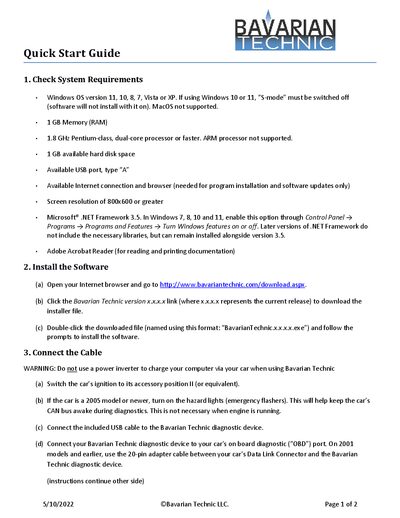
Bavarian Technic Diagnostic Tool Quick Start Guide
The guide provides a concise overview of everything needed to get the Bavarian Technic Diagnostic Tool up and running. It lists the supported operating systems, hardware requirements, and necessary software components.
Step‑by‑step instructions cover installing the software, connecting the USB cable to the vehicle’s OBD port, and launching the application to begin diagnostics.
Covers: Check System Requirements · Install the Software · Connect the Cable · Start the Software
Latest Bavarian Technic manuals
Bavarian Technic Diagnostic Tool Quick Start Guide
Quick Start Guide 2 pages · 688 KB · ENThis Quick Start Guide explains system requirements, installation steps, and connection instructions for the Bavarian Technic Diagnostic Tool.
Which document do I need?
Quick Start Guide
The shortest path to a working setup, usually only a few pages.
Questions answered in Bavarian Technic manuals
What are the system requirements for the Bavarian Technic Diagnostic Tool?
You need a Windows PC (11, 10, 8, 7, Vista or XP without S‑mode), 1 GB RAM, a 1.8 GHz dual‑core processor or faster, 1 GB free disk space, a USB‑A port, internet access, a screen resolution of at least 800 × 600, .NET Framework 3.5, and Adobe Acrobat Reader.
How do I connect the diagnostic device to my car?
Switch the car’s ignition to the accessory position, optionally turn on the hazard lights for newer cars, then plug the included USB cable into the Bavarian Technic device and connect the device’s OBD plug to the vehicle’s diagnostic port.