
Key facts
- Manuals
- 1
- Languages
- ZH
- Last added
- 2026-09-29
Featured Gianni manuals
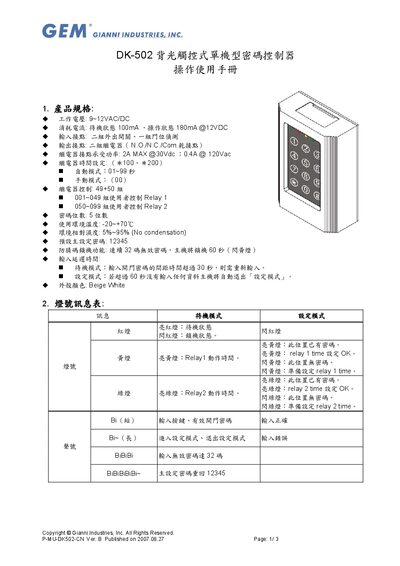
Gianni DK-502 Backlit Touchscreen Standalone Password Controller User Manual
This manual describes the DK-502 backlit touchscreen standalone password controller, including its electrical specifications, relay functions, and environmental limits. It also explains the LED indicator meanings for standby, setting, and lock states.
Detailed operation instructions cover entering and exiting setting mode, adding, deleting and clearing passwords, and configuring relay timing. A wiring reference diagram and protection recommendations are provided, along with warranty terms. This manual is written in Chinese.
Covers: Product Specifications · LED Indicator Table · Operation Instructions · Wiring Reference Diagram · Warranty and Service
Latest Gianni manuals
Gianni DK-502 Backlit Touchscreen Standalone Password Controller User Manual
User Manual 3 pages · 254 KB · ZHThe Gianni DK-502 manual provides specifications, LED indicators, operation steps, wiring reference and warranty information.
Which document do I need?
User Manual
Day-to-day operation, settings and troubleshooting. Start here if the product is already set up.
Questions answered in Gianni manuals
What is the default main password?
The default main password is 12345.
From: Gianni DK-502 Backlit Touchscreen Standalone Password Controller User Manual