
Key facts
- Manuals
- 1
- Languages
- EN
- Last added
- 2026-09-30
Featured Alula manuals
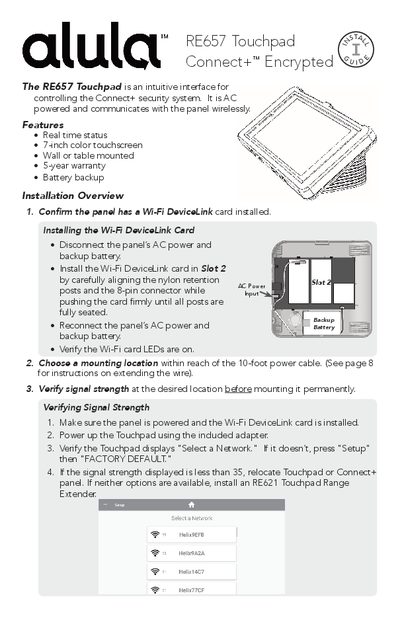
Alula RE657 Touchpad Connect+ Encrypted Installation Guide
The RE657 Touchpad Connect+ Encrypted is a 7‑inch color touchscreen interface for the Alula Connect+ security system. It can be wall‑ or table‑mounted, runs on AC power with battery backup, and communicates wirelessly with the panel.
The guide covers installing the Wi‑Fi DeviceLink card, verifying signal strength, mounting options (both with and without disassembly), enrolling the Touchpad to a panel, menu navigation, settings, troubleshooting, warranty information, and technical specifications.
Covers: Installation Overview · Wi‑Fi DeviceLink Card Installation · Mounting Options · Signal Strength Verification · Touchpad Enrollment · Menu Guide
Latest Alula manuals
Alula RE657 Touchpad Connect+ Encrypted Installation Guide
Installation Guide 12 pages · 1.3 MB · ENThe Alula RE657 Touchpad Connect+ Encrypted Installation Guide provides step‑by‑step setup, mounting, enrollment, and troubleshooting instructions.
Which document do I need?
Installation Guide
Mounting, wiring and first power-up. Read it before the hardware goes in.
Questions answered in Alula manuals
How do I verify signal strength before mounting the Touchpad?
Power up the Touchpad, ensure it displays "Select a Network," and check that the Wi‑Fi signal strength is 35 or higher; otherwise relocate the Touchpad or use an RE621 Range Extender.
From: Alula RE657 Touchpad Connect+ Encrypted Installation Guide
What is the procedure to enroll the Touchpad to a panel?
Press the enroll button on the side of the panel until it beeps, then select the desired panel on the Touchpad and follow the discovery and authentication steps until the DISARMED screen appears.
From: Alula RE657 Touchpad Connect+ Encrypted Installation Guide