
Key facts
- Brand
- JWSK-5
- Model
- JWSK-5 series
- Category
- Temperature sensors
- Documents
- 2
- Languages
- ZH
- Last added
- 2012-03-13
Start here
Kunlun Coast JWSK-5 Series Temperature Humidity Controller User Manual
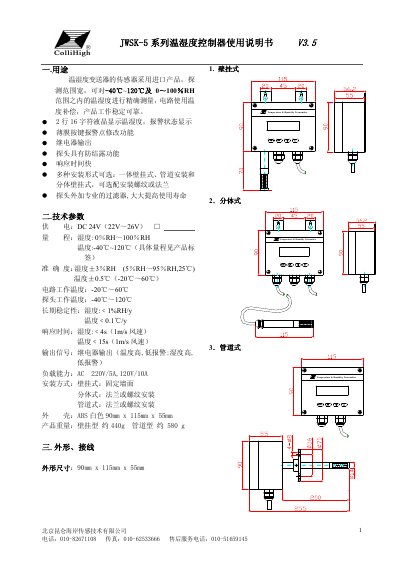
The JWSK-5 series controller measures temperature from –40 °C to 120 °C and humidity from 0 % RH to 100 % RH with high accuracy (±0.5 °C, ±3 % RH). It features a 16‑character LCD, relay outputs, anti‑condensation probe, and multiple mounting options (wall‑mount, split‑type, pipe‑mount).\n\nThe manual covers technical parameters, wiring diagrams, step‑by‑step installation, LCD operation, alarm setting, fault troubleshooting, and routine maintenance. It also includes transport, storage guidelines and a password‑protected parameter menu for advanced configuration. This manual is written in Chinese.
Read onlineJWSK-5 series specifications
| Supply Voltage | DC 24 V (22 V–26 V) |
|---|---|
| Temperature Range | –40 °C ~ 120 °C |
| Humidity Range | 0 % RH ~ 100 % RH |
| Temperature Accuracy | ±0.5 °C (–20 °C ~ 60 °C) |
| Humidity Accuracy | ±3 % RH (5 % RH ~ 95 % RH at 25 °C) |
| Response Time (Humidity) | < 4 s (1 m/s wind) |
| Response Time (Temperature) | < 15 s (1 m/s wind) |
| Output Type | Relay (high/low temperature and humidity alarms) |
| Load Capacity | AC 220 V / 5 A, 120 V / 10 A |
| Dimensions | 90 mm × 115 mm × 55 mm |
| Weight (wall‑mount) | ≈ 440 g |
| Weight (pipe‑mount) | ≈ 580 g |
| Installation Options | Wall‑mount, split‑type (flange or thread), pipe‑mount (flange or thread) |
Source: Kunlun Coast JWSK-5 Series Temperature Humidity Controller User Manual
All JWSK-5 series documents by type
Day-to-day operation, settings and troubleshooting. Start here if the product is already set up.
Questions answered in these manuals
What power supply does the JWSK-5 controller require?
It operates on a DC 24 V supply (acceptable range 22 V–26 V).
From: Kunlun Coast JWSK-5 Series Temperature Humidity Controller User Manual
How can I set the temperature and humidity alarm points?
Enter the parameter menu with the MENU key, then use the ↑/↓ keys to adjust the alarm values and confirm with the appropriate key.
From: Kunlun Coast JWSK-5 Series Temperature Humidity Controller User Manual
What voltage does the controller require?
It operates from a DC24 V supply (acceptable range 22 V to 26 V).
From: Kunlun Coast JWSK-5 Series Temperature and Humidity Controller User Manual