
Key facts
- Manuals
- 2
- Languages
- ZH
- Last added
- 2026-09-29
Featured 晨光 manuals

晨光 ADG98975 Barcode Scanner User Manual
This manual introduces the ADG98975 wired 2‑D image barcode scanner, covering its physical layout, connector definitions, and how to connect it to a host via USB or RS‑232. It explains power‑on procedures, maintenance, and the scanner’s dimensions and views.
Subsequent chapters detail the communication protocols, configurable scanning modes, lighting and aiming settings, audible and visual prompts, data editing options, and extensive barcode symbol parameters. The document ends with troubleshooting tips, FAQs, and several appendices with default settings, code tables, and example parameter configurations. This manual is written in Chinese.
Covers: Introduction · Hardware Overview · Communication Interface · Scanning Modes · Lighting and Aiming · Prompt Output
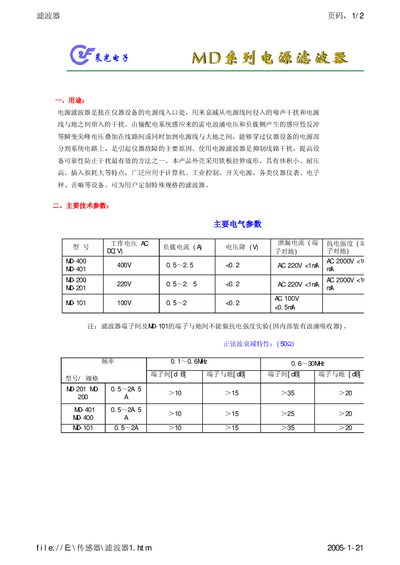
Chenguang Tech MD Series Power Supply Filter Installation Guide
The MD series power supply filter is installed at the power entry of equipment to attenuate noise and transient voltages from the mains and ground, improving reliability of computers, industrial controllers, switches, instruments, scales and audio devices. The filter housing is made of stamped steel, offering compact size, high voltage resistance and low insertion loss.
The guide provides key electrical specifications, sinusoidal attenuation characteristics, mechanical dimensions, wiring diagrams for models MD‑200, MD‑400, MD‑101, MD‑201 and MD‑401, and detailed installation advice such as avoiding internal routing, ensuring good electrical contact, minimizing grounding resistance and keeping output leads away from input leads. This manual is written in Chinese.
Covers: Product Overview · Main Electrical Parameters · Sinusoidal Attenuation Characteristics · Mechanical Dimensions · Wiring Diagrams · Installation Guidelines
Latest 晨光 manuals
晨光 ADG98975 Barcode Scanner User Manual
User Manual 111 pages · 5.4 MB · ZHThe ADG98975 barcode scanner user manual provides setup, operation, communication interfaces, scanning modes, lighting, prompts, and data editing instructions.
Chenguang Tech MD Series Power Supply Filter Installation Guide
Installation Guide 2 pages · 97 KB · ZHInstallation guide for Chenguang Tech MD series power supply filters, describing technical parameters, wiring and mounting recommendations.
Which document do I need?
User Manual
Day-to-day operation, settings and troubleshooting. Start here if the product is already set up.
Installation Guide
Mounting, wiring and first power-up. Read it before the hardware goes in.
Questions answered in 晨光 manuals
How can I restore the scanner to factory defaults?
Select the reset option in the menu to restore the factory default settings.
What are the recommended dimensions for the MD‑200 and MD‑400 models?
Both models use pins with a diameter of 0.8 mm and a minimum pin length of 8 mm.
From: Chenguang Tech MD Series Power Supply Filter Installation Guide