
Key facts
- Manuals
- 1
- Languages
- EN
- Last added
- 2012-02-24
Featured Transfer manuals
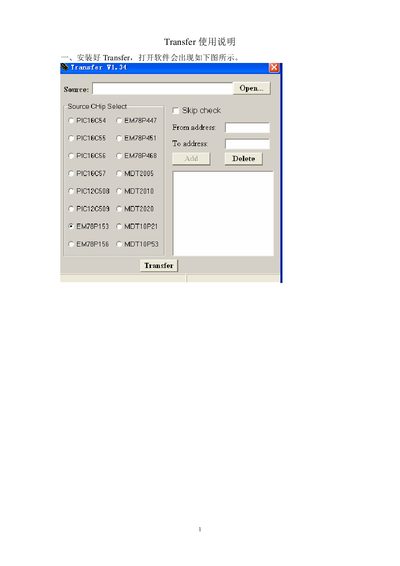
Transfer User Manual
The manual provides step‑by‑step instructions for performing a transfer operation. It describes selecting a source, setting the destination address, and initiating the transfer process.
After the transfer is started, the utility reports success messages such as "Transfer success!" and prompts to save the transferred file. The document also includes notes on address formatting and chip‑select options.
Covers: Introduction · Transfer Procedure · Source and Destination Addresses · Chip Select Options · Transfer Confirmation
Latest Transfer manuals
Transfer User Manual
User Manual 3 pages · 107 KB · ENThis Transfer User Manual explains how to use the Transfer utility to move files between source and destination addresses.
Which document do I need?
User Manual
Day-to-day operation, settings and troubleshooting. Start here if the product is already set up.
Questions answered in Transfer manuals
How do I start a transfer?
Select the source and destination addresses, then initiate the transfer; the utility will display a "Transfer success!" message when completed.
From: Transfer User Manual
What does the utility display after a successful transfer?
It shows a confirmation message such as "Transfer success!" and may prompt to save the transferred file.
From: Transfer User Manual