
Key facts
- Manuals
- 1
- Languages
- ZH
- Last added
- 2012-03-14
Featured SJC02-A(03 manuals
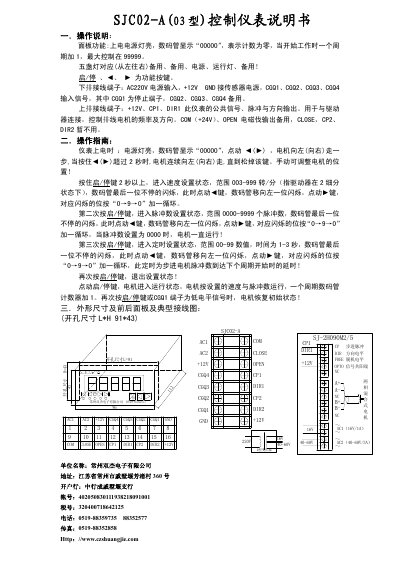
Shuangjie Electronics SJC02-A Controller Manual
This manual describes the functions of the SJC02‑A controller, including panel indicators, key functions, and how the numeric display operates. It explains that the display shows "00000" at power‑on and counts up to 99999 as the controller runs.
The document also details the wiring terminals (AC220V input, +12V, GND, signal inputs CGQ1‑CGQ4, and output signals such as CP1, DIR1, COM, OPEN, CLOSE) and provides step‑by‑step procedures for speed, pulse‑count, and timing settings, as well as physical dimensions and a typical wiring diagram. This manual is written in Chinese.
Covers: Panel Functions · Wiring Terminals · Operation Instructions · Operation Guide · Physical Dimensions and Wiring Diagram
Latest SJC02-A(03 manuals
Shuangjie Electronics SJC02-A Controller Manual
User Manual 1 pages · 128 KB · ZHThe manual provides operation instructions, wiring details, and setting procedures for the Shuangjie Electronics SJC02‑A controller.
Which document do I need?
User Manual
Day-to-day operation, settings and troubleshooting. Start here if the product is already set up.
Questions answered in SJC02-A(03 manuals
How do I start the motor?
Press the start/stop key; the motor will enter the running state.
How can I set the motor speed?
Hold the start/stop key for more than 2 seconds to enter speed‑setting mode, then adjust the value between 003 and 999 rpm.