
Key facts
- Manuals
- 4
- Languages
- ZH · EN · JA
- Last added
- 2026-10-03
Featured GWINSTEK manuals
GW Instek AFG-3000 Series Arbitrary Waveform Generator User Manual
This manual covers safety instructions, main features, panel layout, and step‑by‑step procedures for configuring and operating the AFG‑3000 series arbitrary waveform generator. It includes quick‑start guidance, detailed menu descriptions, and instructions for using digital inputs, modulation, scanning, pulse sequences, and ARB functions.
Additional sections describe remote interface options (GPIB, RS‑232, USB), command syntax, SCPI registers, error handling, and maintenance tasks such as fuse replacement and firmware updates. The appendix provides compliance statements and a full specification table. This manual is written in Chinese.
Covers: Safety Instructions · Main Features · Panel Introduction · Setting up the Signal Generator · Quick Operation · Modulation
Gwinstek GPM-8213 Digital Power Meter User Manual
This user manual guides operators of the Gwinstek GPM-8213 digital power meter through essential safety precautions, proper handling, and environmental requirements before use. It covers voltage and current limits, grounding, and cleaning procedures to ensure safe and accurate operation.
The document details the meter’s features, such as programmable voltage and current ranges, harmonic distortion measurement, and remote‑control interfaces. It also includes step‑by‑step setup, measurement modes, and a full list of technical specifications for reliable power measurement in laboratory and field applications.
Covers: Safety Instructions · Product Introduction · Features · Appearance · Setup · Basic Settings
GW Instek GPD-2303S/3303S/4303S Series DC Power Supply User Manual
This manual covers safety precautions, installation, and operation of the GPD‑2303S/3303S/4303S series DC power supplies. It explains the three output modes—independent, series, and parallel—and details front‑panel controls, remote‑control procedures, and error handling.
The document also lists the electrical specifications, recommended operating environment, and optional accessories such as USB and test leads. A troubleshooting section answers common user questions and provides contact information for technical support. This manual is written in Chinese.
Covers: Safety Overview · General Description · Main Features · Operation Principle · Front Panel · Rear Panel
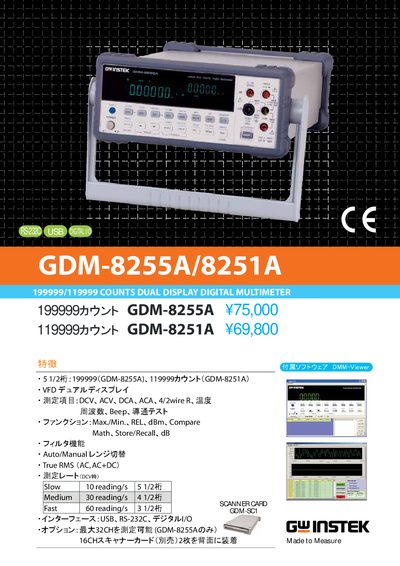
GWINSTEK GDM-8255A / GDM-8251A User Manual
The GDM-8255A and GDM-8251A are multimeters that provide DC and AC voltage, current, resistance, frequency, and temperature measurements. They feature a dual‑display VFD, auto/manual range selection, true RMS, and various calculation functions such as dB, dBm, and hold.
The instruments support USB, RS‑232C, and digital I/O connections and come with accessories such as test leads, a calibration key, and a 16‑channel scanner card. Safety notes and operating temperature limits are included in the manual. This manual is written in Japanese.
Covers: Specifications · Measurement Ranges · Accuracy · Interface · Accessories · Safety Information
Latest GWINSTEK manuals
GW Instek AFG-3000 Series Arbitrary Waveform Generator User Manual
User Manual 299 pages · 4.6 MB · ZHThe GW Instek AFG-3000 series user manual provides safety guidelines, setup instructions, and detailed specifications for the arbitrary waveform generator.
Gwinstek GPM-8213 Digital Power Meter User Manual
User Manual 107 pages · 3.2 MB · ENThe manual provides safety instructions, setup steps, measurement functions, remote control options, and specifications for the Gwinstek GPM-8213 digital…
GW Instek GPD-2303S/3303S/4303S Series DC Power Supply User Manual
User Manual 54 pages · 2.2 MB · ZHThe GW Instek GPD‑2303S/3303S/4303S series DC power supply user manual provides safety guidelines, operation instructions, remote control commands, and full…
GWINSTEK GDM-8255A / GDM-8251A User Manual
User Manual 2 pages · 818 KB · JAGWINSTEK GDM-8255A and GDM-8251A manual with specifications, measurement ranges, accuracy, and interface options.
Which document do I need?
User Manual
Day-to-day operation, settings and troubleshooting. Start here if the product is already set up.
Questions answered in GWINSTEK manuals
How should the GPM‑8213 be stored when not in use?
Store the instrument indoors at temperatures between –40 °C and 70 °C, with humidity below 90 % RH and no condensation.
Why does the output still turn on/off after pressing the panel lock key?
The output key is not controlled by the panel lock key, so locking the panel does not affect output operation.
From: GW Instek GPD-2303S/3303S/4303S Series DC Power Supply User Manual
Why are saved settings not turning the output on after recall?
Saved settings default the output to the "off" state for safety, so the output remains off after recall.
From: GW Instek GPD-2303S/3303S/4303S Series DC Power Supply User Manual
What DC voltage ranges does the GDM-8255A support?
It offers five DC voltage ranges: 100 mV, 1 V, 10 V, 100 V, and 1000 V.
What temperature sensor types can be measured and over what range?
It measures temperature with J, K, and T‑type thermocouples from 0 °C to 300 °C.